A computer that won't power on or won't get past a black screen needs a different kind of help than a computer that's just running slow. A PC tune-up cleans up software, not hardware, so it fixes a no-boot problem only when the cause is a corrupted operating system file, a bad startup program, or a driver conflict — not when the cause is a dead hard drive, failing power supply, or motherboard fault.
- A PC tune-up can't fix a computer that won't start when the cause is hardware failure — a dead drive, bad power supply, or fried motherboard.
- Tune-ups do resolve boot loops caused by corrupted startup files, bloated startup programs, or driver conflicts.
- TechConnect LLC treats a no-boot PC as a diagnostic repair case first, then runs a tune-up once it boots.
- Beep codes, a blank screen with spinning fans, or no lights at all point to hardware, not software.
Why this matters
People search "pc tune-up" expecting a cure-all, and most tune-up services are advertised that way — faster boot times, fewer crashes, cleaner startup. That's real, but it's a maintenance service for a computer that already turns on.
A computer that won't start at all is a repair problem, not a maintenance problem. Sending a dead machine in for a tune-up wastes a trip; the technician needs to run hardware diagnostics first, on TechConnect LLC's bench or over remote access if the machine at least powers up, before any cleanup step matters.
Can a Tune-up Fix a Computer That Won't Start?
Sometimes, yes — but only for a specific category of failure. Here's how the two service types actually differ:
| Situation | What a tune-up does | Fixes a no-boot issue? |
|---|---|---|
| Windows freezes at the logo, restarts in a loop | Repairs startup files, clears corrupted updates | Often yes |
| Too many programs load at boot, machine takes 5+ minutes to reach desktop | Trims startup items, clears temp files, updates drivers | Yes, but this isn't a true no-boot |
| Fans spin, no lights, no display at all | Nothing — this is a hardware diagnostic | No |
| Hard drive clicks or grinds before shutdown | Nothing — the drive needs data recovery or replacement | No |
| Blue screen with a stop code, then reboot loop | Sometimes — depends on whether the error is driver-level or disk-level | Sometimes |
The pattern: if the PC gets electrical power and tries to boot, a tune-up has a shot. If there's no sign of life, or the failure happens before Windows even attempts to load, that's a hardware call.
When a tune-up can fix a no-boot problem
A tune-up earns its keep when the operating system is technically intact but something in the startup sequence is broken. Typical fixable cases in 2026:
- A failed Windows Update leaves the system stuck reapplying changes on every restart.
- A malware infection corrupts system files needed to load the desktop.
- A driver update conflicts with the graphics card and the display never initializes.
- Startup disk usage hits 100% from too many background programs, and the machine appears frozen rather than off.
In each of these, the hardware is fine — the software layer between power-on and desktop is the broken part. A technician working through how much a PC tune-up costs will usually price this kind of repair the same as a standard tune-up, since the fix is a boot-repair pass plus the normal cleanup.
When a tune-up can't fix a no-boot problem
Hardware failure looks different from a software hang, and no amount of cleanup touches it. Watch for these signs:
- No lights, no fan spin, nothing at all — usually a power supply or motherboard failure.
- Fans spin and lights come on, but the screen stays black — often a failed graphics card, RAM seating issue, or dead display cable.
- Repeated beep codes on startup — the motherboard is reporting a specific hardware fault before Windows ever loads.
- Clicking, grinding, or a burning smell — a failing hard drive or a component overheating; this needs immediate shutdown, not a software fix.
“If the fans spin but the screen stays black, that's a display or hardware fault — not something a tune-up touches.”
When the culprit is a dying drive, the priority shifts from "fix the boot" to "save the data," and that's a separate service. Crashed hard drive recovery costs run on a different scale than a tune-up, because the work is pulling files off failing media rather than cleaning up a working one.
Why boot failures happen in the first place
A handful of causes account for most "won't start" calls TechConnect LLC sees across North Carolina:
- Failed or interrupted Windows updates — the OS gets stuck mid-install and can't complete the boot sequence.
- Corrupted or unseated RAM — the machine posts partially, then locks up or won't display anything.
- A dying hard drive or SSD — the drive can no longer read the boot sector reliably.
- A failing power supply — inconsistent power means the system can't stay on long enough to boot.
- Malware or ransomware damage — critical system files get overwritten or encrypted.
- BIOS/UEFI corruption — a bad firmware update leaves the motherboard unable to hand off to the OS.
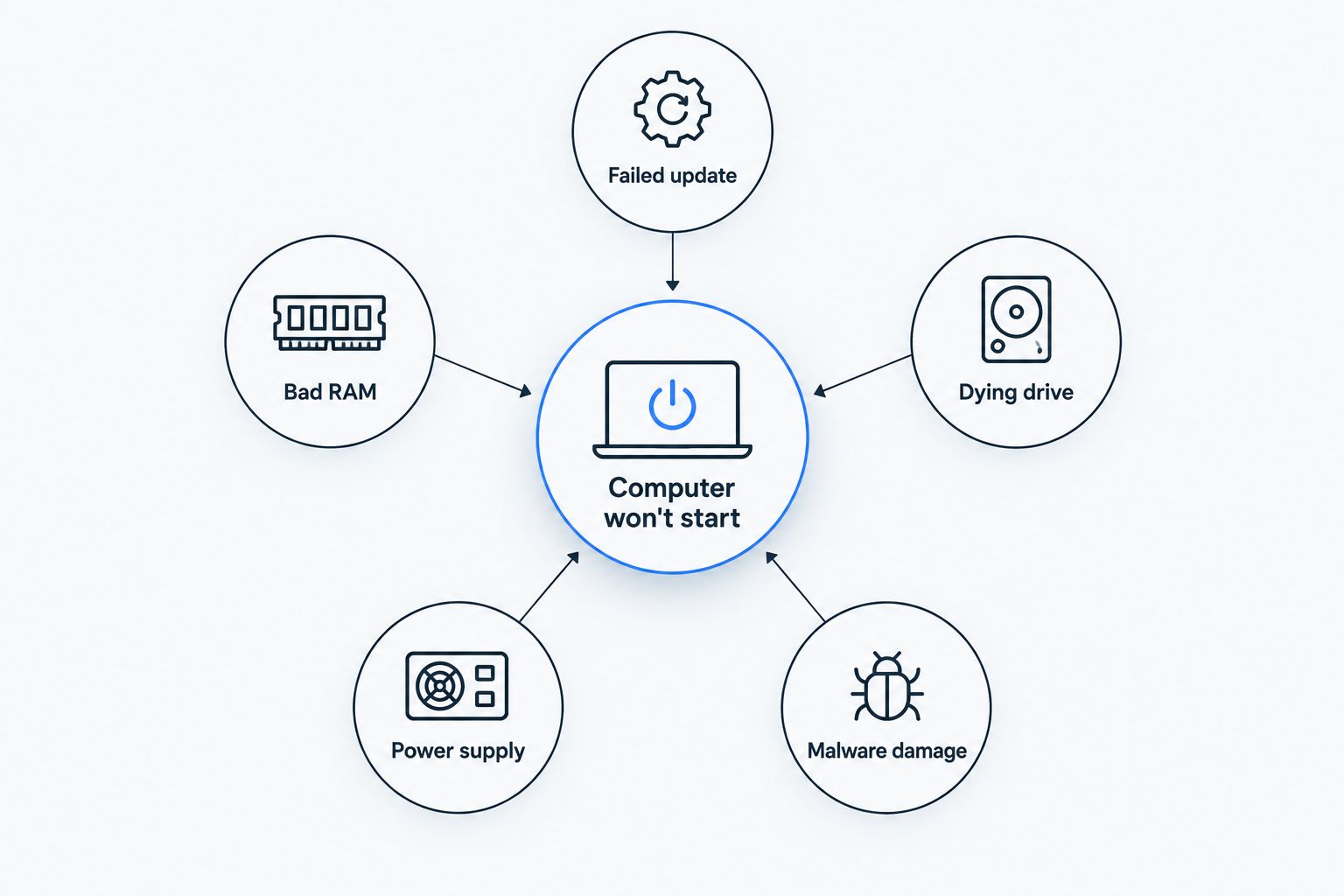
Only the first and last of those six respond to a tune-up. The other four need physical diagnostics — testing RAM, checking drive health, or swapping the power supply.
Get your PC diagnosed today
Same-day diagnostic checks whether it's a tune-up fix or a hardware repair.
How do I know if my computer needs a tune-up or a repair?
A tune-up is the right call when the computer turns on, reaches the login screen or desktop, and just runs slow, hangs, or has driver clutter. A repair is the right call when the screen stays black, the machine won't power on at all, or it makes clicking or grinding noises before shutdown — those point to hardware, not software.
Can virus removal fix a computer that won't start?
Virus removal can fix a no-boot problem when malware corrupted the startup files, which does happen with certain ransomware strains. But if the drive itself has failed, virus removal alone won't restore it — that case moves into data recovery territory instead.
Will a tune-up speed up a computer that does start but boots slowly?
Yes — a slow boot (not a failed one) is the classic tune-up case: trimming startup programs, clearing temp files, and updating drivers typically cuts boot time noticeably without touching hardware.
FAQ
Can a PC tune-up fix a computer that won't start?
A PC tune-up fixes a no-boot problem only when the cause is software — a corrupted startup file, failed update, or driver conflict. Hardware failures like a dead power supply or failing drive need a hands-on repair, not a tune-up.
What's the difference between a PC tune-up and a computer repair?
A tune-up cleans up software — startup items, temp files, drivers — on a machine that already turns on. A repair diagnoses and replaces failed hardware, which a tune-up never touches.
How do I know if it's a hardware problem and not a software one?
If the screen stays black with no lights or fan movement, or you hear clicking or grinding, that's hardware. If the machine turns on and attempts to load Windows but freezes or loops, that's usually software.
Can a virus stop a computer from starting?
Yes — certain malware and ransomware corrupt or encrypt the system files Windows needs to load, which produces the same symptoms as a corrupted update.
Is a computer that won't start always a hardware issue?
No — roughly half of no-boot calls trace back to software causes like failed updates or malware, which a boot repair or tune-up can resolve without replacing parts.
Should I try to fix a computer that won't start myself?
Basic checks like reseating RAM or checking the power cable are safe to try. Beep codes, clicking drives, or a burning smell mean stop and get a diagnostic instead of opening the case further.
Does a tune-up include data backup before repair?
A standard tune-up doesn't include data recovery — that's a separate service when the drive itself has failed and files need to be pulled off before any fix.
One last thing
The fastest way to sort a no-boot PC into "tune-up" or "repair" is the power-on behavior: fans spinning with a black screen almost always means hardware, while a machine that reaches a logo or spinner and then freezes is usually a software fix. Don't guess past that point in 2026 — a five-minute diagnostic saves a wasted trip either way.