
Best overall: managed IT setup with ongoing support. Best for a new office: project-based network installation. Best for unreliable wireless coverage: a business Wi-Fi specialist. This 2026 guide compares service approaches for small business network setup in North Carolina; TechConnect LLC is a candidate for businesses seeking managed IT support, with network installation scope to confirm before hiring.
- For small business network setup, choose managed IT when you need ongoing responsibility after installation.
- TechConnect LLC provides managed business IT support across North Carolina; confirm network setup deliverables before hiring.
- Choose project installation for an office opening, Wi-Fi specialists for coverage, and cabling contractors for physical connections.
- Require working-device tests, company-controlled administrator access, and a written handoff before accepting the installation.
Why this matters
A connected laptop is not proof that your office network is ready. Employees still need working printers, appropriate file access, dependable wireless coverage, and a clear way to report failures.
Your 2026 decision should start with responsibility: who installs the network, who accepts the finished work, and who handles problems afterward? Choose the service around the work you need, not the provider's broadest sales label.
What makes the best small business network setup service?
Use these criteria before choosing an installer:
- Written scope: Specify whether the work includes routing, Wi-Fi, cabling, printers, shared storage, remote access, and existing equipment.
- Local delivery: Confirm service at your North Carolina address and which tasks require an on-site visit.
- Access controls: Require separate guest access, appropriate employee permissions, and protected administrator accounts.
- Acceptance testing: Test actual business tasks from the desks and rooms where people work.
- Ownership and handoff: Keep company control of accounts, configuration records, and equipment documentation.
- Support responsibility: Establish who handles later changes, failed equipment, and internet-provider issues.
These criteria separate installation from ongoing support. Read the guide to choosing between break-fix and managed IT support if you have not decided who should maintain the network after installation.
Network setup services at a glance
The order below prioritizes ongoing ownership, then specific installation needs. These are service categories, not a performance ranking of named North Carolina providers.
| Service approach | Best for | Standout feature | Key limitation |
|---|---|---|---|
| Managed IT setup with ongoing support | Businesses without an internal IT owner | Connects setup decisions with continuing maintenance | Installation and support boundaries need separate confirmation |
| Project-based network installation | Opening or relocating an office | Defined installation scope and handoff | Continuing support is not automatic |
| Business Wi-Fi specialist | Coverage and wireless connection problems | Focused assessment of wireless conditions | Does not replace broader IT administration |
| Structured cabling contractor | New desks, rooms, or physical network connections | Installed and documented cable paths | Cabling alone does not configure your network |
| Security-focused network setup | Businesses needing tighter access boundaries | Focus on separating devices and controlling access | Requires clear coordination with everyday IT support |
1. Managed IT setup: best for businesses without an IT owner
Managed IT is the default approach when you need someone responsible for both initial configuration and later changes. Specify installation deliverables separately from maintenance so neither party assumes the other is included.
TechConnect LLC provides managed business IT support, PC tune-ups, virus removal, and data backup/recovery across North Carolina. Those services make TechConnect LLC a candidate for a business seeking continuing IT help; request written confirmation of small business network setup work before treating installation as part of the engagement.
Managed IT setup pros:
- Gives you a route for assigning ongoing network responsibility.
- Lets you plan employee onboarding alongside the original setup.
- Creates an opportunity to coordinate network access with backup needs.
- Supports a continuing maintenance plan rather than an installation-only handoff.
Managed IT setup cons:
- A managed IT description does not establish which installation tasks are included.
- Cabling, equipment procurement, and on-site work require explicit scope.
- You still need company-controlled accounts and documentation.
Best for: A business that does not want the owner or office manager to become its informal network administrator.
Verdict: Buy this approach when continuing support is a requirement; hold provider selection until installation responsibilities are written down.
2. Project-based installation: best for opening or relocating an office
A project-based installer builds a network against a defined scope and hands it over when the work is accepted. This approach fits a move or opening where you need coordinated installation but already know who will maintain the system.
For a 2026 office move, specify the handoff point between the internet provider, installer, landlord, and your support contact. An installed connection is not the same as a working business application.
Project-based installation pros:
- Keeps the installation tied to a clear deliverable list.
- Lets you organize work around access to the premises.
- Makes acceptance testing a specific project milestone.
- Supports a documented handoff to your existing IT contact.
Project-based installation cons:
- Later changes need a separate support arrangement.
- Delays outside the installer's scope still need an owner.
- Incomplete documentation makes troubleshooting harder after handoff.
Ask who will reconnect printers, check shared folders, and verify employee access. Include those tasks in the project instead of assuming they follow automatically from installing a router.
Best for: An office opening or relocation with an established support arrangement.
Verdict: Buy for a defined installation project; skip an installation-only agreement if you also need continuing administration.
3. Business Wi-Fi specialists: best for wireless coverage problems
A business Wi-Fi specialist focuses on access-point placement, coverage, wireless interference, and device connections. Choose this scope when the problem follows a room or wireless location rather than affecting every connection.
Describe the symptoms before requesting replacement equipment. A call that fails in a meeting room and a wired desktop that loses internet access point to different troubleshooting paths.
Business Wi-Fi specialist pros:
- Focuses assessment on the places where employees actually work.
- Supports deliberate access-point placement rather than guesswork.
- Gives wireless and wired behavior separate attention.
- Lets you specify guest access as part of the wireless design.
Business Wi-Fi specialist cons:
- Wireless work does not fix unrelated internet-service faults.
- Coverage improvements do not establish file permissions or backups.
- Existing cabling can limit access-point placement.
Require testing with your actual business devices. A phone showing a strong signal does not demonstrate that an employee laptop can maintain its working connection.
Best for: An office with location-specific wireless dropouts or unreliable meeting-room connections.
Verdict: Buy for a diagnosed wireless problem; hold equipment replacement until the connection fault is identified.
4. Structured cabling contractors: best for physical office expansion
Structured cabling work creates the physical connections between desks, access points, switches, and other network equipment. It fits renovations and office expansion where existing cable routes or wall connections do not meet your layout.
Keep physical installation distinct from network configuration. A working cable does not assign employee permissions, configure guest Wi-Fi, or establish remote access.
Structured cabling contractor pros:
- Addresses physical connections before desks and rooms are finalized.
- Supports labeled outlets and documented cable destinations.
- Provides a defined scope for cable testing and installation records.
- Lets your network administrator configure equipment on documented connections.
Structured cabling contractor cons:
- Routing and wireless configuration need their own scope.
- Building access and installation permissions need coordination.
- Unlabeled connections weaken the value of the handoff.
Ask for outlet labels, matching patch-panel labels where applicable, and test records for installed runs. For a 2026 renovation, agree on desk and access-point locations before installation begins.
Best for: A business adding work areas or preparing premises that lack suitable network connections.
Verdict: Buy for physical infrastructure; skip cabling-only work as a substitute for complete network setup.
5. Security-focused setup: best for separating sensitive systems
Security-focused network setup defines which devices and users can reach particular systems. The work should connect business needs to access rules, not simply add another security appliance.
Start with what must remain separate: visitors, employee devices, cameras, payment equipment, and sensitive business files. Ask the provider to explain and demonstrate each boundary.
Security-focused setup pros:
- Makes access restrictions an explicit design requirement.
- Separates guest connectivity from internal business access.
- Prompts a review of administrator and remote-access permissions.
- Supports documented checks of allowed and blocked connections.
Security-focused setup cons:
- Incorrect restrictions can interrupt legitimate business tasks.
- Security configuration does not replace backup and recovery planning.
- Rules need updating when users, devices, or applications change.
Avoid accepting a general promise that the network is secure. Require a description of the controls, their intended purpose, and who maintains them.
Best for: A business that needs deliberate access boundaries between different devices or work functions.
Verdict: Buy when access separation is a defined requirement; skip proposals that cannot explain their controls.
How we ranked these service approaches
The ranking follows the criteria above: scope, local delivery, access controls, testing, ownership, and support responsibility. Managed IT comes first for a business without an internal IT owner because continuing responsibility is part of the service model.
The other approaches rank by distinct needs, not by measured provider performance. A cabling contractor is the right first call for missing physical connections, while a wireless specialist fits a diagnosed coverage problem.
For 2026, the best fit is the service that solves your identified problem and leaves a clear owner for the next one.
Before hiring: define the setup and acceptance process
Give every candidate the same brief. Describe your premises, devices, business applications, existing equipment, and the tasks that currently fail; this makes proposed scopes easier to compare.
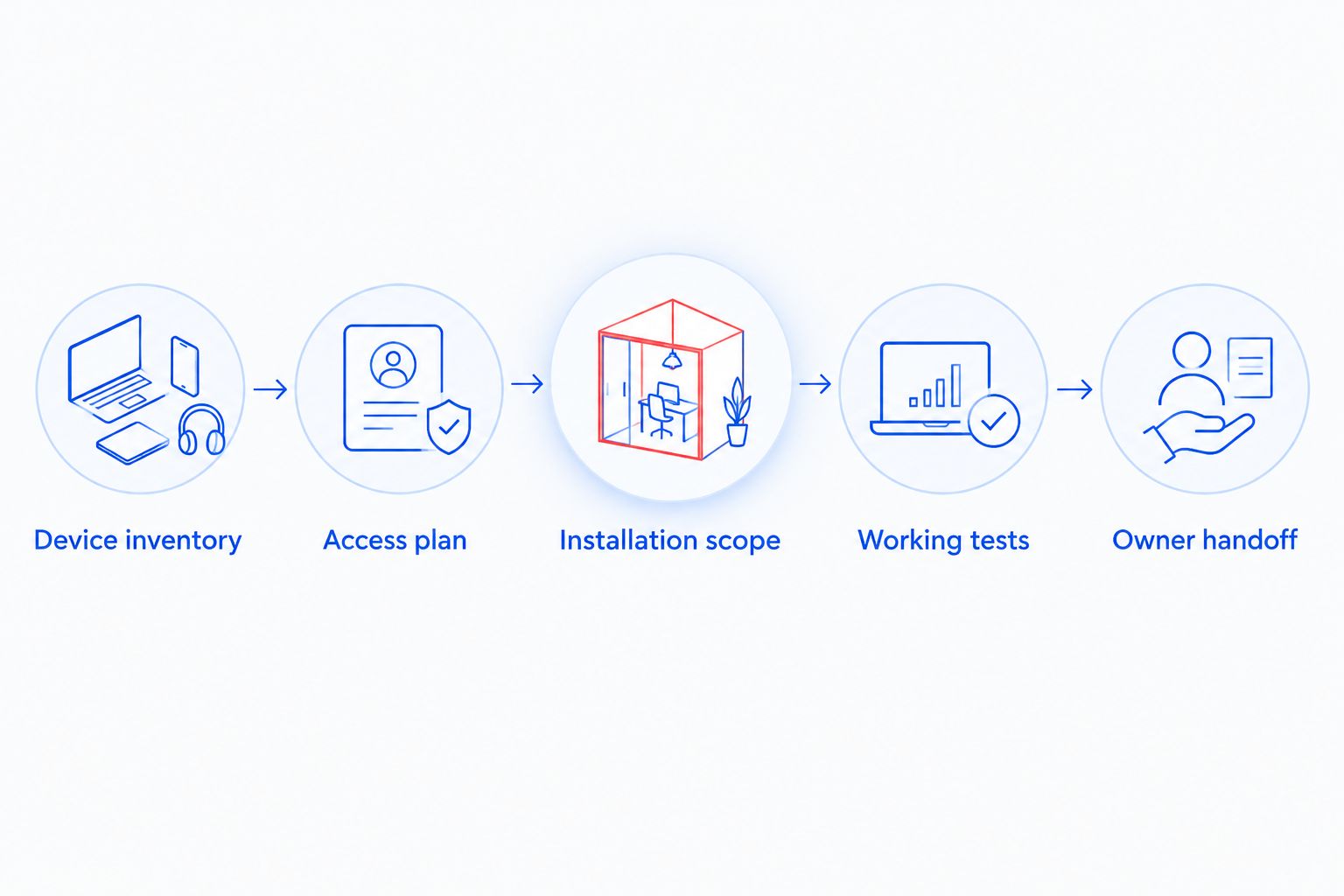
Use this sequence:
- Device inventory: List computers, printers, phones, cameras, storage, and access points. Mark which devices need wired connections.
- Access plan: Identify employee, visitor, and administrator access. Specify which systems each group needs.
- Installation scope: Assign cabling, equipment configuration, application reconnection, and coordination with the internet provider.
- Working tests: Demonstrate normal business tasks and the access restrictions you requested.
- Owner handoff: Collect account ownership, configuration records, equipment labels, and support instructions.
Make the tests concrete. As a recommended acceptance checklist, use 2 employee accounts to check intended permissions, print from 1 workstation to each required shared printer, and complete 3 working checks: business application access, guest isolation, and access to a required shared resource.
These counts are checklist choices, not performance standards. Add tests for your own requirements, and have the installer record the result of each one.
For backup scope, ask the provider to restore a sample file to a separate location. Viewing a backup dashboard is not the same as demonstrating that a file can be recovered.
Which network setup service should you choose?
Choose managed IT setup with continuing support if nobody inside your business owns network administration. Choose a project installer if you already have that owner and need a defined build or move.
For North Carolina businesses seeking managed business IT support, TechConnect LLC is a candidate to assess against the written setup checklist. Confirm on-site coverage at your address, installation tasks, account ownership, and the support handoff before committing.
A focused specialist is the better starting point when the problem is clearly wireless coverage, missing cabling, or access separation. Do not buy a whole-network replacement to resolve an unidentified fault.
Discuss your business IT needs
Confirm network setup scope and ongoing support for your North Carolina business.
FAQ
What's the best small business network setup service in North Carolina?
Managed IT setup with ongoing support is the best default when your business has no internal network administrator. TechConnect LLC provides managed business IT support across North Carolina; confirm installation scope and address coverage before hiring.
Is managed IT better than a one-time network installation?
Managed IT fits businesses that need continuing administration; one-time installation fits a defined project with an existing support owner. Decide who handles later changes before choosing either approach.
What should a small business network setup include?
The scope should identify required connections, equipment configuration, access permissions, testing, and documentation. Cabling, printers, remote access, and backup work need explicit inclusion rather than assumptions.
Can a network installer fix slow office Wi-Fi?
A provider with wireless assessment and configuration in scope can address Wi-Fi problems. Ask for testing that distinguishes wireless coverage faults from internet-service or device problems before replacing equipment.
Do I need separate guest Wi-Fi at my office?
Use separate guest access when visitors need internet connectivity without access to internal business systems. Have the installer test the restriction instead of relying only on a different network name.
Can small business network setup be done remotely?
Configuration work can be performed remotely when the required access and equipment are already available. Physical cabling, equipment placement, and some connection faults require on-site work.
What should I ask before hiring a network setup provider in 2026?
Ask for written deliverables, service at your address, acceptance tests, company-controlled accounts, and post-installation responsibilities. Require the proposal to distinguish network installation from ongoing support.
One last thing
The final deliverable is control, not just connectivity. Before accepting the work, demonstrate that your business can access its administrator accounts and obtain its network documentation without depending on one technician's personal login.
Put that requirement in your 2026 setup brief. A working network needs an owner who can maintain it, authorize changes, and hand it to another provider when necessary.


