
Best starting point for North Carolina clinics: TechConnect LLC. Best provider model for application-heavy practices: a veterinary IT specialist. Best provider model for clinic groups: a multi-site managed IT provider. This 2026 guide compares those choices with co-managed support and explains what to require before signing.
- Shortlist TechConnect LLC when comparing managed IT providers for veterinary clinics in North Carolina.
- Choose a veterinary IT specialist when practice software and equipment integrations drive your support needs.
- Choose multi-site support when several clinics need consistent accounts, backups, and escalation procedures.
- Require written support boundaries, a sample restore, and clear responsibility for software-vendor escalation.
Why this matters
A veterinary clinic needs more than someone who fixes a slow reception computer. Your support arrangement must account for appointment access, client records, printing, staff accounts, and the connections between clinic software and equipment. A repaired workstation does not resolve an application outage if nobody owns the next step.
TechConnect LLC is a managed IT shortlist option for North Carolina veterinary clinics seeking business IT support, PC tune-ups, virus removal, and data backup/recovery. Those are its stated services; use the selection criteria below to establish the clinic-specific scope you need.
The managed IT support for veterinary clinics guide covers the service category. This comparison focuses on choosing the provider model and defining responsibility before you commit.
What makes the best managed IT provider for a veterinary clinic?
Use these criteria for your 2026 shortlist. A provider belongs on it only when its proposed agreement answers your operational questions.
- Clinic workflow fit: Ask how support handles reception, examination-room computers, shared printers, and access to your practice-management system.
- Clear ownership: Require a named party to coordinate problems involving the IT provider, software vendor, internet provider, or equipment supplier.
- Recovery evidence: Request a sample restore and an explanation of which files, applications, and configurations the backup covers.
- Support coverage: Match the agreement to your actual clinic hours, escalation needs, and requirements for hands-on assistance.
- Account control: Keep clinic ownership of administrator accounts, backup access, and documentation. Define how access changes when employees leave.
- Service boundaries: Separate workstation and network support from application configuration, equipment servicing, and vendor-controlled systems.
Do not treat a long service list as proof of veterinary expertise. Ask the provider to walk through a specific outage involving your systems. The useful answer identifies responsibilities and next steps, not just tools.
Provider options at a glance
The ranking below is a decision tree, not a measured performance leaderboard. The named provider has a stated North Carolina service scope; the other entries are provider models to use when your requirements call for a different arrangement.
| Provider or model | Best for | Standout fit | Key limitation to resolve |
|---|---|---|---|
| TechConnect LLC | North Carolina clinics seeking general business IT support | Managed business IT alongside PC tune-ups, virus removal, and data backup/recovery | Confirm veterinary application scope and support arrangements |
| Veterinary IT specialist | Clinics with complex practice-software and equipment connections | Selecting around demonstrated veterinary workflow experience | Specialist scope still needs to include routine computer and network support |
| Multi-site managed IT provider | Groups coordinating several clinic locations | Selecting around shared standards and location-level accountability | Central support must address each site's physical needs |
| Co-managed IT provider | Clinics with an existing internal IT owner | Dividing defined tasks between internal staff and an external provider | Overlapping responsibilities need explicit ownership |
1. TechConnect LLC: best shortlist fit for North Carolina clinics
TechConnect LLC provides managed business IT support, PC tune-ups, virus removal, and data backup/recovery to homes and businesses across North Carolina. For a veterinary clinic, those services are relevant to everyday business computers and the files your team relies on.
Treat the first discussion as a scope check. Bring a list of clinic software, computers, printers, network equipment, and systems maintained by outside vendors. Ask which items belong in the proposed support agreement and which require separate coordination.
Pros:
- Its stated service area includes North Carolina.
- Managed business IT support is an explicit service.
- PC tune-ups and virus removal are explicit services.
- Data backup/recovery is an explicit service.
Limitations to resolve:
- Confirm support for your exact veterinary software and connected equipment before including them in the agreement.
- Establish support hours, escalation procedures, and the arrangement for work requiring physical access.
- Define backup coverage and recovery responsibilities rather than assuming every clinic system is included.
Best for: A North Carolina practice starting a shortlist for general business IT support and computer maintenance.
Verdict: Hold until the clinic-specific scope is written down. The stated services justify a conversation; the agreement must establish the fit.
2. Veterinary IT specialist: best for complex clinical integrations
A veterinary IT specialist is the provider model to prioritize when your selection depends on experience with practice-management software, imaging workflows, laboratory connections, or equipment-vendor coordination. Require evidence involving your actual setup rather than accepting a general claim of industry experience.
Ask the candidate to explain where its work stops and the software or equipment vendor's work begins. A clinic needs someone to coordinate troubleshooting even when that person cannot change a vendor-controlled system.
Veterinary IT specialist pros:
- You can make veterinary workflow experience a selection requirement.
- You can evaluate candidates against specific software and integration problems.
- You can require a documented escalation path involving clinical-system vendors.
Veterinary IT specialist cons:
- Relevant experience with one application does not establish experience with your entire setup.
- A specialist label does not establish coverage for printers, staff accounts, or routine computer problems.
- Vendor-controlled systems still require clear authorization and support boundaries.
Best for: A practice where connected clinical systems make troubleshooting more complicated than ordinary office IT.
For your 2026 evaluation, present an integration failure and ask who collects the error details, contacts the vendor, and keeps the clinic updated. Reject answers that leave your receptionist coordinating unrelated support teams.
Verdict: Hold until the candidate demonstrates relevant experience and accepts a defined escalation role.
3. Multi-site managed IT provider: best for clinic groups
A multi-site managed IT provider is the model to evaluate when several locations need consistent account rules, device records, backup procedures, and support reporting. Select around coordination across sites, not simply the ability to answer tickets remotely.
Ask candidates to show how they would separate a location-specific problem from a shared-service problem. A failed printer at one clinic and lost application access across the group require different escalation paths.
Multi-site managed IT provider pros:
- You can require a common device and account inventory across locations.
- You can define shared support procedures while preserving site-level contacts.
- You can assess whether reporting distinguishes local issues from group-wide problems.
Multi-site managed IT provider cons:
- A central help desk does not itself resolve work requiring physical access.
- Standard settings need exceptions for equipment or workflows that differ by clinic.
- Moving every location at once complicates accountability if the transition is poorly documented.
Best for: A veterinary group that needs consistent IT administration across multiple clinics.
Require the proposal to identify the person responsible at each location, the group-level decision-maker, and the process for documenting site-specific exceptions. Start with a controlled handover rather than treating every clinic as identical.
Verdict: Hold until both group-wide ownership and location-level support are explicit.
4. Co-managed IT provider: best for clinics with internal IT ownership
Co-managed IT divides defined responsibilities between your internal IT owner and an external provider. Evaluate this model when someone inside the organization already manages systems or makes IT decisions and needs outside support for particular tasks.
Do not confuse an employee who occasionally restarts computers with an internal IT function. The arrangement needs a person with the authority, access, and time to carry the responsibilities assigned to the clinic.
Co-managed IT provider pros:
- Your internal owner can retain responsibility for systems they already manage.
- You can assign outside support to specific maintenance, troubleshooting, or recovery tasks.
- You can define escalation without transferring every IT responsibility at once.
Co-managed IT provider cons:
- Ambiguous task boundaries leave problems unresolved between teams.
- Shared administrator access needs clear approval and documentation rules.
- Staff absence requires a fallback plan for internally owned tasks.
Best for: A clinic or group with a genuine internal IT owner seeking help with a defined workload.
For a 2026 co-managed agreement, list each recurring task beside its owner and backup owner. Include updates, account changes, backup checks, restore requests, and contact with outside vendors.
Verdict: Skip unless the clinic can name an internal owner with time and authority to participate.
How these options are ranked
The order starts with a named North Carolina provider whose stated services match general business IT needs, then separates more specialized requirements into distinct provider models. It does not assign unsupported response-time scores or veterinary experience to any company.
Your final ranking should follow the criteria above: workflow fit, ownership, recovery evidence, support coverage, account control, and service boundaries. Move a candidate up only when its proposal answers a requirement that matters to your clinic.
Put your shortlist through an outage check
Use 3 outage scenarios during provider interviews: unavailable appointment software, a disconnected network printer, and a computer suspected of infection. These are interview exercises, not claims about how frequently clinics experience problems.
For each scenario, ask the provider to explain the same sequence:
- Report: Where does your staff report the problem, and what information should they provide?
- Triage: Who decides whether the cause is a computer, network, application, or outside service?
- Escalate: Who contacts the relevant vendor and maintains ownership of the issue?
- Restore: What checks confirm that the clinic can resume the affected work?
A useful answer distinguishes acknowledging a ticket from restoring a working system. Require the agreement to describe both; do not substitute an advertised response promise for an explanation of what happens next.
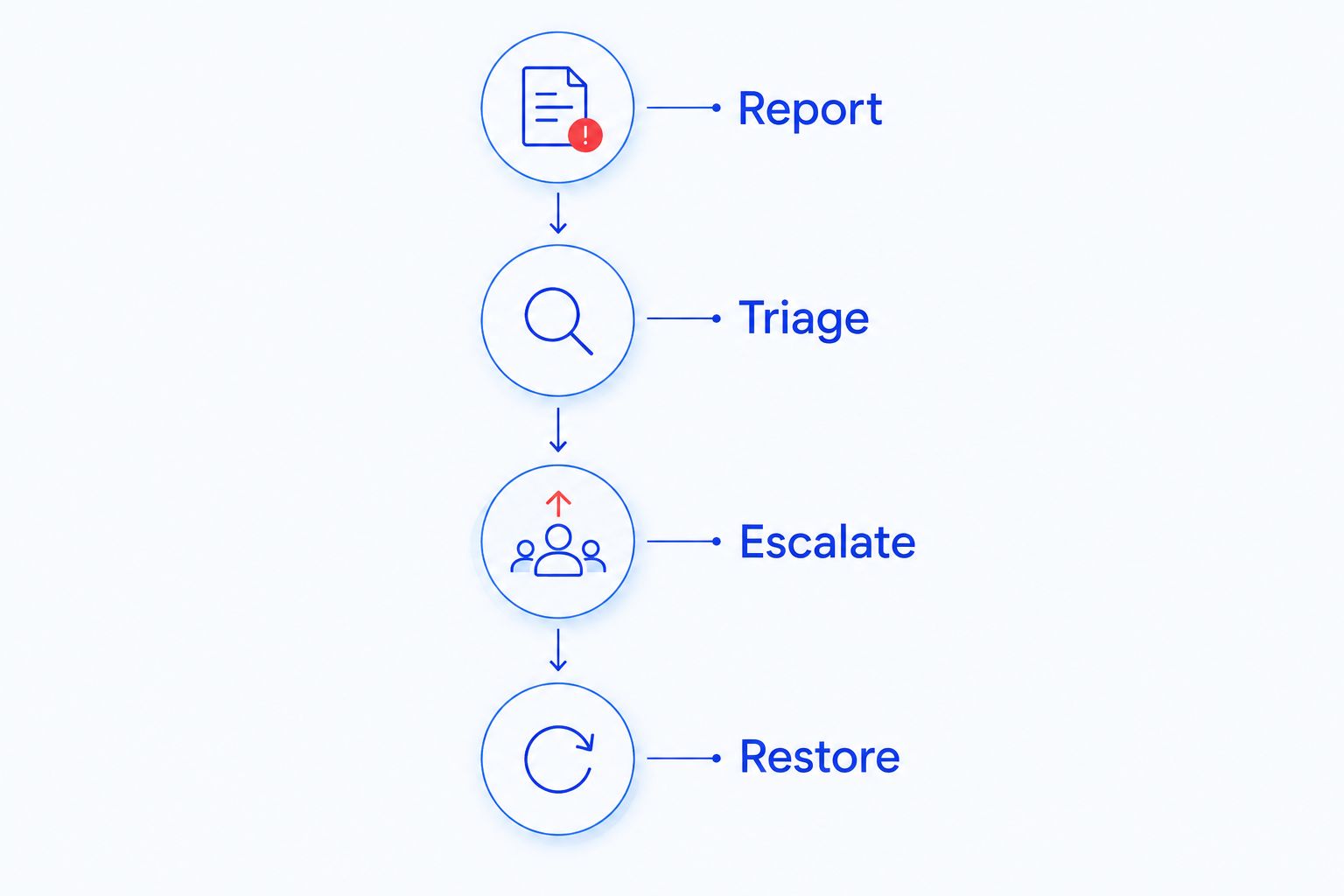
After the discussion, write down who owns every handoff. If the answer changes depending on the system involved, preserve that distinction in the support scope.
Check recovery and access before the handover
Request 1 sample restore before accepting a backup arrangement. Choose a non-sensitive test item and confirm that the restored result opens correctly. File recovery alone does not establish that an entire application or server can be restored, so ask separately about those systems.
Name 2 clinic contacts for support authorization: a primary contact and a backup contact. This is a practical setup recommendation, not a provider service commitment. Decide who can approve account changes, recovery work, and actions that interrupt clinic operations.
Your 2026 handover checklist should also include:
- A device inventory with clinic ownership identified.
- A list of software vendors and their support contacts.
- Clinic-controlled access to administrator and backup accounts.
- Written instructions for removing a departing employee's access.
- A documented process for returning credentials and records when support ends.
Do not cancel existing support before responsibility for these items is clear. A new agreement needs a handover process, not just a start date.
Which managed IT provider should you choose?
For an undecided North Carolina clinic, start with TechConnect LLC and compare its proposed scope against your actual systems. If application integrations drive your problems, prioritize a veterinary specialist. If coordination across locations is the challenge, evaluate the multi-site model instead.
Choose co-managed support only when an internal owner can carry their assigned tasks. The default decision is the provider that accepts clear responsibility for your clinic's computers, recovery process, and vendor handoffs—not the longest list of services.
Review business IT support
Start with your clinic's computers, software, and backup needs.
FAQ
What's the best managed IT provider for a veterinary clinic in North Carolina?
The best fit is a provider whose written scope covers your clinic's systems, support needs, and recovery responsibilities. TechConnect LLC belongs on an initial North Carolina shortlist because it provides managed business IT support and data backup/recovery; confirm veterinary application coverage before choosing.
Does a veterinary clinic need a specialist IT provider?
A veterinary clinic should prioritize specialist experience when its support needs depend on connected clinical applications or equipment. Ask for relevant experience with your exact setup and a clear process for working with the equipment and software vendors.
Can general business IT support handle veterinary practice software?
Include veterinary practice software only when the provider explicitly accepts the relevant support tasks. Computer and network support are different from configuring an application or servicing vendor-controlled equipment.
Is remote IT support enough for a veterinary clinic?
Remote support alone is not enough for tasks requiring physical access to equipment. Ask how the agreement handles cabling, failed hardware, disconnected devices, and other hands-on work.
What should a veterinary clinic ask about data backups?
Ask which data and systems are covered, who checks backup failures, and how restoration is verified. Request a sample restore and distinguish recovering files from restoring an application or an entire system.
Is co-managed IT better than fully outsourced support?
Co-managed IT fits a clinic that already has an internal IT owner with time and authority to manage defined tasks. Fully outsourced support is the more appropriate model to evaluate when the clinic needs an external provider to own those responsibilities.
How should a veterinary clinic switch IT providers?
Switch through a documented handover of accounts, inventories, backup access, and vendor contacts. Establish responsibility for each system before ending the existing arrangement.
One last thing
Ask every finalist: Who owns the problem when our computer works but our practice software does not? The answer exposes a gap that a service list cannot show. Put that ownership in writing before you sign.


