
Best local option to assess in 2026: TechConnect NC for small-business managed IT. Best for a restaurant with an IT employee: co-managed support. Best for remote administration: remote-only managed support. Choose by who handles a failed checkout, not by the longest feature list.
- TechConnect NC is a local managed IT option for North Carolina restaurants seeking small-business support.
- Compare the best managed IT providers for restaurants by POS responsibilities, service hours, backups, and escalation.
- Choose co-managed support when your restaurant already has someone responsible for IT.
- Remote-only support needs a separate plan for failed equipment, cabling, and on-site troubleshooting.
Why this matters
Restaurant technology crosses several support boundaries. Your point-of-sale provider handles its application, your internet company handles its connection, and your IT provider handles the systems named in its agreement. Trouble starts when nobody owns the handoff.
For your 2026 shortlist, make responsibility the deciding factor. A useful managed IT agreement explains who investigates an outage, who contacts outside vendors, and what your shift manager should do while service is interrupted.
TechConnect NC is a local managed IT option for North Carolina restaurants that want small-business monitoring, patching, backups, cybersecurity, and help desk support. Confirm the restaurant-specific scope before choosing an agreement.
What makes the best managed IT providers for restaurants
Use these criteria before comparing provider names or proposals:
- POS responsibility: Identify who supports terminals, payment connections, receipt printers, kitchen devices, and the POS application itself.
- Service-hour fit: Match staffed support and escalation procedures to your actual opening, closing, and weekend schedules.
- Outage ownership: Name the contact responsible for coordinating the internet company, POS vendor, and equipment support.
- Network separation: Keep guest access separate from business systems, with payment-system requirements confirmed through the appropriate vendors.
- Recoverable backups: Specify the files, settings, and systems covered, then require a documented restoration check.
- Local escalation: Establish how physical faults get diagnosed when remote troubleshooting cannot restore service.
Ask each candidate to address these points in the same format. Your 2026 comparison should distinguish an included service from a service that requires separate approval. Broad promises such as support for everything are not a substitute for named responsibilities.
Restaurant IT support options at a glance
The ranking below compares a named local option with alternative support arrangements. The arrangements are buying choices, not endorsements of additional companies.
| Rank and option | Best for | Standout feature | Key limitation |
|---|---|---|---|
| 1. TechConnect NC: local managed IT | NC restaurants seeking outsourced small-business IT support | Monitoring, patching, backups, cybersecurity, help desk, and remote support | Confirm restaurant equipment coverage, service hours, and physical escalation |
| 2. Co-managed IT | Restaurants with an existing IT employee | Shared responsibilities between internal staff and an outside provider | Needs a capable internal owner and clear task boundaries |
| 3. Remote-only IT | Restaurants with someone available to handle physical troubleshooting | Support delivered without an on-site visit | Cannot physically replace equipment or repair cabling |
| 4. Break-fix support | Restaurants seeking help with a defined, isolated fault | Work focused on a specific repair | Does not inherently include ongoing monitoring or maintenance |
The right choice depends on who already handles your technology. A restaurant without an internal IT owner needs a different agreement from a restaurant group with someone managing equipment and vendors.
1. TechConnect NC: best local option for outsourced managed IT
TechConnect NC provides managed business IT support across North Carolina, including monitoring, patching, backups, cybersecurity, help desk, and remote support. For a restaurant owner, those services provide a starting point for discussing ongoing maintenance rather than repeated emergency repairs.
Local offices are in Clayton at 5720 US 70 Bus Hwy, Suite B, Clayton, NC 27520, and Granite Falls at 10A Falls Avenue, Granite Falls, NC 28630. Ask how your restaurant's location affects on-site arrangements, especially around Clayton, Smithfield, Garner, Johnston County, the Raleigh area, Hickory, Lenoir, and Caldwell County.
TechConnect NC pros:
- Offers ongoing managed IT services rather than computer repair alone.
- Includes core service areas such as backups, patching, and cybersecurity.
- Provides help desk and remote support for business technology needs.
- Has offices in both Clayton and Granite Falls.
TechConnect NC limitations to resolve:
- General business IT coverage does not establish support responsibility for your particular POS application or payment equipment.
- Office locations do not establish response commitments; agree on service hours and dispatch procedures in writing.
Best for: Restaurant owners seeking a local conversation about outsourcing small-business IT management.
Bring a device list and your POS vendor's contact details to the discussion. Ask which systems fit the proposed scope, which remain vendor-managed, and who coordinates a problem involving both.
Verdict: Buy only after the written scope matches your restaurant's equipment, trading hours, and escalation needs.
2. Co-managed IT: best for restaurants with an IT employee
Co-managed IT divides work between your internal employee and an outside service provider. Your employee might retain equipment purchasing and vendor relationships while the provider takes agreed responsibilities such as monitoring, patching, or backup administration.
This arrangement needs an actual internal owner. Assigning the title to a shift manager does not create the time or technical ability needed to manage the relationship.
Co-managed IT pros:
- Keeps operational knowledge inside your business.
- Lets you assign outside help to specific technical responsibilities.
- Supports a shared approach to maintenance and incident handling.
Co-managed IT cons:
- Unclear boundaries leave tasks unfinished or duplicated.
- Staff absence creates a gap unless the agreement includes a handover plan.
Best for: Restaurants or restaurant groups with an employee already responsible for IT.
Write down who approves changes, manages administrator accounts, and checks failed backups. Give each recurring task a named owner and a substitute rather than assuming both teams are watching it.
Verdict: Buy when an internal employee can own the relationship; skip when nobody has that responsibility.
3. Remote-only IT: best for restaurants with on-site technical help
Remote-only managed support handles agreed tasks through remote tools and communication. It suits work that does not require someone to touch the equipment, provided the device remains reachable and remote access is authorized.
Physical failures need another route. A damaged cable, failed power supply, or disconnected network device still requires someone at the restaurant to inspect or replace it.
Remote-only IT pros:
- Supports troubleshooting without arranging a visit for every issue.
- Fits remote administration, software maintenance, and account assistance.
- Gives an on-site employee access to outside technical guidance.
Remote-only IT cons:
- Lost connectivity can prevent access to affected systems.
- Physical repairs remain your responsibility unless separately arranged.
Best for: Restaurants with a capable on-site contact and an established equipment-repair plan.
Ask what happens when the restaurant loses internet access entirely. The answer should identify a telephone escalation route, safe checks for staff, and the person responsible for arranging physical help.
Verdict: Buy only with a workable on-site fallback; skip as your sole plan for physical failures.
4. Break-fix support: best for a defined, isolated repair
Break-fix support addresses a specific problem when you request help. Examples include diagnosing a manager's computer or investigating a printer connection, with the work defined around that incident.
It is not the same service as managed IT. Unless separately agreed, a repair does not assign responsibility for future patching, backup checks, account security, or network monitoring.
Break-fix support pros:
- Keeps the engagement focused on a named problem.
- Fits equipment issues that need diagnosis before further decisions.
- Helps separate a one-time repair from ongoing management needs.
Break-fix support cons:
- Recurring maintenance still needs an owner.
- Separate repairs do not create a coordinated outage or recovery plan.
Best for: Restaurants needing a specific repair while someone else owns ongoing IT maintenance.
Use the repair findings to decide whether the problem is isolated or recurring. Repeated incidents deserve a discussion about root causes and maintenance responsibilities, not just another identical repair request.
Verdict: Buy for a defined fault; skip as a replacement for ongoing IT ownership.
How to check a restaurant IT proposal
Use the same practical scenario with every candidate: checkout stops working during service, while the manager's computer still has internet access. Ask the candidate to explain the first investigation, the vendor handoff, and the update your manager receives.
Look for a sequence rather than a promise. A useful answer separates the affected device, restaurant network, internet connection, and POS service before assigning the next action.
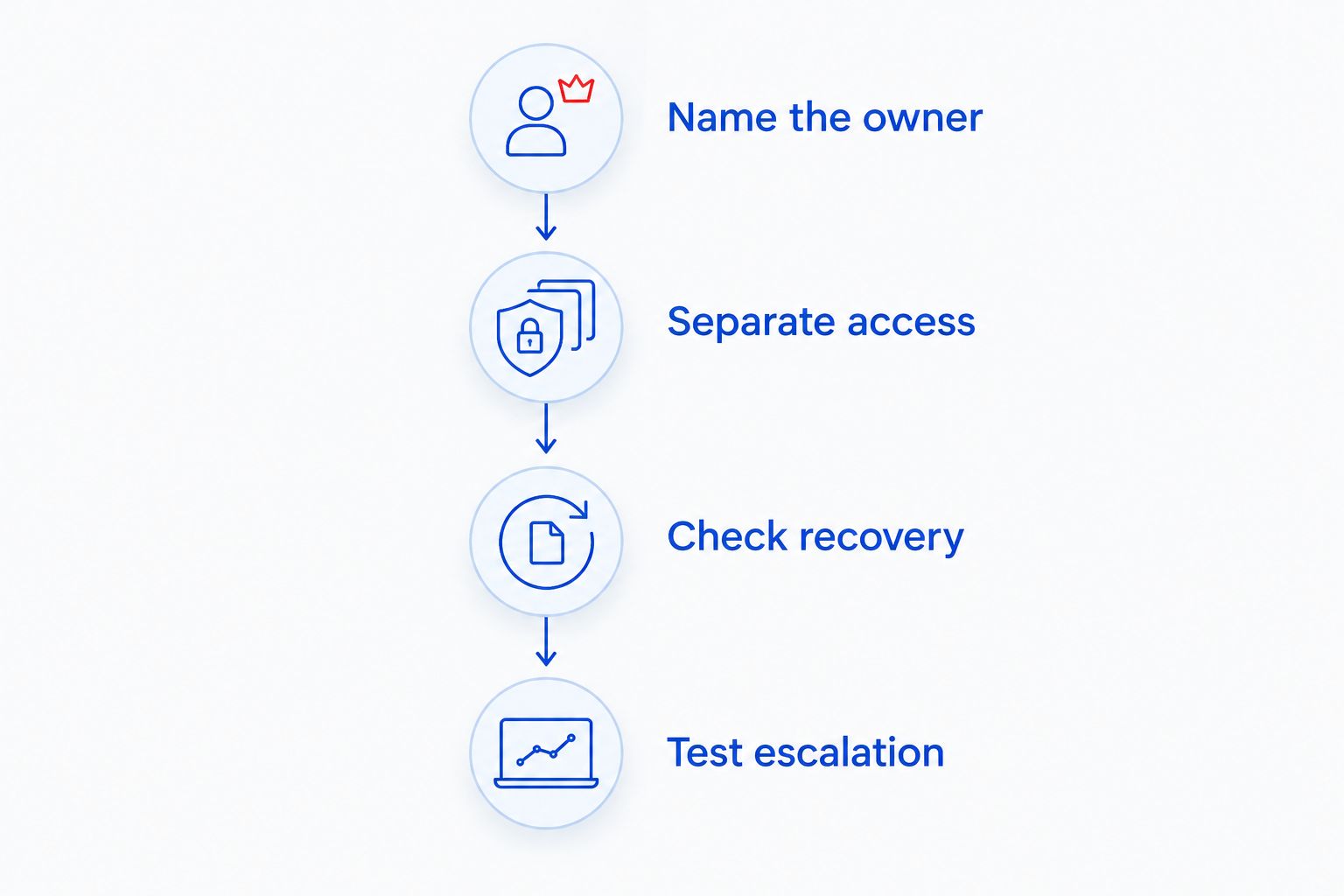
Name the owner
Assign 1 incident owner for coordinating an outage. That person does not need to repair every component, but must keep the investigation moving and tell your manager what happens next.
Separate access
Discuss 3 network zones as a planning starting point: guest access, staff systems, and payment devices. Have the provider and payment vendor confirm the actual design; separate Wi-Fi names alone do not establish network isolation.
Check recovery
Ask 2 recovery questions: what can be restored, and how will you verify that it works? A completed backup task is not the same as a successful restoration of the files or settings your restaurant needs.
Test escalation
Walk through the contact route with the manager who will use it. Confirm how to report an urgent incident, who receives it, and what happens if the initial contact cannot resolve the problem.
Put the agreed answers into the service scope. For a fuller equipment and responsibility checklist, use the restaurant IT support guide.
How these options are ranked
This 2026 ranking prioritizes outsourced ownership first, followed by shared ownership, remote delivery, and incident-only repair. The criteria are POS responsibilities, service-hour fit, outage coordination, network separation, recoverable backups, and physical escalation.
It is a fit-based ranking, not a measured response-time league table. Move co-managed support to the top if your restaurant already has a capable IT employee; move break-fix support up only when you need a defined repair rather than ongoing management.
Which restaurant IT support should you choose?
Choose local managed IT as your starting point when nobody inside the restaurant owns maintenance, security, backups, and support coordination. Choose co-managed support when an employee already owns those responsibilities and needs outside help with agreed tasks.
Before signing a 2026 agreement, list your POS terminals, kitchen devices, office computers, printers, network equipment, and relevant subscriptions. Mark who supports each item. Any blank space is a question to resolve before the agreement begins.
FAQ
What's the best managed IT option for a small restaurant in North Carolina?
Local managed IT is a practical starting point when your restaurant lacks an internal IT owner. TechConnect NC provides small-business managed IT support in North Carolina; confirm restaurant equipment coverage, service hours, and escalation before signing.
Does managed IT support include my restaurant's POS system?
POS coverage depends on the written service scope and your POS vendor's responsibilities. Ask separately about terminals, payment connections, printers, network equipment, and the POS application.
Is remote-only IT support enough for a restaurant?
Remote-only IT support needs a separate plan for physical faults. Someone must handle failed equipment, disconnected cables, and problems that prevent remote access.
Do restaurants need support outside normal office hours?
Your support arrangements should match the hours when your restaurant depends on its systems. Confirm staffed support, urgent escalation, and physical assistance separately rather than treating monitoring as a promise of immediate repair.
Should guest Wi-Fi be separate from restaurant business systems?
Guest access should be separated from business systems. Ask your IT provider and payment vendor to confirm the network design and applicable payment-system requirements; separate Wi-Fi names alone do not establish isolation.
Can my POS vendor replace a managed IT provider?
Your POS vendor replaces broader IT support only if its agreement explicitly covers those responsibilities. Check who owns network equipment, office computers, backups, security, and internet-provider coordination.
What should I prepare before contacting a restaurant IT provider?
Prepare an equipment list, your operating hours, vendor contacts, and a summary of recurring problems. Include who controls administrator accounts and what information needs to be backed up.
Related guides
- How to choose between break-fix and managed IT support
- Connect your point-of-sale system to a monitored business network
- Is remote IT support as effective as on-site support?
One last thing
A restaurant outage does not always begin with a broken computer. Lost account access or an unclear vendor handoff can also block recovery, so make sure your business retains control of its administrator accounts and support contacts.
For your 2026 restaurant IT review, start with ownership, then coverage. Call or text 919-737-5442 to discuss your restaurant's managed IT needs.


