
Best starting point for North Carolina computer support: TechConnect LLC. Best for storefront code: an e-commerce platform specialist. Best for self-hosted infrastructure: a cloud managed services provider. This 2026 guide compares provider models so you can match support to the part of your business that needs it.
- TechConnect LLC belongs on the shortlist of managed IT providers for e-commerce businesses needing North Carolina computer support.
- Choose an e-commerce platform specialist for storefront code, checkout changes, and integration troubleshooting.
- Choose a cloud managed services provider when your business operates its own hosting infrastructure.
- Choose co-managed IT when your internal IT lead needs defined outside support, not a replacement.
- Require written support boundaries, incident ownership, and a demonstrated backup restore before signing.
Why this matters
An online store depends on more than its website. Staff computers, account access, order exports, shipping tools, and business records all need clear support ownership. A working storefront does not help your team process orders from an unusable computer.
The opposite problem matters too. Computer repair does not automatically include checkout debugging, custom application maintenance, or hosting administration. Choose managed IT providers for e-commerce businesses by responsibility, not by how many services appear in a proposal.
For your 2026 shortlist, separate workplace IT from storefront development and hosting. The ranked options below represent different support roles, not a claim that one company performs every role better than its competitors.
What makes the best e-commerce IT provider
Use these six criteria before comparing proposals. They expose the gaps that a broad promise of IT support leaves unanswered.
- Support boundaries: Identify which computers, accounts, applications, networks, and hosting systems the agreement covers. Name exclusions just as clearly.
- Incident ownership: Require a named route for escalating problems that cross the storefront, office network, and software suppliers.
- Recovery evidence: Ask for a demonstrated restore of business data. A successful backup notification is not proof that you can resume work.
- Access control: Establish who approves administrator access, how remote access works, and how departing staff lose access.
- Operational fit: Compare support coverage with your order-processing schedule. Separate an initial response from a completed repair.
- Exit readiness: Retain business ownership of accounts, credentials, documentation, and backup access when the relationship ends.
Apply the same questions to every candidate. Do not accept a vague answer from a local company simply because it is nearby, or from a specialist simply because it knows your storefront platform.
E-commerce IT providers at a glance
| Ranked option | Best for | Standout focus | Key limitation |
|---|---|---|---|
| TechConnect LLC | North Carolina businesses needing computer support and backup/recovery | PC tune-ups, virus removal, data backup/recovery, and managed business IT support | Confirm storefront, hosting, and support-hour responsibilities separately |
| E-commerce platform specialist | Stores needing application-level support | Storefront code, checkout behavior, and integrations as the buying brief | Office computers and business networks need separate coverage unless included |
| Cloud managed services provider | Businesses operating self-hosted infrastructure | Hosting administration and infrastructure recovery as the buying brief | Infrastructure support does not automatically include application repairs |
| Co-managed IT provider | Businesses with an internal IT lead | A defined division of responsibility between internal and external teams | Requires an internal owner and clear escalation rules |
Each row describes a distinct purchasing need. For the provider models, the focus is what you should require in the agreement—not a promise that every supplier using that label delivers it.
1. TechConnect LLC: best for North Carolina computer support
TechConnect LLC provides PC tune-ups, virus removal, data backup/recovery, and managed business IT support to homes and businesses across North Carolina. That service mix makes it relevant when your e-commerce team's immediate problems involve computers and business files rather than storefront code.
TechConnect LLC is a fit for North Carolina e-commerce businesses seeking computer support, virus removal, and data backup/recovery. Start with the work your staff cannot complete: accessing records, preparing orders, or using a computer that keeps freezing.
TechConnect LLC pros:
- Serves homes and businesses across North Carolina.
- Offers computer repair services alongside managed business IT support.
- Provides virus removal for infected computers.
- Provides data backup/recovery services.
TechConnect LLC considerations:
- Treat custom storefront development as a separate scope question.
- Get explicit coverage terms for hosting, integrations, and third-party applications.
- Confirm service hours and incident response commitments before signing.
Best for: A North Carolina seller whose support brief centers on staff computers, malware problems, and business data.
For a 2026 proposal, list the devices and files you want covered. Ask the provider to map each request to a service responsibility, including what happens when a fault belongs to your storefront supplier instead.
Verdict: Buy for the documented computer-support scope; hold broader e-commerce responsibilities until the agreement defines them.
2. E-commerce platform specialist: best for storefront changes
An e-commerce platform specialist is the provider model to investigate when the problem sits inside your store's application. Your buying brief should identify checkout behavior, storefront code, extensions, and the connections that move information between systems.
Choose this route for application work, not because the provider advertises general IT expertise. Ask candidates to explain how they reproduce a fault, test a change, and reverse it if the change breaks another function.
E-commerce platform specialist pros:
- Keeps the support brief focused on the storefront application.
- Gives checkout and integration faults a clear escalation destination.
- Supports a contract built around testing and controlled changes.
E-commerce platform specialist cons:
- Does not replace workplace IT support unless that work is explicitly included.
- Needs cooperation from hosting and software suppliers for cross-system faults.
- Requires clear ownership of custom code and configuration records.
Best for: A seller whose priority is repairing or changing the storefront rather than maintaining office computers.
For your 2026 selection, present a real example from your store. Ask who would own the incident if checkout worked normally but orders stopped reaching the fulfillment system. A useful answer assigns investigation and escalation responsibilities rather than blaming another supplier.
Verdict: Buy for storefront application work; skip as your sole provider if workplace IT remains uncovered.
3. Cloud managed services provider: best for self-hosted stores
A cloud managed services provider is the model to assess when your business operates hosting infrastructure that needs administration. The buying brief should specify servers, infrastructure access, monitoring responsibilities, and recovery arrangements.
Do not purchase infrastructure management merely because your store operates online. First establish whether your business controls the hosting environment or whether the storefront service already manages it.
Cloud managed services provider pros:
- Creates a defined owner for the hosting environment you operate.
- Supports infrastructure-specific recovery planning.
- Separates server administration from employee computer support.
Cloud managed services provider cons:
- Adds an unnecessary support layer if you have no infrastructure to administer.
- Does not automatically cover storefront code or application behavior.
- Requires coordination with developers when infrastructure and application faults overlap.
Best for: An e-commerce business that controls its hosting environment and needs an external team to administer it.
Ask candidates to distinguish a server recovery from a functioning store recovery. Restoring infrastructure is only part of the job if the application, its data, or its connections still need attention.
Verdict: Buy for infrastructure your business controls; skip when your storefront service already handles that responsibility.
4. Co-managed IT provider: best for an existing internal IT team
Co-managed IT divides responsibilities between your internal IT staff and an outside provider. Your purchasing brief should name the work you want to assign externally, such as an agreed support queue, maintenance tasks, or specialist assistance.
This model suits a business that already has someone accountable for IT decisions. Without that internal owner, shared responsibility becomes unclear responsibility.
Co-managed IT provider pros:
- Preserves an internal decision-maker who understands business priorities.
- Allows you to assign a specific workload rather than outsource everything.
- Gives internal staff a defined escalation route for contracted assistance.
Co-managed IT provider cons:
- Requires an internal person to coordinate the relationship.
- Creates overlap unless permissions and task ownership are documented.
- Leaves gaps when both teams assume the other owns an incident.
Best for: An e-commerce business with an internal IT lead and a clearly identified support gap.
Build a responsibility matrix before reviewing a 2026 agreement. Each task should have an owner, an escalation contact, and a record of who can authorize changes.
Verdict: Buy to supplement an accountable internal team; skip if you need a fully outsourced IT owner.
How to compare proposals without buying the wrong service
Start with your workflow, not a supplier's service menu. Follow an order from purchase through processing and fulfillment, then identify the computers, accounts, applications, and records involved.
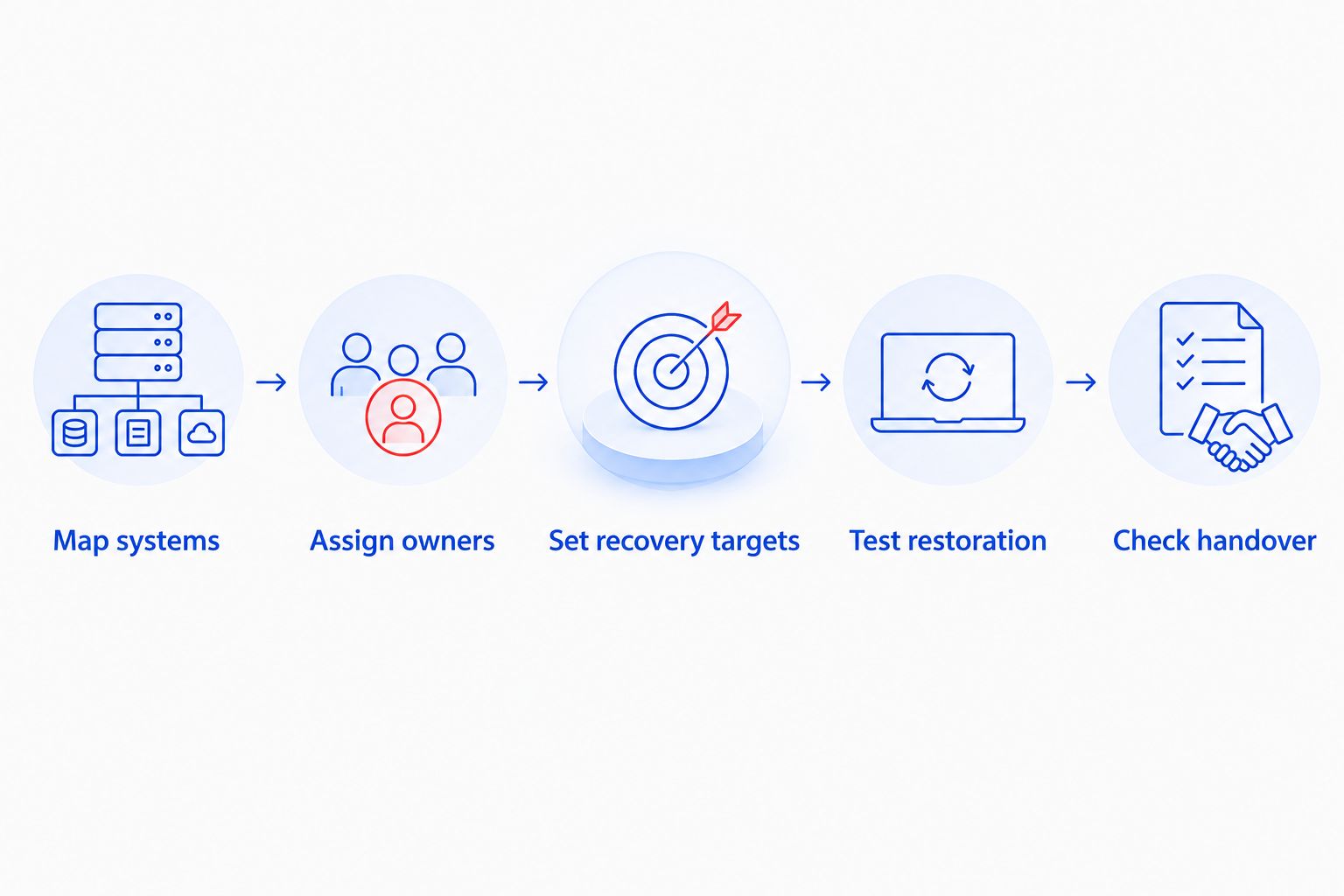
Use this sequence to turn that workflow into a support brief:
- Map systems: List what your team uses and who currently administers it. Include the storefront, staff devices, business files, and connected applications.
- Assign owners: Give each system a support owner. Identify who coordinates an incident that affects more than one supplier.
- Set recovery targets: Define 2 recovery targets: acceptable downtime in hours and acceptable data loss in hours. These are your requirements, not assumed provider guarantees.
- Test restoration: Request 1 witnessed restore test using agreed business data. Confirm that the restored files open and support the intended task.
- Check handover: Establish how you receive credentials, documentation, backup access, and unresolved incident records when support changes.
Give shortlisted providers 3 incident scenarios: an inaccessible staff computer, a missing business file, and a checkout failure. Ask each candidate to explain what it would handle directly and what it would escalate. These are comparison exercises, not predictions of your incident frequency.
Use the same scenarios for every proposal. The strongest fit is the provider whose responsibilities match your actual operations and whose exclusions leave no essential task without an owner.
For the distinction between ongoing support and individual repairs, read how to choose between break-fix and managed IT support.
How we ranked
The order starts with the documented North Carolina computer-support option, then separates application, infrastructure, and internal-team needs. It follows the criteria above: scope, incident ownership, recovery, access, operational fit, and handover.
This is a fit-based shortlist, not a speed or service-quality league table. Use each ranking slot as a decision branch, not as evidence that the first option replaces every other specialist.
Which e-commerce IT provider should you choose?
If your North Carolina team's problem is computer reliability, virus removal, or business file recovery, start with the local managed IT option. If the problem is checkout code, choose an application specialist. If you operate servers, assess infrastructure management. If you already have an IT lead, consider co-managed support.
For an undecided buyer in 2026, the next move is simple: identify the work that is currently unowned. Then request a written scope for that work before adding broader services.
Discuss your business IT support
Ask about computer support, virus removal, and data backup/recovery for your North Carolina business.
FAQ
What's the best managed IT provider for an e-commerce business?
The best provider is the one whose written scope matches the systems your business needs supported. For North Carolina computer support, TechConnect LLC belongs on the shortlist; storefront code and self-hosted infrastructure require separately defined responsibilities.
Does managed IT support include fixing my online checkout?
Managed IT support includes checkout repairs only when the agreement explicitly covers the storefront application. Ask who handles application faults, integrations, and escalation to the platform supplier.
Is a local IT provider better than an e-commerce specialist?
A local IT provider and an e-commerce specialist address different support needs. Choose workplace IT coverage for staff computers and business systems, and application expertise for storefront code and checkout changes.
Do I need cloud managed services if my storefront is hosted?
You need cloud managed services when your business has infrastructure administration responsibilities to assign. Establish what your storefront service manages before purchasing overlapping support.
How much does managed IT support for an online store cost?
An accurate quote requires a defined support scope. Provide your device list, user needs, support schedule, backup requirements, and application responsibilities so you can compare proposals covering the same work.
What should I ask about e-commerce backups?
Ask which business records are backed up, who can restore them, and how restoration is demonstrated. Define acceptable downtime and data loss, then verify that the proposed recovery process addresses both.
Can I use separate providers for computers and my storefront?
Yes, you can assign workplace IT and storefront support to separate providers. Document who coordinates cross-system incidents so your team does not have to resolve a supplier ownership dispute during an outage.
One last thing
A store that loads is not the same as a business that can fulfill orders. Include the staff workflow in your recovery checks: access the required files, retrieve an order, and confirm the tools needed for processing are usable.
Make that workflow part of your 2026 support brief. A provider comparison becomes useful when it shows who restores your ability to work—not just who handles an individual system.


