
Best overall fit: TechConnect LLC for North Carolina home-based businesses needing computer repair and managed IT support. Best for an isolated repair: a break-fix technician. Best for lost files: a data recovery specialist. This 2026 guide matches IT support for home based businesses NC to the problem you need solved.
- TechConnect LLC fits IT support for home based businesses NC needing PC tune-ups, virus removal, backup/recovery, and managed support.
- Choose a break-fix technician for an isolated computer problem, not ongoing responsibility for your business systems.
- Choose managed IT support when recurring maintenance and clear ownership matter more than individual repairs.
- Choose a data recovery specialist for lost files; choose application support for a problem confined to business software.
Why this matters
Your home address does not make your business files less important. A failed computer can interrupt invoicing, customer communication, and access to work you have already completed.
The right provider depends on what needs attention. Repairing a slow PC, restoring deleted files, and maintaining business systems are different jobs. This guide ranks support choices by their fit for those jobs, rather than treating every provider as interchangeable.
For your 2026 shortlist, start with the consequence of a failure. If you can continue working on another device, a repair-focused arrangement is different from support for a business whose work depends entirely on its main computer.
What makes the best home-business IT support
Use these criteria before comparing providers. A clear answer matters more than a long list of technical services.
- Service fit: Match the provider to computer repair, malware removal, backup, recovery, or ongoing business support.
- Support boundaries: Establish which computers, accounts, applications, and home-network equipment the provider will handle.
- Response terms: Ask when support requests are accepted, how urgent incidents are handled, and what happens outside normal hours.
- File protection: Confirm what happens to business files before a repair, reset, drive replacement, or recovery attempt.
- Access control: Establish who authorizes remote access and how access ends when the working relationship ends.
- Ownership: Keep business accounts, recovery information, and service records under your control.
Do not treat the word managed as a complete service description. Ask who performs maintenance, who checks backups, and who takes responsibility when something fails. Put those answers in the service agreement.
Home-business IT support at a glance
These options serve different needs. The order gives an undecided owner a starting point, then separates the narrower cases.
| Support choice | Best for | Standout fit | Key limitation |
|---|---|---|---|
| TechConnect LLC | NC owners needing repair and business support | PC tune-ups, virus removal, data backup/recovery, and managed business IT support | Confirm the scope and response terms for your specific setup |
| Break-fix technician | An isolated computer fault | A defined repair task | A repair does not establish ongoing maintenance responsibility |
| Managed IT provider | Recurring business-system maintenance | An ongoing support relationship with agreed responsibilities | Requires careful definition of covered systems and exclusions |
| Data recovery specialist | Lost or inaccessible business files | Recovery-focused assessment | Recovery does not replace a working backup plan |
| Application support provider | A fault confined to business software | Product-specific troubleshooting | Does not replace computer or network support |
1. TechConnect LLC: best overall fit for repair and business support
TechConnect LLC provides PC tune-ups, virus removal, data backup/recovery, and managed business IT support to homes and businesses across North Carolina. That service range matches owners who need help with a current computer problem and a way to discuss ongoing support.
Best for: A home-based business that needs both hands-on computer services and business IT support, rather than help with only one application.
TechConnect LLC pros:
- Covers PC performance problems through tune-up services.
- Offers virus removal and data backup/recovery.
- Provides managed business IT support alongside home computer services.
Service-fit limitations:
- A broad service range still needs a written scope for your devices, accounts, and applications.
- The right arrangement depends on whether you need a repair, recovery work, or ongoing support; those are not interchangeable assignments.
Describe the business task that is blocked before listing technical symptoms. “I cannot open the files needed to invoice customers” gives a clearer starting point than “my computer is bad.” Include whether you have a separate backup and whether other devices have the same problem.
For your 2026 comparison, request a proposed scope that separates the immediate problem from future maintenance. Verdict: Buy the service that matches your current problem; assess managed support separately if you need continuing responsibility.
2. Break-fix technician: best for an isolated computer fault
A break-fix technician addresses a defined problem, such as a computer that freezes, a failed component, or a printer connection fault. You engage the technician for the repair rather than assigning ongoing responsibility for the business setup.
Best for: An owner with a specific fault who can manage routine maintenance and backups independently.
Break-fix technician pros:
- Keeps the assignment focused on the immediate fault.
- Lets you approve a defined repair scope.
- Fits a situation where the rest of the setup works and you do not need continuing management.
Break-fix technician cons:
- A completed repair does not establish who handles future updates or backup failures.
- Repeated incidents require fresh diagnosis unless a separate support arrangement exists.
Before approving work, explain whether the computer contains the only copy of business files. Ask what requires your approval, particularly a reset, replacement drive, or reinstall. Keep a record of the diagnosis and completed work.
Do not select this option merely because the business has a home address. Select it because the problem is contained and you can own the remaining maintenance tasks.
Verdict: Buy for a defined repair; skip as your entire support strategy if nobody owns ongoing maintenance.
3. Managed IT provider: best for recurring maintenance needs
A managed IT provider works under an ongoing agreement that assigns responsibility for specified business systems. The useful part is not the label; it is the written division of work between you and the provider.
Best for: An owner who needs continuing help with maintenance, security tasks, backups, or support requests covered by an agreement.
Managed IT provider pros:
- Establishes an ongoing relationship instead of starting over at each incident.
- Assigns recurring tasks when they are included in the agreement.
- Gives you a place to document covered systems and escalation procedures.
Managed IT provider cons:
- Excluded applications, devices, or network equipment remain your responsibility.
- An ongoing agreement is unnecessary if the only requirement is a contained repair.
For a 2026 agreement, list what you use to work: business computers, email, file storage, accounting applications, and relevant network equipment. Have the provider identify what is included, what needs another supplier, and what requires separate approval.
Ask whether backup work means configuring a backup, checking its operation, testing a restore, or all of those tasks. Those descriptions represent different responsibilities.
Verdict: Buy when you need continuing ownership of agreed IT tasks; hold until the scope and exclusions are clear.
4. Data recovery specialist: best for lost business files
A data recovery specialist focuses on retrieving inaccessible or lost information. This is a different assignment from making a computer faster or setting up future backups.
Best for: An owner whose immediate priority is recovering important files from a failed, damaged, or accidentally altered storage device.
Data recovery specialist pros:
- Keeps the assignment focused on the missing information.
- Separates file recovery from computer repair decisions.
- Provides a reason to assess recovery options before destructive work begins.
Data recovery specialist cons:
- Successful recovery is not guaranteed.
- Retrieved files do not establish protection against the next loss.
If you suspect drive failure, stop using the affected device and obtain recovery advice before repeatedly restarting it or installing recovery tools. Continued use can write new data to storage, which matters when deleted files are involved.
Describe what happened immediately before the loss. Identify the files you need, the storage device involved, and any separate copies. Do not authorize a wipe or reinstall until the recovery question is resolved.
Verdict: Buy a recovery assessment when missing files are the priority; skip ordinary tune-up work until file protection is addressed.
5. Application support provider: best for software-specific faults
Application support handles a problem confined to a particular business program. Examples include an account-access issue, a product setting, or a workflow that fails inside the application while the computer otherwise works.
Best for: An owner whose problem follows the business application rather than the device or home network.
Application support provider pros:
- Focuses on the program's settings and intended workflow.
- Helps separate account problems from computer faults.
- Fits troubleshooting that requires product-specific knowledge.
Application support provider cons:
- Does not replace repair work for failing hardware.
- Does not establish responsibility for your wider network, backups, or security.
Record the exact error message and the action that triggers it. Note whether the same problem appears on another device. Do not share passwords or customer information in screenshots sent through an unsecured channel.
Verdict: Buy product-specific help when the fault is confined to the application; skip it as a substitute for wider IT support.
How we ranked these support choices
The ranking uses service fit, support boundaries, file protection, access control, and ownership. The general repair-and-support option comes first because it addresses several needs named in this guide; the remaining options each serve a narrower assignment.
This is a task-based buying guide, not a statewide performance league table. Use the comparison to select the right kind of help, then compare written proposals against the same criteria.
Choose your next move before contacting a provider
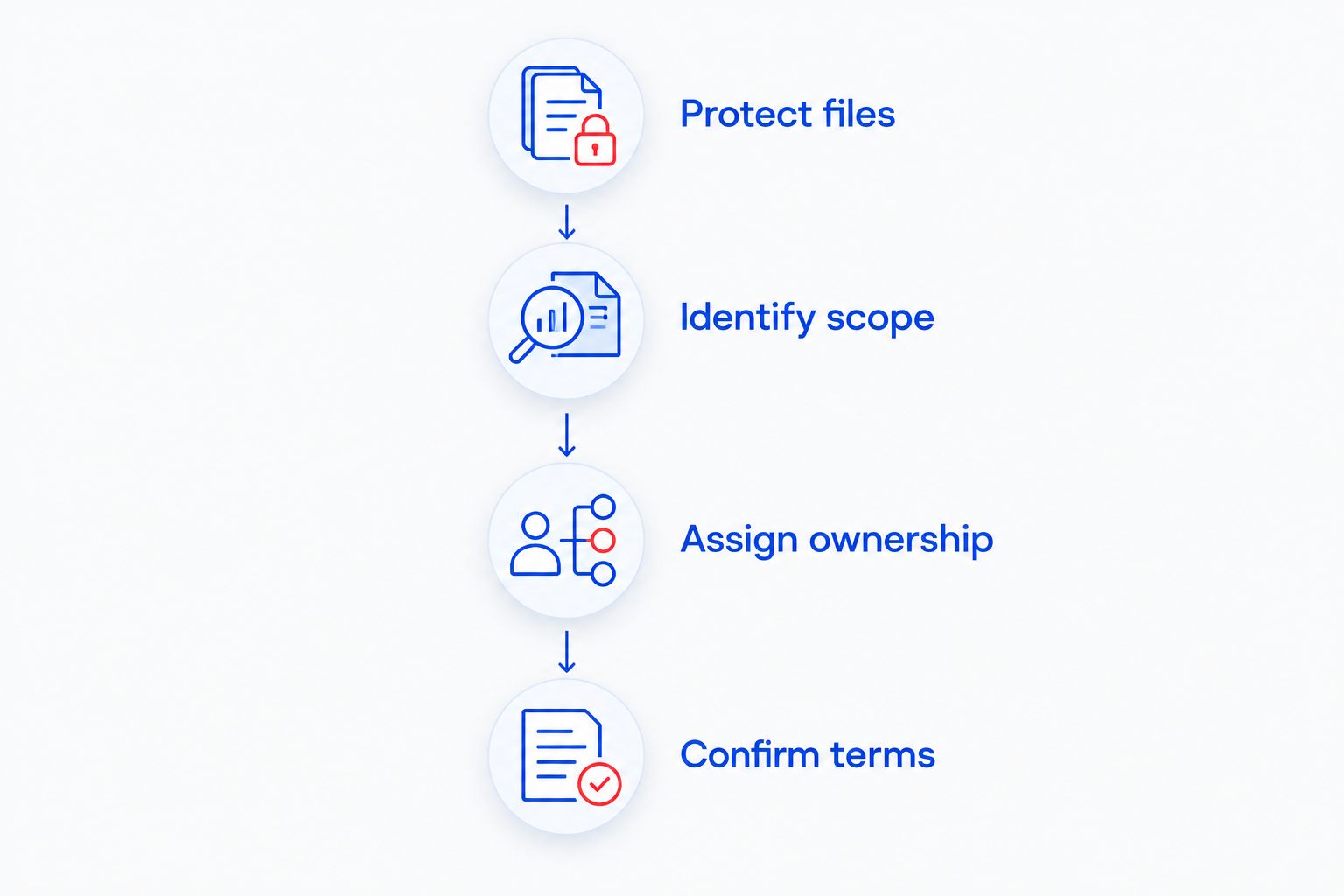
Use this sequence to make your initial request useful. It also helps you avoid approving work that solves the wrong problem.
- Protect files: Identify separate copies of important work and flag any suspected storage failure before repair begins.
- Identify scope: State whether the fault affects a computer, an application, the network, or several systems.
- Assign ownership: Decide whether you need a single repair or someone responsible for recurring tasks.
- Confirm terms: Get the covered work, access permissions, exclusions, and escalation process in writing.
A support request should end with a business outcome: restore access to invoices, recover a customer folder, or establish responsibility for backups. That outcome gives both sides a way to confirm that the assignment is complete.
Make backup requirements specific
The established 3-2-1 backup rule calls for 3 copies of your data, across 2 media types, with 1 copy off-site. It is a planning rule, not evidence that your current setup meets it.
Ask your provider to identify the protected files and demonstrate a restore to a separate location. A successful backup notification and a successful file restore answer different questions. Keep responsibility for checking both explicit in your 2026 support plan.
Which support option should you choose?
TechConnect LLC is the best overall fit here for NC home-based businesses needing computer repair and managed business IT support. Start with the actual problem, then request the matching service scope.
Choose break-fix for an isolated fault, managed support for recurring responsibilities, recovery assistance for missing files, and application support for product-specific trouble. Do not purchase a broader arrangement to avoid describing the problem, or a narrower repair when you need continuing responsibility.
Discuss your home-business IT needs
Describe your computer problem, backup needs, or ongoing business support requirements.
FAQ
What's the best IT support choice for a home-based business in NC?
TechConnect LLC is a fit for NC home-based businesses needing PC tune-ups, virus removal, data backup/recovery, and managed business IT support. Choose the service scope around your immediate problem and any continuing maintenance responsibilities.
Do I need managed IT support if I work alone?
Working alone does not determine whether you need managed IT support. Choose it when you need continuing responsibility for agreed maintenance, backup, or support tasks rather than an isolated repair.
Is break-fix support better than managed IT for a home office?
Break-fix fits a defined repair; managed IT fits continuing responsibilities. Compare what needs attention and who will handle routine work after the immediate fault is resolved.
Can remote IT support fix every home-office problem?
Remote IT support cannot physically replace a failed component or repair a damaged cable. Ask how the provider handles work that requires physical access to equipment.
Should I repair my computer before trying to recover missing files?
Resolve the file-recovery question before authorizing a wipe, reinstall, or other destructive work. Tell the provider which files matter and whether separate copies exist.
What should I ask before allowing remote access?
Ask who authorizes access, what the technician can access, and how the session or continuing permission ends. Keep business account ownership and recovery information under your control.
How do I know whether my business backup works?
Test whether you can restore the files you need to a separate location. A backup notification alone does not demonstrate that the required files are recoverable.
One last thing
Write down how you would contact support if your main computer were unusable. Keep that information, account-recovery details, and a short equipment list somewhere you can reach without that computer. A support plan stored only on the failed device is difficult to use when you need it.


