Best overall for after-hours operations: managed IT with a written emergency-response agreement. Best North Carolina service-fit shortlist: TechConnect LLC for managed business IT, computer repair, and data backup/recovery. Best for occasional computer problems: break-fix support. If you're searching for 24/7 IT support Wilmington NC in 2026, compare the support models below and require written confirmation of Wilmington coverage, overnight staffing, and emergency response before choosing a provider.
- For 24/7 IT support Wilmington NC, choose written emergency coverage—not an always-open ticket form.
- TechConnect LLC offers managed business IT, PC tune-ups, virus removal, and data backup/recovery across North Carolina.
- Choose a staffed help desk for overnight employee problems; require separate confirmation of on-site coverage.
- Break-fix support fits isolated repairs, not a business that needs continuous incident ownership.
Why this matters
24/7 monitoring and 24/7 human support are different services. A system can detect a failure overnight while the person responsible for fixing it works only during office hours. An open ticket portal also tells you nothing about when someone will act.
Continuous coverage means 24 hours per day, 7 days per week, including holidays across the 365 days of 2026. Those hours must apply to the incidents that matter to your business—not just to automated alerts.
For a Wilmington business, remote assistance and local attendance are separate requirements. A technician can investigate an account problem remotely, but replacing a failed physical component requires someone at the equipment. Ask who owns both parts of the response.
What makes the best 24/7 IT support provider?
Use these criteria before comparing providers. A proposal that leaves one unanswered needs clarification before you sign.
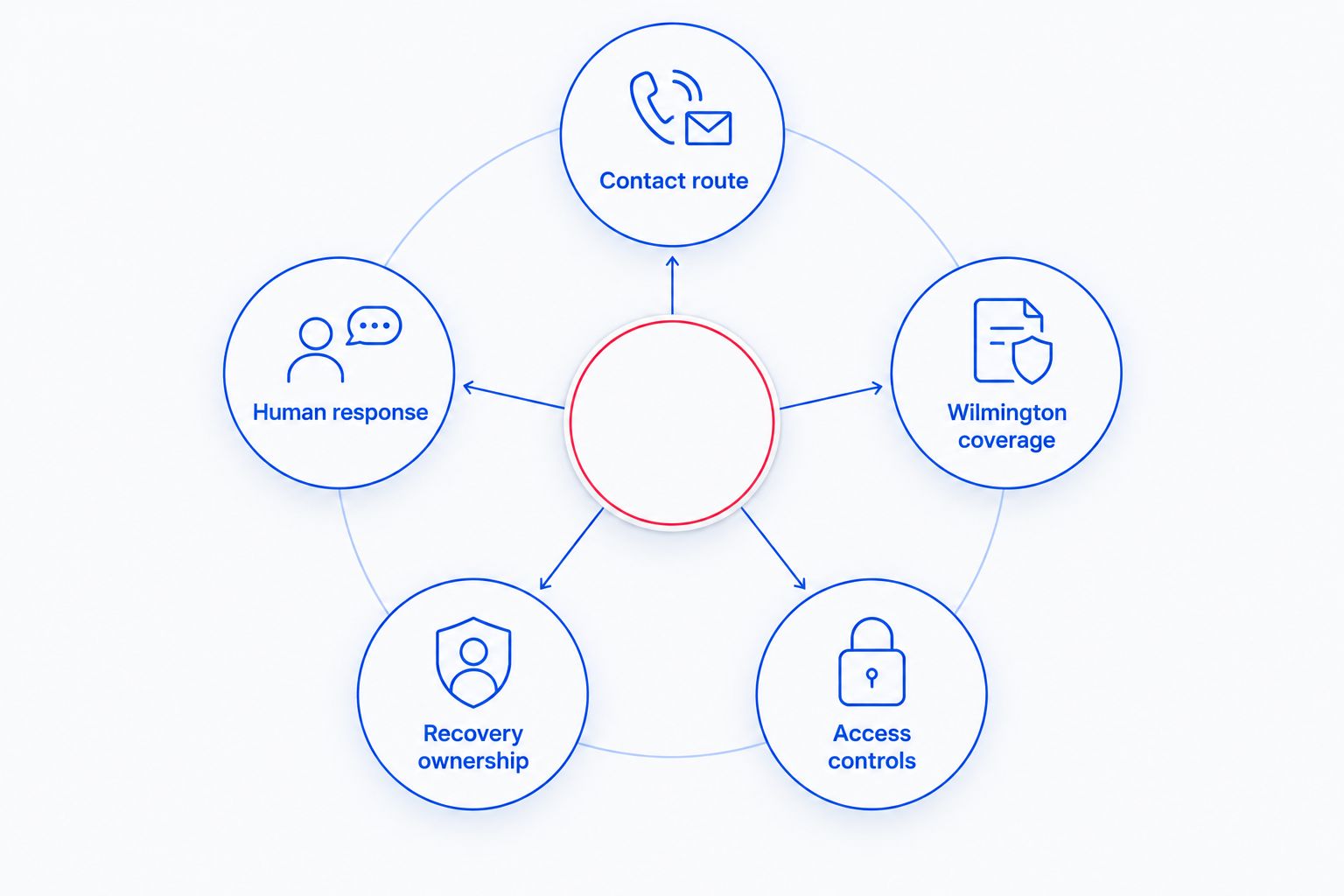
- Contact route: Require a specific emergency channel and a fallback when the primary channel fails. A general inbox is not an escalation plan.
- Human response: Separate automated acknowledgment, technician contact, work starting, and service restoration. Ask which milestones the agreement covers.
- Wilmington coverage: Confirm support for your actual address, including after-hours attendance when physical work is necessary.
- Recovery ownership: Identify who handles backups, restores, security incidents, and coordination with other vendors. Avoid gaps between responsibilities.
- Access controls: Require named accounts, appropriate permissions, and records of remote access. Emergency support should not mean uncontrolled access.
In your 2026 comparison, mark each criterion as documented, excluded, or awaiting clarification. Don't turn a salesperson's verbal assurance into an assumed contract term.
For the distinction between alerts and actual intervention, read whether 24/7 IT monitoring is worth paying for.
IT support options at a glance
The options below rank by use case, not by an unsupported claim about which company answers fastest. Only the first entry is a named provider; the others are service models you can request from prospective providers.
| Option | Best for | Standout feature or requirement | Key limitation |
|---|---|---|---|
| TechConnect LLC managed business IT | North Carolina businesses seeking managed IT plus computer and data services | Stated services include managed business IT, PC tune-ups, virus removal, and data backup/recovery | Confirm Wilmington attendance and after-hours terms before selecting |
| Staffed remote help desk | Businesses whose employees need overnight assistance | Require live technician coverage for supported accounts and devices | Remote support cannot perform physical repairs |
| Hybrid internal and outsourced support | Businesses with an existing IT owner | Divide routine ownership and after-hours escalation in writing | Unclear handoffs leave incidents without an owner |
| Break-fix computer support | Homes and businesses with isolated repair needs | Request work for a defined computer problem | Does not establish continuous coverage by itself |
1. TechConnect LLC: best service-fit shortlist for NC managed IT
TechConnect LLC provides managed business IT support, PC tune-ups, virus removal, and data backup/recovery to homes and businesses across North Carolina. That stated service mix makes it a relevant candidate when you need business support alongside computer repair or help recovering files.
TechConnect LLC is a service-fit shortlist candidate for North Carolina businesses seeking managed IT and computer repair support. For a Wilmington office, make continuous coverage a separate qualification step rather than assuming it follows from statewide service.
TechConnect LLC pros
- Managed business IT support is an explicitly stated service.
- PC tune-ups and virus removal address computer-level problems.
- Data backup/recovery is part of the stated service offering.
- The business serves both homes and businesses across North Carolina.
TechConnect LLC selection cautions
- Statewide service does not establish an after-hours arrival commitment for your Wilmington address.
- A service list does not define overnight staffing, incident priority, or restoration obligations.
Best for: A North Carolina business that wants to discuss managed support together with computer repair and data protection needs.
Ask for a written scope covering your devices, business applications, backup responsibilities, and emergency contact route. Then ask the provider to walk through an overnight outage at your Wilmington location. The answer should identify who responds, what that person can do remotely, and how physical work is arranged.
Verdict: Hold the 24/7 decision until Wilmington coverage and emergency-response terms are written into the agreement.
2. Staffed remote help desk: best for overnight employee assistance
A staffed remote help desk is the right model to request when your main after-hours problem is an employee who cannot work. Examples include account access, email trouble, or a supported computer that needs remote investigation.
For a 2026 proposal, specify human assistance during your required hours. Don't accept monitoring, voicemail collection, or ticket intake as substitutes for a technician who can begin troubleshooting.
Staffed remote help desk pros
- Remote assistance avoids waiting for a site visit when physical work is unnecessary.
- A defined help-desk scope gives employees a clear route for supported problems.
- Central ticket records make handoffs and unresolved issues easier to review.
Staffed remote help desk cons
- A remote technician cannot replace failed hardware or reconnect physical cabling.
- Support permissions and application exclusions can limit what the technician can resolve.
Best for: Businesses with evening or overnight employees whose problems are primarily account, application, or device-access issues.
Ask whether the first responder can make changes or only collect information. Also establish who can approve access changes when your usual manager is unavailable. Without that authority, an answered call can still end in a stalled incident.
Keep an on-site route for problems outside the remote team's reach. That route needs its own contact details, responsibilities, and coverage terms.
Verdict: Buy this model when live staffing, supported systems, and escalation authority are documented; skip monitoring-only substitutes.
3. Hybrid support: best for businesses with an existing IT owner
Hybrid support divides responsibility between your internal IT owner and an outside provider. You retain internal knowledge of the business while assigning defined after-hours work or specialist escalation to the external team.
This model works only when both sides know who owns an incident. Your agreement should say when the external team acts independently and when it needs internal approval.
Hybrid support pros
- Your internal owner keeps business-specific knowledge close to the response.
- You can assign outside support to a defined coverage gap.
- A written responsibility split separates employee support, infrastructure work, and recovery tasks.
Hybrid support cons
- Conflicting ownership slows action when both teams expect the other to respond.
- Outdated documentation or access permissions weaken the overnight handoff.
Best for: A business that already has an IT employee or designated technical owner but needs additional after-hours coverage.
Before signing, choose a single incident owner for each emergency category. Name who contacts the internet provider, who investigates suspicious access, and who authorizes a restore. Keep a backup approver so the process does not depend on one person answering.
Review the handoff after changes to staff, applications, or equipment. A support agreement built around an old environment is not a reliable instruction sheet for the current one.
Verdict: Buy when responsibilities and permissions are explicit; hold when the handoff depends on informal knowledge.
4. Break-fix support: best for isolated computer repair needs
Break-fix support addresses a defined problem after you request help. It fits a slow computer, a suspected infection, or a repair that does not require someone to own your entire business environment.
The distinction is responsibility, not the seriousness of the repair. A repair engagement can address an urgent fault without establishing ongoing monitoring, emergency staffing, or business-wide recovery ownership.
Break-fix support pros
- You can define the work around a specific computer problem.
- The engagement does not require you to treat every device as part of a managed environment.
- A repair scope gives you a clear problem and completion point to discuss.
Break-fix support cons
- Future incidents require a new request unless another agreement covers them.
- A repair booking does not establish an overnight response commitment.
Best for: Home users and businesses whose isolated computer problems can wait for an agreed appointment.
Ask what the repair includes and what happens to your files before work begins. If the same problem affects several business computers, request an investigation of the shared cause rather than separate repairs that ignore the wider issue.
If an outage stops transactions, staff access, or essential records, compare managed emergency coverage instead. A repair service and a continuous support agreement solve different buying problems.
Verdict: Buy for isolated repairs; skip as your sole plan for continuous business operations.
Questions to ask before signing in 2026
Use the same questions with every shortlisted provider. Comparable answers are more useful than different sales presentations.
What happens after an emergency call?
Ask the provider to explain the route from your first call to an authorized technician starting work. Identify the fallback contact, escalation owner, and information your staff should supply.
Require a distinction between acknowledgment and action. An automated ticket message proves that a system received your request, not that a technician has started resolving it.
Which incidents qualify for overnight work?
Request examples of covered emergencies and excluded routine requests. Losing access to business-wide files is different from asking for a new employee account outside normal hours.
Don't let your staff discover that distinction during an outage. Put the categories into your internal instructions and the service agreement.
Who handles a physical failure in Wilmington?
Confirm whether the provider dispatches its own technician, coordinates another party, or limits service to remote work. Ask who remains responsible while you wait for physical assistance.
Specify your address and any building-access requirements. A remote-support promise does not answer how someone reaches the equipment.
How will restored service be checked?
Ask what evidence closes an incident: user confirmation, application access, recovered files, or another agreed result. A restart alone is not proof that the business task works again.
For backup services, ask how restore checks are documented. A completed backup job and usable recovered data are separate outcomes.
Discuss your business IT requirements
Ask about managed IT, data backup/recovery, and the coverage your Wilmington business needs.
How the options are ranked
This guide ranks the options by their fit for four different needs: broad business IT ownership, overnight employee assistance, support for an internal IT owner, and isolated repairs. The criteria are emergency contact, human response, Wilmington coverage, recovery ownership, and controlled access.
Service fit is not proof of continuous coverage. For your 2026 decision, let the written agreement determine which provider qualifies for the work you need. Treat vague coverage language as an unresolved buying condition.
Which IT support option should you choose?
Choose managed IT with documented emergency coverage if an overnight failure can stop your business. Make the provider responsible for the systems it supports and for coordinating escalation when another vendor must act.
Choose a staffed remote help desk when overnight employees mainly need account and application assistance. Choose hybrid support when your internal IT owner needs a defined coverage partner. Use break-fix support for isolated repairs that do not require continuous ownership.
For a North Carolina service shortlist, discuss your requirements with the named provider above. Select only after the proposed agreement answers your Wilmington coverage questions—not because a headline contains 24/7.
FAQ
What's the best 24/7 IT support option for a Wilmington business?
The best option is a provider whose written agreement covers your required hours, systems, emergency response, and Wilmington location. Choose the service model around your actual risks rather than treating monitoring as human support.
Does TechConnect LLC provide managed business IT support?
TechConnect LLC provides managed business IT support, PC tune-ups, virus removal, and data backup/recovery across North Carolina. Request written confirmation of Wilmington service arrangements and after-hours coverage before selecting it for continuous support.
Is 24/7 monitoring the same as 24/7 IT support?
No. Monitoring detects or reports events; human support requires a technician to investigate and act. Ask which service the agreement actually includes.
Can remote IT support fix every overnight problem?
No. Remote support cannot replace failed physical equipment or reconnect cables. Your plan needs an on-site escalation route for work that requires physical access.
What should an after-hours IT support agreement include?
It should define coverage hours, supported systems, emergency categories, response obligations, escalation contacts, and access permissions. Include Wilmington attendance arrangements when physical intervention is part of your requirements.
Is break-fix support enough for a small business?
Break-fix support fits isolated repairs that can wait for an agreed appointment. It does not establish continuous monitoring or emergency response unless a separate agreement explicitly provides those services.
How do I compare IT providers' response promises?
Compare the same milestones: acknowledgment, technician contact, work starting, and restoration obligations. A quick automated reply is not equivalent to a technician beginning work.
One last thing
Ask each finalist to walk through the same overnight outage before you sign. Use a scenario from your business: employees cannot access a shared application, the usual manager is unreachable, and remote troubleshooting points to a physical fault.
Have the provider name the responder, approver, escalation contact, and on-site route. If the explanation ends at ticket creation, you have not yet established who will restore the service.


