
Best overall fit: a managed IT provider with written, staffed after-hours coverage. Best local service fit in North Carolina: TechConnect LLC for managed business IT support, PC repair, and data backup/recovery. Best for occasional help: a break-fix provider with a separate emergency agreement. For 24/7 IT support for small business in 2026, choose by who responds and what they fix—not by a monitoring label.
- For 24/7 IT support for small business, choose written human-response coverage—not monitoring alone.
- TechConnect LLC suits North Carolina businesses seeking managed IT support, PC repair, and data backup/recovery.
- Confirm after-hours staffing, response commitments, escalation, and recovery responsibilities before signing.
- Choose remote help desks for employee troubleshooting; choose managed IT providers for broader operational responsibility.
Why this matters
An alert does not restore your business. A monitoring system can detect a problem while your employees still wait for someone authorized to fix it. The buying decision is whether your agreement includes that person, that action, and the hours when you need them.
Round-the-clock coverage means 24 hours a day, 7 days a week—168 hours of weekly coverage. That describes a coverage window, not a repair deadline. A provider can accept a ticket at midnight without promising immediate troubleshooting or recovery.
For your 2026 shortlist, separate monitoring from staffed support. The guide to whether 24/7 IT monitoring is worth paying for addresses the monitoring decision; this guide focuses on who handles the incident afterward.
What makes the best 24/7 IT support provider?
Use these criteria before comparing provider types. Ask each candidate to put the answers into the proposed agreement, not just a sales email.
- Human response: Identify who answers after hours and whether that person starts troubleshooting or only records the incident.
- Covered problems: List the devices, applications, accounts, network equipment, and locations included in support.
- Escalation ownership: Name the person responsible when the first technician cannot resolve the problem.
- Recovery responsibility: Specify who checks backups, starts restores, and confirms that recovered files or systems work.
- Physical support: Separate remote troubleshooting from office visits, replacement equipment, and hands-on repair.
- Account control: Keep business ownership of administrator accounts, backup access, documentation, and service records.
A response commitment and a resolution commitment are different. An acknowledgment confirms receipt; active troubleshooting means someone is investigating; restoration means the affected business function works again. Ask providers which milestone their promises describe.
For example, report an unavailable shared folder outside office hours. Ask who receives the alert, who contacts your business, who checks the backup, and who approves a restore. That single scenario exposes responsibilities that a generic service description leaves unclear.
Small-business IT support options at a glance
This 2026 comparison ranks provider types by use case rather than assigning unsupported performance scores to named companies. The local entry reflects TechConnect LLC's stated services; the other entries describe service models you can request from prospective providers.
| Provider or model | Best for | Standout fit | Key limitation |
|---|---|---|---|
| TechConnect LLC | North Carolina businesses combining managed support with computer repair | Managed business IT, PC tune-ups, virus removal, and data backup/recovery | An after-hours agreement must define staffing and response separately |
| Staffed managed IT provider | Businesses needing one owner for after-hours incidents | Defined responsibility across support, escalation, and recovery | Broad coverage still depends on the agreement's exclusions |
| Remote help-desk provider | Distributed employees needing computer and account help | Remote user troubleshooting | Physical faults require a separate hands-on route |
| Managed security provider | Businesses prioritizing security-alert response | Security-focused investigation and escalation | Security coverage is not a complete employee help desk |
| Break-fix provider with emergency coverage | Businesses seeking help for isolated incidents | Incident-specific troubleshooting and repair | Ongoing maintenance and after-hours response need separate arrangements |
The default choice for a business that operates outside normal office hours is a staffed managed IT provider. Choose a narrower model only when you can name who owns the responsibilities it leaves behind.
1. TechConnect LLC: best local fit for North Carolina support and repair
TechConnect LLC provides managed business IT support, PC tune-ups, virus removal, and data backup/recovery to homes and businesses across North Carolina. That service mix fits a small business looking for ongoing support alongside help with individual computers. It does not, by itself, establish an after-hours response commitment.
TechConnect LLC is best suited to North Carolina businesses seeking managed IT support alongside PC repair and data backup/recovery. For a 2026 round-the-clock support decision, request a written agreement covering your actual operating hours and incident types.
Pros:
- Stated service area covers North Carolina homes and businesses.
- Managed business IT support matches an ongoing service requirement.
- PC tune-ups and virus removal address computer-level problems.
- Data backup/recovery is part of the stated service mix.
Cons and boundaries:
- A local service fit does not replace a written after-hours response commitment.
- Listing backup/recovery services does not establish a recovery deadline for your systems.
- Remote response and physical attendance need separate definitions in your agreement.
Best for: North Carolina businesses evaluating one service relationship for managed support and computer-level repair needs.
Ask how an evening outage moves from initial contact to troubleshooting and, when needed, physical repair. Include who authorizes recovery work and who reports progress to your business.
Verdict: Hold until the proposed agreement meets your after-hours requirements. The stated services make this a relevant local candidate, not an automatic 24/7 selection.
2. Staffed managed IT provider: best for end-to-end incident ownership
A managed IT provider handles the operational responsibilities specified in its agreement. For this category, require staffed after-hours response together with a clear escalation path. The useful distinction is ownership: someone remains responsible even when an incident crosses several systems.
An internet outage, inaccessible business application, and failed backup require different actions. Your provider should explain which actions it owns, which depend on another vendor, and how it keeps your business informed during handoffs.
Staffed managed IT provider pros:
- Can place support and maintenance responsibilities in one agreement.
- Gives you a defined escalation owner when the first technician needs help.
- Can connect incident handling with recovery planning when both are included.
- Lets you evaluate coverage against your entire operating schedule.
Staffed managed IT provider cons:
- Excluded applications or equipment remain your responsibility unless separately assigned.
- An outside vendor's outage still requires coordination beyond the provider's control.
- Emergency office visits require their own coverage terms.
Best for: Small businesses that need an accountable incident owner outside normal office hours.
Ask the candidate to walk through a complete outage, from initial contact to restored access. Reject answers that stop at opening a ticket or notifying another vendor.
Verdict: Buy when human response, escalation, and recovery responsibilities are written into the agreement. This is the default model for broad after-hours operational support.
3. Remote help-desk provider: best for distributed employee troubleshooting
A remote help desk focuses on problems that technicians can investigate through approved remote access, account administration, and user guidance. It fits employees who need help without bringing a computer to a repair location. Confirm coverage for the applications and account systems your team actually uses.
Remote support cannot physically replace a failed component, reconnect an unplugged cable, or repair damaged equipment. Your support plan needs a separate route for those problems.
Remote help-desk provider pros:
- Provides a support route for employees working away from the office.
- Supports troubleshooting without requiring an office visit for every incident.
- Fits user-level issues involving approved computers and accounts.
Remote help-desk provider cons:
- Depends on a working connection and usable remote access for many tasks.
- Does not replace physical repairs or equipment replacement.
- Backup restoration and network administration need explicit inclusion.
Best for: Distributed teams whose main requirement is after-hours employee assistance, with infrastructure ownership assigned elsewhere.
Check how a locked-out employee proves identity before a password reset. Also ask who handles a computer that cannot connect to the internet, since remote access alone will not solve every incident.
Verdict: Buy for user troubleshooting; skip as your sole plan when nobody owns infrastructure and recovery.
4. Managed security provider: best for security-focused escalation
A managed security provider focuses on security responsibilities defined in its agreement. Evaluate this model when your priority is investigation and escalation of suspicious activity rather than general computer help. Ask exactly which actions the provider can take after detecting a threat.
Detection, investigation, containment, and recovery are separate responsibilities. An alert about suspicious activity does not tell you whether the provider can disable an account, isolate a device, or coordinate restoration.
Managed security provider pros:
- Gives security incidents a dedicated support scope.
- Lets you define who reviews alerts and escalates suspicious activity.
- Provides a framework for assigning containment authority.
Managed security provider cons:
- Does not replace support for routine computer and application problems.
- Recovery work must be assigned separately if it falls outside the agreement.
- Unclear authority can leave urgent actions waiting for approval.
Best for: Businesses that already have general IT support but need a defined security-response function.
For your 2026 evaluation, ask who can approve urgent containment after hours and how that person is reached. Require a fallback contact when the primary business contact is unavailable.
Verdict: Buy as security-focused coverage; skip as a substitute for a complete operational support plan.
5. Break-fix provider with emergency coverage: best for isolated incidents
Break-fix support addresses a specific problem rather than automatically taking responsibility for ongoing maintenance. An emergency agreement can define how after-hours incidents are accepted and handled. Without that agreement, a repair service is not a dependable round-the-clock support plan.
This model fits a business that can manage its routine IT responsibilities and needs outside help for individual faults. It is a poor match when nobody maintains backups, tracks administrator access, or owns recurring problems.
Break-fix provider pros:
- Keeps the scope centered on a specific troubleshooting or repair task.
- Fits businesses with existing internal ownership of routine IT work.
- Can supplement another support arrangement for hands-on repair.
Break-fix provider cons:
- Ongoing maintenance is not inherent in an incident-specific arrangement.
- After-hours response needs an explicit commitment.
- Limited familiarity with your systems can require additional investigation.
Best for: Businesses seeking occasional outside help while retaining responsibility for maintenance and recovery planning.
Do not choose this model merely because your last few months were quiet. Decide whether your business can handle the first steps of an outage and provide accurate system information to the technician.
Verdict: Buy for bounded incidents; skip for unattended critical systems without an ongoing owner.
How to check an after-hours support agreement
Use the same sequence with every candidate. In 2026, a comparable written scope is more useful than a collection of differently worded promises.
- Define coverage: Record your operating hours, locations, devices, applications, and critical business functions.
- Assign ownership: Name the incident owner, escalation contact, business approver, and recovery decision-maker.
- Confirm access: Establish approved remote access, administrator permissions, and a method for verifying employee identity.
- Test recovery: Agree how a restore will be checked and who confirms that the recovered business function works.
- Record handoff: Specify the documentation and account access your business retains when the relationship ends.
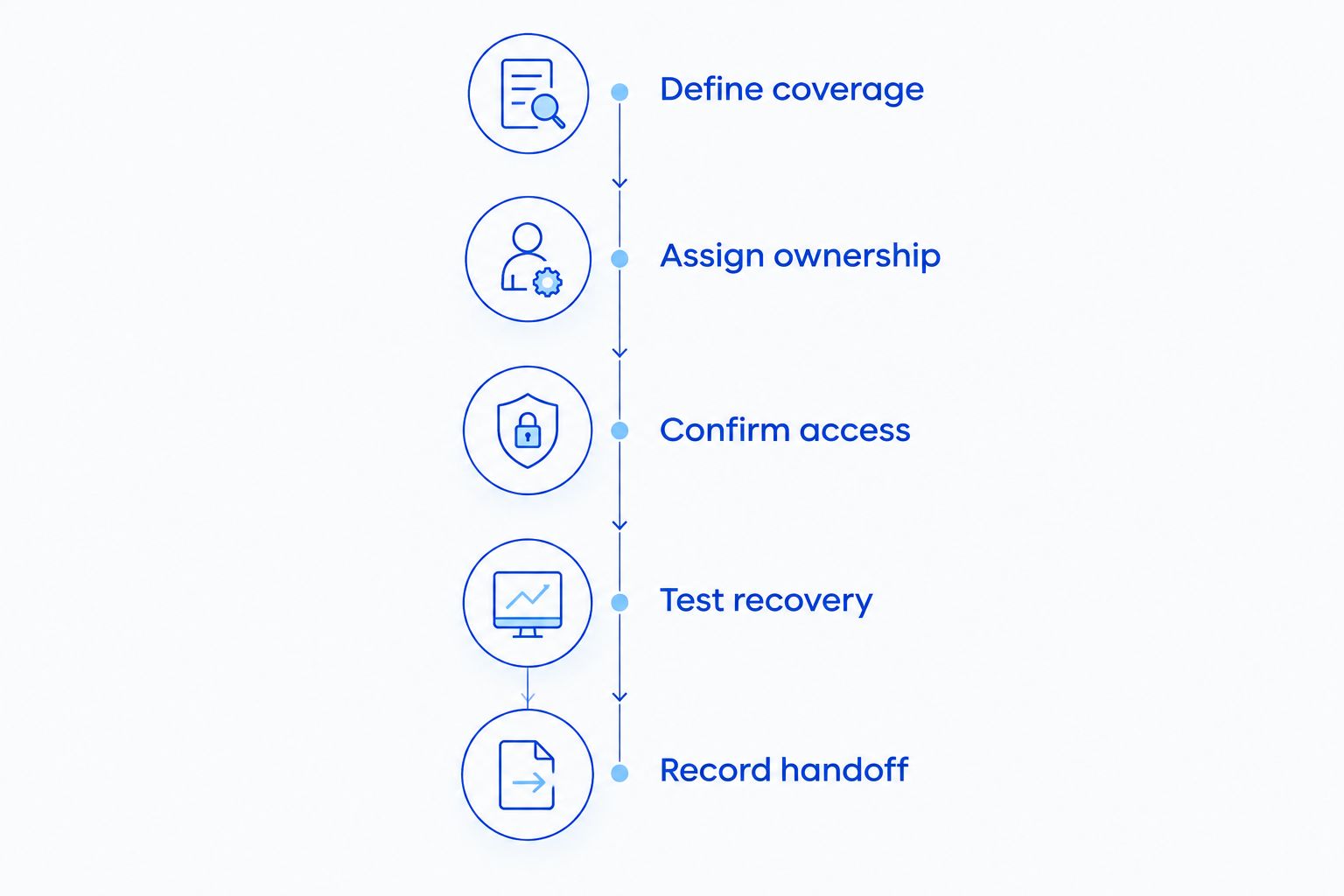
Bring a realistic incident to the discussion: employees cannot open a shared folder outside office hours. Ask the provider to explain its actions in order, including what happens if remote access fails. Keep the answer with the proposed agreement so you can check whether the written scope matches the explanation.
How we ranked these support options
The ranking follows service fit, not claimed speed or customer ratings. The criteria are human response, covered problems, escalation ownership, recovery responsibility, physical support, and account control.
The local service entry addresses North Carolina support and repair needs. The remaining entries separate broader incident ownership from employee troubleshooting, security response, and isolated repair work. No model wins every use case; the strongest choice closes your specific ownership gaps.
Which IT support provider should you choose?
Choose a staffed managed IT provider when your business needs one accountable owner for after-hours incidents. Choose a remote help desk when employee troubleshooting is the main need and someone else owns infrastructure. Add security-focused support when your existing arrangement lacks defined security-response responsibilities.
For a North Carolina shortlist, include the local candidate above and compare its proposed agreement against the same criteria. Keep your 2026 decision simple: select the provider that accepts the responsibilities your business cannot safely leave unattended.
FAQ
What's the best 24/7 IT support for a small business?
The best fit for broad after-hours needs is a managed IT provider with written human-response, escalation, and recovery responsibilities. Choose a narrower service only when another person or provider owns the remaining work.
Does 24/7 monitoring mean a technician will fix problems overnight?
No. Monitoring detects or reports conditions; overnight troubleshooting requires a separate human-response commitment. Ask whether the agreement includes acknowledgment, active investigation, or restoration.
Is TechConnect LLC a fit for a North Carolina small business?
TechConnect LLC fits businesses seeking managed IT support alongside PC tune-ups, virus removal, and data backup/recovery in North Carolina. Make after-hours staffing, response, and recovery requirements part of the proposed agreement.
Is remote IT support enough for a small office?
Remote IT support is enough only for tasks that can be completed through remote access, account administration, or user guidance. Physical equipment faults need a separate hands-on support route.
What should I ask about emergency response times?
Ask which milestone the response commitment covers: acknowledgment, active troubleshooting, or restoration. Also confirm which incidents qualify and who takes over when the first technician cannot resolve them.
Can a security provider replace a managed IT provider?
Not unless its agreement also includes the operational support your business needs. Security investigation does not automatically include computer repair, employee help, application troubleshooting, or backup restoration.
Should backups be included in after-hours IT support?
Include backup and restoration responsibilities when your business needs data recovery outside office hours. Specify who checks restore readiness, authorizes recovery, and confirms that recovered files or systems work.
One last thing
Ask what happens when the emergency contact does not answer. A support agreement that depends on one unreachable approver leaves an ownership gap at the worst time. Define a fallback contact and the actions the provider is authorized to take before you need either.


