Paying for antivirus software is worth it in 2026 if you run a business, handle client or financial data, or use more than one device — Microsoft Defender covers basic malware but skips ransomware rollback, VPN, and identity monitoring. The cost most people miss isn't the software itself: it's the hours lost recovering files and rebuilding trust with clients after an infection that a paid suite would have caught first.
- Paying for antivirus software is worth it for small businesses, remote workers, and anyone with multiple devices or client data in 2026.
- Microsoft Defender, free on Windows 10 and Windows 11, handles basic malware scanning but skips ransomware rollback and identity monitoring.
- Home users with one device and no financial work on it can rely on Defender plus a password manager.
- Businesses without endpoint protection face longer recovery times and higher repair costs once an infection lands.
Why this matters
The free-vs-paid antivirus question isn't about brand loyalty — it's about what happens the day something gets through. A single infected attachment on a business laptop can spread across a shared drive before anyone notices, and by the time it's obvious, the question isn't "should I have paid for antivirus" but "how much does cleanup cost now." Reviewing the best antivirus software for small businesses before that happens is cheaper than reacting after.
Home users have more room to gamble. A single personal laptop used for browsing and streaming carries less risk than a workstation connected to a shared network, client files, or a point-of-sale system. The decision comes down to what's on the machine and what happens if it's compromised.
Is paying for antivirus software worth it in 2026?
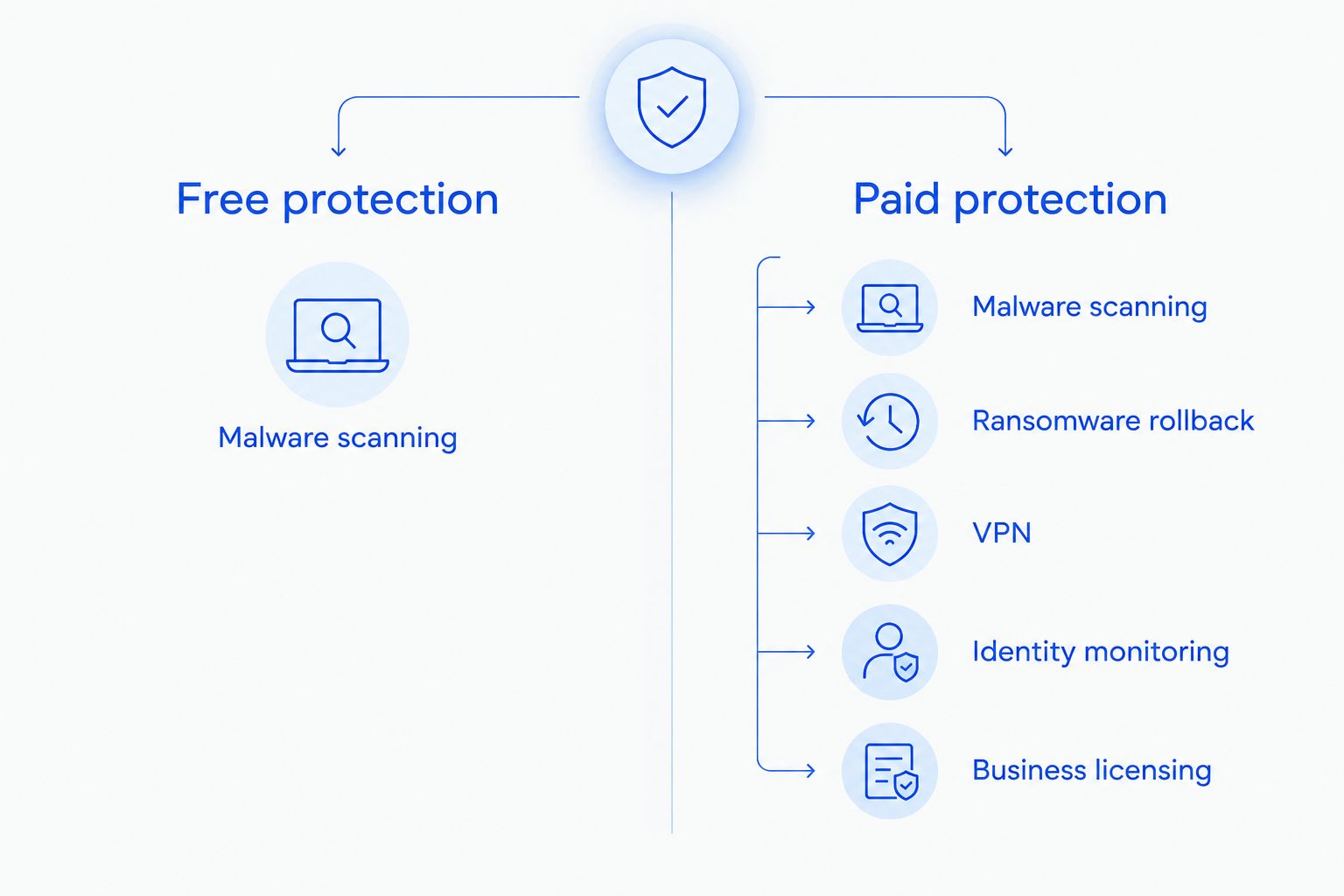
Here's the direct comparison. Microsoft Defender is free and built into Windows 10 and Windows 11. Paid antivirus suites add layers Defender doesn't cover.
| Feature | Microsoft Defender (free) | Paid antivirus suite |
|---|---|---|
| Real-time malware scanning | Yes | Yes |
| Ransomware rollback/recovery | No | Yes, on most suites |
| VPN included | No | Yes, on most bundles |
| Dark web/identity monitoring | No | Yes, on most bundles |
| Multi-device/business licensing | Limited | Yes, centralized |
| Direct phone or chat support | No | Yes, on business tiers |
Verdict: paid antivirus wins for anyone running a business or multiple devices; free Defender is enough for a single, low-risk personal machine.
Free antivirus: worth it for single-device home users
Microsoft Defender scans for known malware, blocks common phishing sites through browser integration, and updates automatically with Windows. For a household with one laptop, light browsing, and no financial software running locally, that's often enough.
Best for: casual home users with a single device and no sensitive files stored locally. Verdict: Skip paying.
The catch is what Defender doesn't do. It won't roll back files encrypted by ransomware, it doesn't monitor whether your email shows up in a data breach, and it offers no direct support line when something goes wrong — you're on your own to figure out next steps.
Paid antivirus suites: worth it for businesses and remote workers
Once a computer touches client records, payment data, or a shared business network, the calculus changes. Paid suites bundle ransomware protection, VPN access for remote logins, and centralized management across every device on a team.
Best for: small businesses, remote workers logging into company systems, and households running five or more devices. Verdict: Buy.
Endpoint protection matters most here. A single unprotected laptop on a business network is the weak point an attacker looks for first — see how endpoint protection software closes that gap across an entire office instead of one machine at a time.
Why the free-vs-paid decision varies
- Number of devices — one personal laptop is a different risk profile than five business workstations.
- Sensitive data on the machine — client records, tax files, or payment info raise the stakes of any infection.
- Remote work habits — logging into company systems from home or a coffee shop widens the attack surface.
- Ransomware exposure — businesses without tested backups have the most to lose if a paid suite's rollback feature isn't there; anti-ransomware tools exist specifically for this gap.
- Compliance requirements — medical, legal, and financial businesses often need documented endpoint protection, not just "good enough" scanning.
- Access to support after an infection — paid tiers often include a support line; free tools leave recovery entirely up to you or whoever you call afterward.
Not sure which tier fits your setup?
Get a straight answer on what your devices actually need.
Is Windows Defender enough for a small business in 2026?
Windows Defender is not enough for most small businesses in 2026 because it lacks ransomware rollback, centralized device management, and dark web monitoring that client data protection typically requires. It's fine as a baseline layer, but businesses handling customer records usually need a paid suite on top of it.
Do I need both antivirus and a firewall?
Yes, antivirus and a firewall do different jobs — antivirus catches malicious files already on a device, while a firewall blocks unwanted network traffic before it reaches that device. Running only one leaves a gap the other was built to cover.
Is paid antivirus better than free antivirus for remote workers?
Paid antivirus is better than free antivirus for remote workers because most paid suites bundle VPN access, which matters when logging into company systems from home networks or public Wi-Fi. Free Defender has no VPN component built in.
FAQ
Is paying for antivirus software worth it in 2026?
Paying for antivirus software is worth it in 2026 for businesses, remote workers, and multi-device households — the paid tier adds ransomware rollback, VPN, and identity monitoring that free tools skip. A single low-risk personal device can often get by on Microsoft Defender alone.
Does Windows 11 come with free antivirus?
Windows 11 comes with Microsoft Defender built in and running by default, at no extra cost. It handles real-time malware scanning but not ransomware recovery or identity monitoring.
What's the biggest weakness of free antivirus tools?
The biggest weakness of free antivirus tools is the lack of ransomware rollback and direct support after an infection. Recovery is left entirely to the device owner or whoever they call for help afterward.
Do small businesses need paid antivirus or is Defender enough?
Small businesses generally need paid antivirus rather than relying on Defender alone, since client data and shared networks raise the cost of any single infection. Defender covers basic scanning but not business-grade centralized management.
Is a VPN included with paid antivirus worth using?
A VPN bundled with paid antivirus is worth using for remote workers logging into company systems from home or public networks. It encrypts that connection in a way free antivirus tools don't address at all.
How often should antivirus software scan a computer?
Antivirus software should run real-time protection continuously and a full scan on a regular schedule, weekly at minimum for business machines. Continuous protection catches most threats before a scheduled scan would ever run.
Can antivirus software stop every virus removal case from happening?
Antivirus software reduces the chance of an infection but cannot stop every case, since new malware variants outpace signature updates. That's why a recovery plan matters as much as the software itself.
Is one antivirus license enough for a business with multiple devices?
One antivirus license is rarely enough for a business with multiple devices, since most consumer-grade free tools cover a single machine. Paid business tiers are built for centralized licensing across an entire office.
One last thing
The software question matters less than the backup question. Paid antivirus reduces the odds of an infection reaching your files, but if it does, the machines that recover fastest in 2026 are the ones with a tested backup running separately from whatever antivirus tier they picked — check the virus removal workflow for what that actually looks like end to end.