
A small business saves money by switching to managed IT support only when its total managed-support spending is lower than the repair bills, internal troubleshooting costs, and documented disruption it replaces. For your 2026 decision, compare the same services over the same period and include onboarding, contract overlap, and work excluded from the agreement—not just the recurring support bill.
- How much money can a small business save by switching to managed IT support? Compare total annual costs.
- Count repair invoices, internal troubleshooting, and documented downtime without counting the same loss twice.
- Managed IT support is not automatically cheaper; exclusions and transition work affect the result.
- TechConnect LLC provides managed business IT support across North Carolina; evaluate the agreement against your actual needs.
How much money can a small business save by switching to managed IT support?
Your savings equal your current total IT support cost minus your total cost after switching. A savings percentage is meaningful only when both totals cover the same period and responsibilities. Before comparing proposals, review how to choose between break-fix and managed IT support.
Use the most recent 12 months of invoices and operational records as your starting point. That gives you a 1-year comparison rather than a comparison between an unusually quiet month and a recurring agreement.
| Cost category | Current support arrangement | Proposed managed IT arrangement |
|---|---|---|
| Support work | Repair invoices and existing support agreements | Recurring agreement and excluded support work |
| Internal troubleshooting | Recorded employee time handling technical problems | Internal coordination and troubleshooting that remain |
| Software and backup | Existing licenses and backup services | Included services plus subscriptions you still need |
| Business disruption | Documented interruption costs | Separately stated forecast, not guaranteed savings |
| Transition work | Existing commitments and cancellation obligations | Onboarding, migration, and overlapping agreements |
| Equipment work | Repairs and replacements already planned | Hardware and project work outside the agreement |
Do not assume every current expense disappears. A managed support agreement does not, by itself, replace computers, cancel software subscriptions, or eliminate every outage.
Calculate the amount and the percentage separately
Use these calculations with your own records:
- Annual savings: current annual total minus proposed annual total.
- Savings percentage: annual savings divided by current annual total, multiplied by 100.
- First-year savings: current annual total minus proposed annual total, including transition expenses.
A positive result means the proposal reduces the costs included in your calculation. A negative result means it increases them. If the proposal improves coverage while increasing spending, describe it as a service improvement—not a saving.
Why this matters
A repair invoice shows what you paid a technician. It does not show the owner’s time spent chasing a printer problem or an employee’s time waiting for access to files. Those costs belong in your comparison when you can document them.
The reverse mistake is just as expensive: treating every hour of computer trouble as lost revenue. Work postponed until later is different from a canceled appointment, an unrecoverable transaction, or paid overtime.
Separate cash savings from recovered working time. Both matter, but combining them without explanation makes a proposal look better than the records support. Your 2026 budget needs a clear distinction between money no longer spent and capacity returned to your team.
Break-fix support: best for isolated repair needs
Break-fix support is a fit when you want help with a specific problem rather than an ongoing service agreement. Its financial advantage is that you do not commit to recurring support solely to obtain occasional repairs.
Its limitation is that each incident still needs a response: someone must identify the issue, arrange help, and manage the interruption. Compare the repair invoice with the internal effort required to get the work completed.
Do not dismiss break-fix because it lacks a recurring agreement. If your records show limited repair needs and little internal troubleshooting, managed support must justify its additional responsibilities through a like-for-like comparison.
Managed IT support: best for recurring support needs
Managed IT support is a fit when your business needs ongoing technical assistance and clearly assigned responsibilities. The financial case depends on what the agreement actually covers, which existing expenses it replaces, and which problems still require separate work.
The advantage is a defined ongoing relationship. The limitation is that recurring spending continues during quiet periods, and exclusions remain your responsibility. Predictable spending and lower spending are different outcomes.
For a 2026 comparison, ask the provider to identify support scope, service hours, backup responsibilities, and project exclusions in writing. Do not treat the phrase managed IT as proof that every computer-related task is covered.
In-house support: best for work requiring internal ownership
In-house support is a fit when your business needs an employee to own technical work alongside internal operations. An employee can hold company-specific knowledge and coordinate closely with other departments, but staffing brings employment and coverage responsibilities.
Compare the role’s actual duties before assuming an outside agreement replaces it. A managed provider handling computer support is not necessarily taking over purchasing decisions, application administration, vendor management, or business-process design.
| Support model | Best for | Financial advantage | Financial limitation |
|---|---|---|---|
| Break-fix | Isolated repair needs | No recurring agreement solely for occasional repairs | Incident spending and internal coordination remain |
| Managed IT | Recurring support needs | Defined ongoing scope for covered work | Recurring spending and exclusions remain |
| In-house support | Work requiring internal ownership | Direct allocation of employee time to business needs | Employment costs and absence coverage remain |
Choose the model that matches the work, then compare its total cost. Comparing a narrow repair service with a broader support agreement without adjusting the scope does not establish savings.
Why managed IT savings vary
Savings change when the work being compared changes. Review these factors against your own records and the proposed agreement:
- Existing repair demand: recurring troubleshooting creates a different baseline from isolated repairs.
- Internal workload: owner and employee time belongs in the calculation when it is recorded and valued consistently.
- Coverage scope: remote assistance, on-site work, after-hours help, and project work need explicit inclusion or exclusion.
- Backup responsibilities: confirm whether the agreement replaces existing backup work or leaves those services separate.
- Transition obligations: onboarding, migration, and overlapping commitments affect the first-year result.
- Remaining equipment needs: switching providers does not remove planned replacement or repair work unless the agreement expressly covers it.
TechConnect LLC is a fit for North Carolina small businesses seeking managed IT support. TechConnect LLC provides managed business IT support, PC tune-ups, virus removal, and data backup/recovery; assess the proposed scope rather than assuming these services are bundled together.
How do you calculate savings before switching?
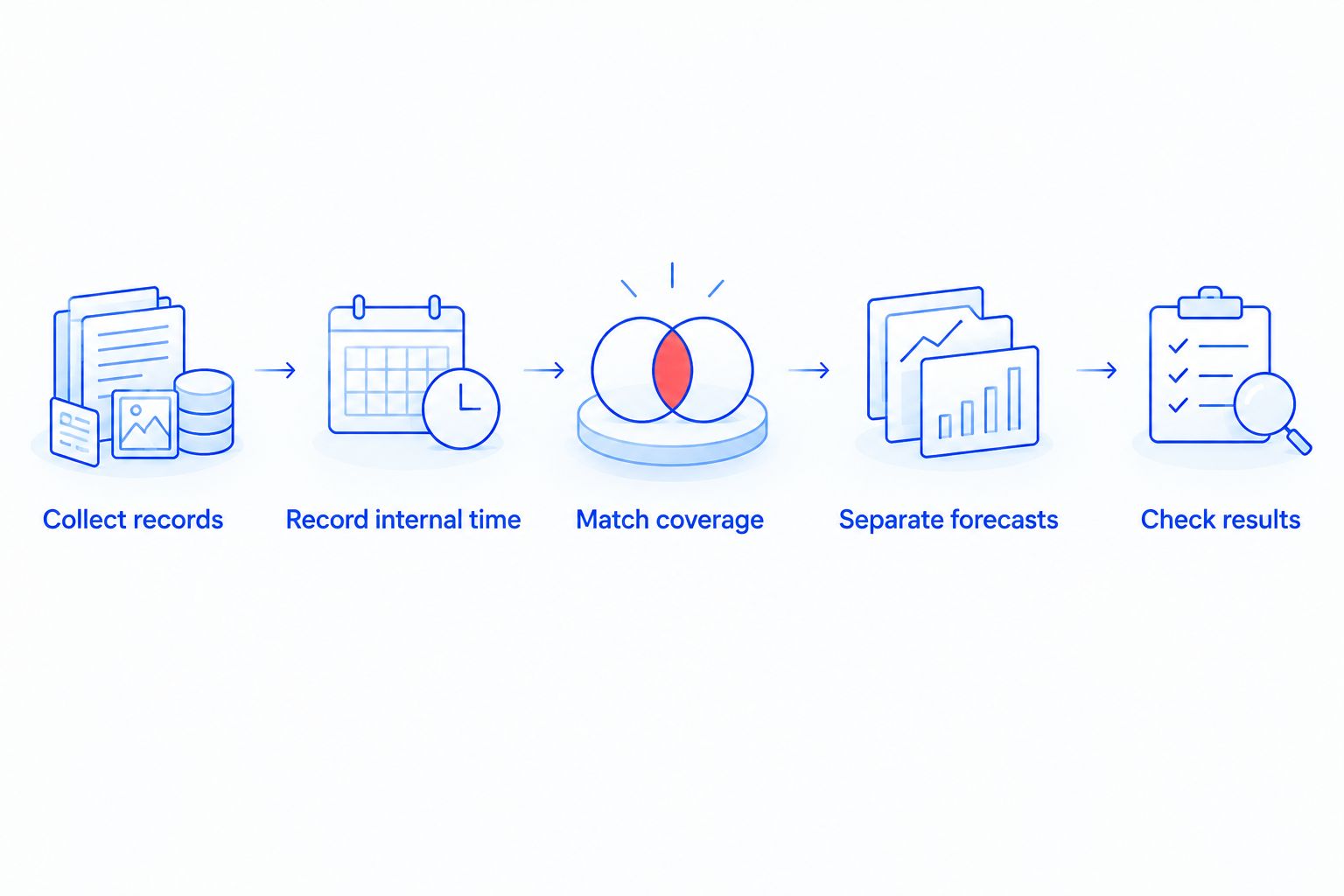
Build a comparison you can update after the switch. Keep confirmed spending separate from estimates so an assumption cannot quietly become a promised result.
1. Collect records
Gather support invoices, software renewals, backup charges, repair records, and existing agreements. Include expenses paid through different departments so your baseline does not omit technical spending outside the main support account.
For the 2026 decision, mark which obligations continue after the switch. A subscription only becomes a saving when it can actually be removed without losing a needed service.
2. Record internal time
Identify who handles computer problems before outside help arrives. Use recorded time and the same labor-cost method for both arrangements; do not assign a different value to an employee’s time merely to improve the proposed result.
Convert minutes consistently: 60 minutes equal 1 hour. Record the task as well as the duration, because managing a provider relationship remains internal work even when technical troubleshooting moves outside the business.
3. Match coverage
Place each current responsibility beside the corresponding proposed responsibility. Mark anything excluded, unclear, or assigned to your team.
Ask specifically about new employee setup, computer replacement, backup recovery, software issues, and network troubleshooting. These are questions about the agreement, not assumptions that every managed provider includes the work.
4. Separate forecasts
Put confirmed expenses in one column and expected reductions in another. An expense you can cancel is different from downtime you hope to avoid.
Keep a conservative case that does not depend on preventing a hypothetical major incident. Then explain any additional benefit separately, including what evidence supports it and how you will check it.
5. Check results
After switching, compare actual spending and recorded internal effort with the baseline. Identify changes in staffing, equipment, or workload that make the periods different.
An increase in support activity does not automatically mean the switch failed. It does mean you need to distinguish growth in business needs from work that the agreement was expected to replace.
What should you confirm before signing?
Get the exclusions in writing before approving the switch. A proposal cannot support a reliable savings calculation when responsibility for ordinary work is unclear.
Ask the provider to explain:
- Which users, computers, and business systems the agreement covers.
- Who handles problems that require an on-site visit.
- What happens when a request falls outside the agreement.
- Who checks backups and performs recovery work.
- Which onboarding and migration tasks are included.
- What access, documentation, and assistance you receive when the relationship ends.
These answers establish scope; they do not establish guaranteed outcomes. For TechConnect LLC managed IT support, compare the written proposal with your business’s repair, backup, and ongoing support needs before making a savings claim.
Discuss your business IT needs
Review managed business IT support for your North Carolina business.
Will managed IT support lower my expenses immediately?
First-year savings include transition work, so a lower recurring support expense does not establish an immediate saving. Onboarding, overlapping agreements, and unresolved technical work belong in the switching calculation.
Compare the transition period separately from the ongoing arrangement. This makes it clear whether the proposal lowers continuing expenses but requires additional spending to get started.
Can managed IT support save money without replacing an employee?
Recovered employee time is a benefit, but it is not automatically a cash saving. If payroll stays the same, show the time returned to normal work separately from expenses eliminated.
A stronger business case identifies what the employee can do with that time. Do not attach revenue to the recovered hours unless your business records support that connection.
Is predictable IT spending the same as saving money?
Predictable IT spending is not the same as lower total spending. An agreement can simplify budgeting while increasing the amount you spend or expanding the services you receive.
For your 2026 review, label the outcome accurately: lower expenses, clearer budgeting, broader coverage, or reduced internal workload. Do not substitute one result for another.
FAQ
How much money can my small business save by switching to managed IT support?
Your savings equal your current total IT support cost minus your total cost after switching. Compare the same period and scope, including transition work, exclusions, and documented internal time.
What records do I need to calculate managed IT savings?
Use support invoices, repair records, software and backup expenses, existing agreements, and recorded internal troubleshooting time. A 12-month baseline gives you an annual comparison rather than a single-month snapshot.
Is managed IT support cheaper than break-fix support?
Managed IT support is cheaper only when its comparable total cost is lower than your break-fix total. Include internal coordination and work excluded from the managed agreement before deciding.
Can I count fewer outages as guaranteed savings?
Do not count avoided outages as guaranteed savings. Separate confirmed expense reductions from forecasts about disruption, and explain the evidence behind each forecast.
Should I include employee troubleshooting time in the calculation?
Include documented employee troubleshooting time, but separate recovered working time from cash savings. Payroll that remains unchanged is not an expense eliminated by switching.
Does managed IT support include computer replacements and backup recovery?
The written agreement determines whether computer replacements and backup recovery are included. Confirm each responsibility rather than assuming the managed IT label covers it.
How do I know whether switching actually saved money?
Compare actual post-switch spending and internal support effort with your baseline. Adjust the comparison for changes in staffing, equipment, service scope, and business workload.
One last thing
Ask which current invoice you can stop paying after the switch. That question separates a confirmed expense reduction from a promise about future efficiency.
If the answer is none, the agreement still needs a business case—but that case rests on coverage, accountability, or recovered time rather than an immediate reduction in bills. Keep those benefits visible without calling them proven savings.


