Standard computer virus removal takes 1 to 3 hours in 2026, but that number only covers scanning and cleanup — a severe infection that requires a full system reimage or data recovery can stretch to 24 to 48 hours. The hidden cost most homeowners and small offices miss: restoring backed-up files, reinstalling software licenses, and verifying no reinfection after the scan can add another 1 to 2 hours on top of the removal itself.
- Computer virus removal takes 1-3 hours for standard malware, 24-48 hours for reimage-level infections in 2026.
- Ransomware and business network infections run 2-5 business days because every connected device needs isolation and scanning.
- File restoration and software reinstallation after the scan adds 1-2 hours that most quotes leave out.
- TechConnect LLC handles diagnostics same-day across North Carolina, before quoting a removal timeline.
Why This Matters
A vague timeline turns a two-hour fix into a lost workday. If you're running a small office in Raleigh or Charlotte and a PC goes down mid-shift, the difference between "a few hours" and "a couple of days" decides whether you send staff home or route work to another machine.
Malware also spreads while it sits untreated — a single infected laptop plugged into an office network on Monday can be five infected machines by Wednesday. Getting a realistic timeline upfront from a virus removal service lets you plan around the outage instead of reacting to it.
How Long Does Computer Virus Removal Take?
The timeline depends almost entirely on what kind of infection is present and how many devices are affected. Here's the breakdown technicians use to scope a job in 2026:
| Infection type | Typical time | What's included |
|---|---|---|
| Adware / browser hijacker | 1-2 hours | Scan, removal, browser reset |
| Standard trojan or worm | 2-3 hours | Deep scan, quarantine, registry cleanup |
| Deep infection (reimage needed) | 24-48 hours | Full wipe, OS reinstall, data restore |
| Ransomware | 1-3 days | Isolation, decryption attempt, backup restore |
| Business network (multiple PCs) | 2-5 business days | Per-device scanning, network audit |
The 1-to-3-hour figure assumes a single home or office PC with a common infection type and no data loss. Once ransomware, multiple infected devices, or a corrupted operating system enter the picture, the clock moves from hours to days.
Standard Malware Removal: 1 to 3 Hours
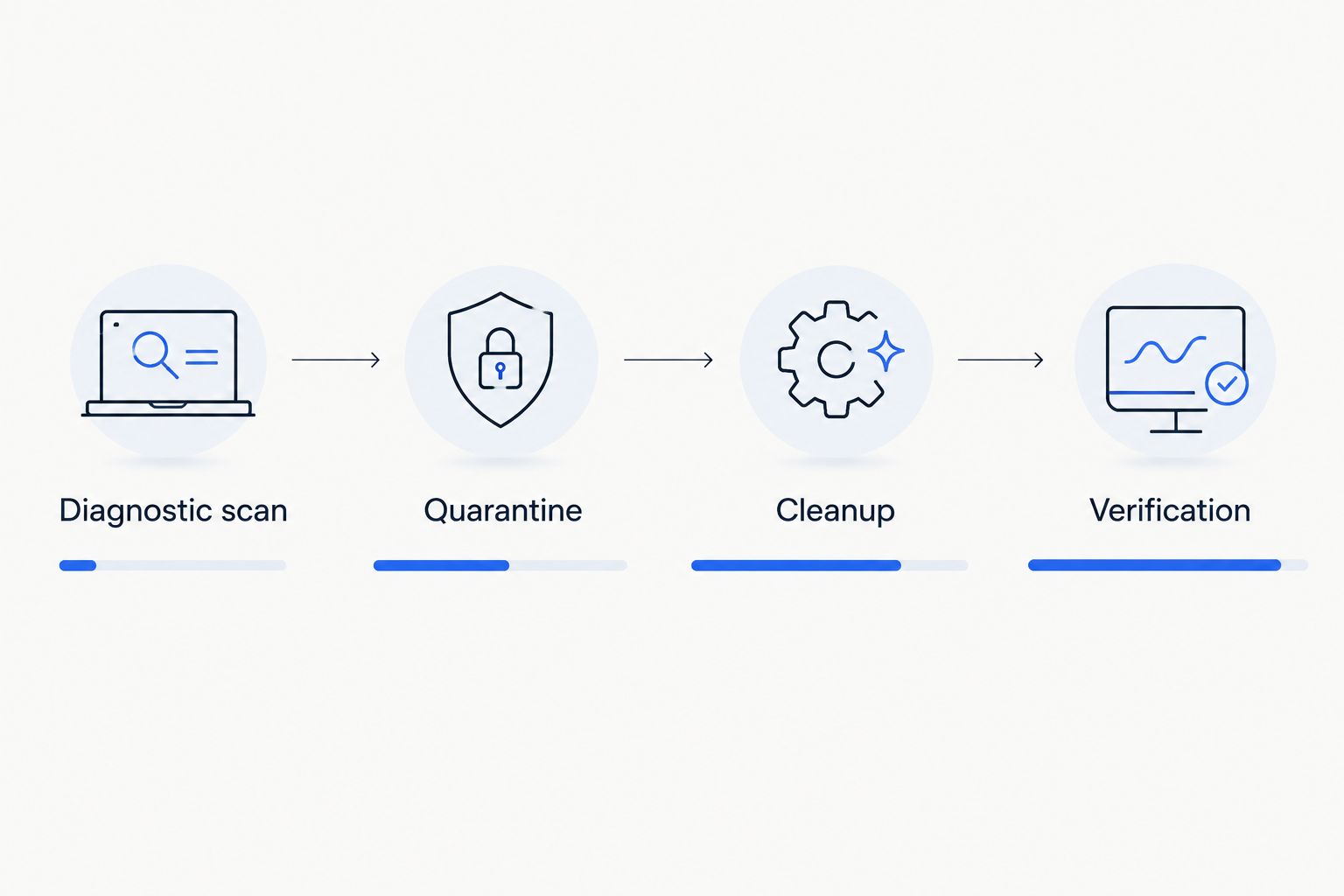
Most adware, spyware, and low-grade trojans clear out in 1 to 3 hours. A technician runs a deep scan, quarantines the infected files, resets browser settings, and checks startup programs for anything that re-launches the malware on reboot. Verdict: this is the most common scenario and the fastest to resolve — buy the standard cleanup and move on.
Severe Infection Requiring a Reimage: 24 to 48 Hours
When malware buries itself in system files or the antivirus can't fully quarantine it, the safer fix is wiping the drive and reinstalling Windows from scratch. That process — backup, wipe, reinstall, restore, reinstall software — runs 24 to 48 hours depending on how much data needs to come back. Verdict: worth the wait if the alternative is a computer that keeps reinfecting itself.
Business Network Infection: 2 to 5 Business Days
A single infected PC on an office network turns into a multi-device job fast. Every connected machine needs to be isolated, scanned, and cleared before the network is declared safe, which is why this scenario runs 2 to 5 business days rather than hours. Verdict: budget for downtime and get an on-site diagnostic instead of trying to clean each machine one at a time.
Why Virus Removal Time Varies
A handful of factors push a job from the 1-to-3-hour range into multi-day territory:
- Type of malware — adware clears fast; ransomware and rootkits take days because they hide inside system processes.
- Number of infected devices — one laptop is hours; a five-PC office network is days.
- Whether backups exist — restoring from a clean backup is quick; rebuilding files from scratch after data loss is not.
- Age and condition of the hardware — an aging PC that's already running slow adds diagnostic time before removal even starts.
- Remote vs. on-site access — remote diagnostics can start immediately; on-site visits add scheduling time in rural parts of North Carolina.
- Whether the OS needs reinstalling — a clean scan-and-remove is hours; a full reimage adds a full day or more.
Related Questions
Can Antivirus Software Remove a Virus That's Already Installed?
Sometimes, but not always — antivirus software that's already running when the infection lands often can't quarantine malware that's disabled it or buried itself in system files. That's the scenario that turns a 1-hour scan into a 24-to-48-hour reimage.
Does a Slow Computer Always Mean a Virus?
No — a slow PC is just as often a full hard drive, too many startup programs, or aging hardware as it is malware. A proper diagnostic separates the two before you pay for virus removal you don't need.
Can I Speed Up Virus Removal Myself?
Running a free scanner before your appointment can shave time off the technician's diagnostic step, but a partial removal you attempt yourself can also hide symptoms and make the real infection harder to isolate. Leave the quarantine and cleanup to a technician once malware is confirmed.
If the infection has already caused a crash or wiped files, the full path from infected to clean looks different than a standard scan — the virus removal workflow walks through diagnostic, quarantine, cleanup, and backup restore in order, which is useful context before you book a same-day appointment.
TechConnect LLC runs same-day diagnostics for home and business PCs across North Carolina, and the diagnostic itself determines which timeline — 1 to 3 hours or 24 to 48 — applies to your machine.
Get a same-day virus diagnostic
Find out your real removal timeline before you commit to a fix.
FAQ
How long does computer virus removal take?
Standard virus removal takes 1 to 3 hours in 2026, while a severe infection needing a full reimage runs 24 to 48 hours. Ransomware and multi-device business infections can take 1 to 5 days depending on backup availability.
How much does computer virus removal cost in 2026?
Cost scales with the same factors that drive time — a standard scan and cleanup costs less than a full reimage with data recovery. Check current pricing directly since it varies by infection type and device count.
Can a virus damage my computer's hardware?
Some malware can damage hardware indirectly by overworking components or corrupting firmware, though most viruses target software and data rather than physical parts. A diagnostic will confirm whether hardware is affected before removal starts.
Is it faster to reimage a PC than to remove the virus?
Reimaging takes longer upfront (24 to 48 hours versus 1 to 3 for a standard scan) but it's often the safer choice when malware has buried itself in system files. A technician will recommend reimaging only when standard removal risks leaving remnants behind.
Can virus removal services recover infected files?
Yes, in many cases files can be recovered before or during the cleanup process, though heavily corrupted or encrypted files may not be fully recoverable. Recovery success depends on how the malware affected the files and whether a backup exists.
Does remote virus removal take less time than on-site?
Remote removal often starts faster since there's no travel time, but on-site work may be needed for hardware-level issues or when multiple office devices are infected. Either way, the 1-to-3-hour standard timeline applies once work begins.
What happens if I ignore a virus instead of removing it?
An untreated virus typically spreads to other files or devices on the same network within days, turning a single-hour fix into a multi-day cleanup. Ransomware in particular gets more damaging the longer it runs undetected.
Can antivirus software remove a virus that's already installed?
Sometimes, but antivirus software that was already running when the infection landed often can't fully quarantine malware that's disabled it. That's the scenario that pushes removal from a quick scan into a full reimage.
One Last Thing
The part most quotes skip: verification. A scan that finishes in 2 hours but skips the post-cleanup check leaves the door open for reinfection within days, especially if the original entry point — a browser extension, a weak password, an outdated plugin — never got fixed. Ask whether your quoted timeline includes a verification pass before you call the job done in 2026.