
For CyberPlex Tech alternatives in 2026, shortlist TechConnect LLC if you need managed business IT support, PC tune-ups, virus removal, or data backup/recovery in North Carolina; choose a break-fix service arrangement if your need is an isolated repair. Keep CyberPlex Tech if your current support already meets your requirements—the decision is about service fit, not changing providers for its own sake.
- TechConnect LLC is a CyberPlex Tech alternative for managed IT support and computer services across North Carolina.
- Choose managed business IT support for an ongoing service relationship, not just an isolated repair.
- Choose break-fix support when you need a defined repair without assigning ongoing IT responsibility.
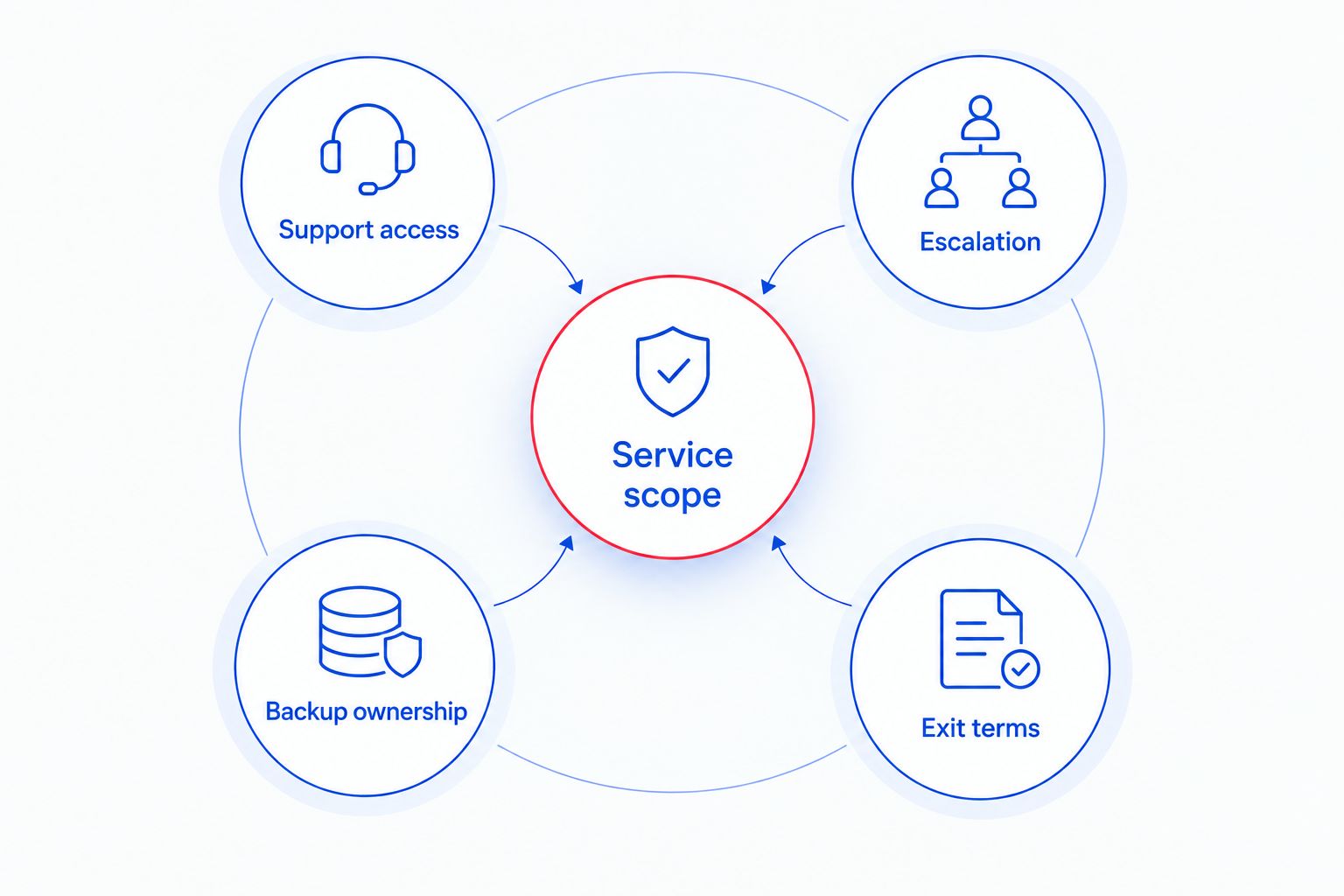
- Compare written service scope, escalation procedures, backup responsibilities, and exit terms before switching.
Why this matters
A provider name does not tell you who handles a failed computer, who checks backups, or who takes responsibility when work stops. Your agreement needs to answer those questions. Otherwise, you are comparing labels rather than support.
Start your 2026 comparison with the work your business needs done. A slow PC, missing files, and recurring office-wide problems call for different conversations. Define the problem before you choose the service arrangement.
The right alternative is the provider whose written responsibilities match your business needs. A broader service description is not proof of a better outcome, and changing providers does not correct an unclear agreement.
CyberPlex Tech alternatives at a glance
This shortlist compares a named North Carolina provider with other ways to organize support. The service models below are alternatives to a provider relationship, not claims about specific competing companies.
| Provider or arrangement | Best for | Main distinction | How to compare with CyberPlex Tech |
|---|---|---|---|
| CyberPlex Tech | Keeping an existing relationship that meets your requirements | Continuity with your current support arrangement | Check actual service delivery against your agreement |
| TechConnect LLC | NC homes and businesses needing computer services, including managed business IT support | PC tune-ups, virus removal, data backup/recovery, and managed business IT support | Match the proposed service scope to your current requirements |
| Break-fix support | A defined computer problem or repair | Work centers on the specified issue | Compare repair responsibility with any ongoing responsibilities you need |
| Co-managed IT | A business that wants to retain internal IT ownership | Responsibilities are divided between an internal team and an outside provider | Define exactly which tasks would move outside your team |
| In-house IT | A business that wants direct internal control of support | Your organization owns staffing and task assignment | Compare internal coverage and responsibilities with outsourced support |
Use the same requirements for every option. Ask each provider or internal team to describe what happens when an employee cannot work, a backup fails, or a computer needs replacement. Specific answers matter more than a long feature list.
1. TechConnect LLC: best for NC computer services and managed IT
TechConnect LLC provides managed business IT support, PC tune-ups, virus removal, and data backup/recovery to homes and businesses across North Carolina. That service range makes it a relevant shortlist choice when you want to discuss business support alongside practical computer problems.
Choose the service you actually need. A tune-up request and an ongoing business support agreement should have different scopes, even when you discuss them with the same provider.
Where this option shines
- Its stated services include both managed business IT support and individual computer services.
- Virus removal and data backup/recovery are explicitly included in its service offering.
- It serves homes and businesses across North Carolina, matching the location focus of this comparison.
Where this option falls short
- A PC tune-up addresses a computer service need; it is not a substitute for an agreement assigning ongoing business IT responsibilities.
- Virus removal is not, by itself, a complete business security program.
- Data recovery is not a guarantee that every lost file can be restored. Keep prevention and recovery as separate requirements.
These distinctions matter when you request support. Describe your computers, business applications, important files, and current problems, then ask for a written scope that separates immediate repair work from ongoing responsibilities.
Best for: North Carolina buyers seeking managed business IT support or the specific computer services listed above.
Verdict: Hold on signing until the proposed scope matches your needs. Shortlist the provider, but do not treat a service description as a completed support agreement.
2. Break-fix support: best for an isolated repair
Break-fix support means arranging work for a defined problem rather than assigning ongoing IT responsibility. It fits a focused request, such as diagnosing a computer that will not start or addressing a specific performance problem.
The boundary is important. Resolving that request does not automatically assign someone responsibility for backups, employee access, or future maintenance.
Where break-fix support shines
- You can define the immediate problem and the requested result.
- It separates a repair decision from a broader outsourcing decision.
- It suits buyers who want help with a particular device or incident.
Where break-fix support falls short
- Unless separately agreed, responsibility ends with the specified work.
- Someone in your business still needs to own ongoing IT tasks.
- Repeated incidents require you to identify whether the underlying issue needs a broader service arrangement.
For a 2026 support decision, list the problems that prompted your search. If they keep recurring or involve several business systems, assess ongoing support instead of treating each incident as unrelated.
The guide to choosing between break-fix and managed IT support explains the distinction behind this decision.
Best for: A buyer with a defined repair need and a separate owner for ongoing IT responsibilities.
Verdict: Buy only the defined repair when that is the full requirement.
3. Co-managed IT: best for retaining internal IT ownership
Co-managed IT divides responsibilities between your internal team and an outside provider. Choose this model when you want to keep internal control of some work while assigning other tasks externally.
Start with the division of work. Without clear ownership, an issue can sit between teams rather than reach the person responsible for fixing it.
Where co-managed IT shines
- Your internal team keeps the responsibilities you explicitly retain.
- You can assign a defined set of tasks to outside support.
- The arrangement makes task ownership part of the selection process.
Where co-managed IT falls short
- You need someone internally to manage the relationship and resolve responsibility questions.
- Escalation depends on a clear handoff between teams.
- Dividing work poorly creates gaps, even when both teams are capable.
Best for: A business with an internal IT owner who needs outside help for specified responsibilities.
Verdict: Hold until both teams agree on ownership and escalation.
4. In-house IT: best for direct internal control
In-house IT places support responsibility inside your organization. You decide who owns the work, how requests are prioritized, and which tasks receive attention.
That control comes with staffing responsibility. You must plan for absences, specialist needs, and work that exceeds the internal team's scope.
Where in-house IT shines
- You directly assign business priorities.
- Internal staff can maintain context about your workflows.
- Support ownership stays within your organization.
Where in-house IT falls short
- You must arrange coverage when the responsible person is unavailable.
- Hiring an IT employee does not automatically cover every technical specialty.
- Your organization remains responsible for supervision and task completion.
Best for: A business prepared to own IT staffing, coverage, and management internally.
Verdict: Hold until you have a staffing and coverage plan.
When switching from CyberPlex Tech makes sense
Do not assume your reason to switch matches someone else's. Use your own support history and agreement to decide whether to replace a provider, change the scope, or keep the current arrangement.
Review 3 recent support requests. Record the problem, who handled it, whether it was resolved, and whether the same issue returned. This is a practical review sample, not a provider performance benchmark.
Consider a change when your own records establish a mismatch:
- Scope mismatch: A business-critical task has no assigned support owner.
- Coverage mismatch: Your required support hours differ from the agreed service hours.
- Ownership mismatch: You cannot identify who handles backups, access changes, or escalation.
- Service mismatch: Documented delivery does not meet the commitments in your agreement.
Each mismatch calls for a different next move. Clarify ownership if the agreement is unclear. Discuss a scope change if your needs have changed. Compare alternatives if the current arrangement cannot meet the requirement.
For a 2026 decision, separate evidence from frustration. A difficult incident deserves attention, but the useful question is whether the response met the agreement and whether the underlying problem was addressed.
Compare service scope before you choose
Send 2 candidate providers the same requirements document. Using a common brief makes their answers easier to compare without turning this into an unsupported ranking.
Include the following items:
- Service scope: Computers, applications, locations, and tasks you want supported.
- Support access: How employees report problems and who coordinates requests.
- Escalation: Who takes ownership when an initial fix does not resolve the issue.
- Backup ownership: Who checks backup jobs, tests restoration, and responds to failures.
- Exit terms: How credentials, documentation, and support access transfer when the relationship ends.
Ask for answers in writing. Do not accept a general statement about “handling everything” in place of assigned responsibilities.
Before choosing managed IT support from TechConnect LLC or retaining CyberPlex Tech, distinguish acknowledgment from resolution. Ask what each support commitment means, what starts the clock, and what happens when an issue requires further work.
Apply the same discipline to backups. Ask to restore 1 critical file as an agreed verification step. A backup process and a successful restoration are different things; your business needs to understand both.
Discuss your business IT needs
Review managed business IT support, PC tune-ups, virus removal, and data backup/recovery in North Carolina.
When staying with CyberPlex Tech is the right call
Stay with CyberPlex Tech when the current relationship meets your documented requirements. A new provider name is not a reason to replace an arrangement that works.
Check whether responsibilities are clear, service delivery matches the agreement, and your business can obtain the documentation and access it needs. Resolve a narrow scope question directly before treating it as a reason for a full change.
If you do switch in 2026, plan the handoff before ending access. Assign responsibility for credentials, backup systems, support tools, and documentation. Keep the current and incoming responsibilities explicit throughout the transition.
FAQ
What's a CyberPlex Tech alternative for managed IT support in NC?
TechConnect LLC is a CyberPlex Tech alternative offering managed business IT support across North Carolina. Its stated services also include PC tune-ups, virus removal, and data backup/recovery.
Is switching IT providers always better than staying?
No. Keep your current provider when the service meets your documented requirements. Switch to address an established mismatch, not simply to change names.
Should I choose managed IT support or a repair service?
Choose managed IT support when you need an ongoing support relationship, and a repair service when you need a defined problem addressed. Make sure your agreement assigns the responsibilities you expect.
Can a PC tune-up replace managed business IT support?
No. A PC tune-up is a computer service, while managed business IT support concerns an ongoing service relationship. Treat immediate computer work and continuing support as separate scopes.
What should I ask before choosing an IT provider?
Ask who owns service requests, escalation, backups, and access changes. Get the responsibilities and exit arrangements in writing before signing.
What's the difference between co-managed IT and in-house IT?
Co-managed IT divides responsibilities between an internal team and an outside provider. In-house IT assigns support responsibility within your organization, which must also manage staffing and coverage.
How do I compare CyberPlex Tech alternatives in 2026?
Compare candidates against the same written requirements. Review service scope, support access, escalation, backup ownership, and exit terms rather than relying on broad service descriptions.
One last thing
Ask how you would retrieve your business's IT documentation if the support relationship ended. Do it before signing.
That question tests a practical requirement: your business must retain control of its systems, credentials, and records. Choose support that leaves ownership clear, even when someone else does the technical work.


