
Yes, Microsoft Teams conversations can be backed up, but the method must explicitly support the chats or channel messages you need to protect. Saving messages for compliance, exporting readable records, and restoring conversations inside Teams are different tasks; protecting messages also does not automatically protect their linked files.
- Can Microsoft Teams conversations be backed up? Yes, but verify message coverage and the actual recovery destination.
- Microsoft Teams retention preserves records under policy; it is not the same as a restorable backup.
- Protect Teams messages and their SharePoint or OneDrive files separately within your backup plan.
- TechConnect NC provides managed IT support and backups for North Carolina small businesses.
Can Microsoft Teams conversations be backed up?
Yes. Choose the method by what you need back, not by whether it carries a backup label. For your 2026 plan, distinguish a readable record from a working conversation restored into Teams.
If you need help assigning responsibility, TechConnect NC provides managed IT support and data backup services for North Carolina businesses. Ask for the exact message coverage and recovery process before treating any setup as complete.
| Approach | Best for | Main benefit | Main limitation |
|---|---|---|---|
| Teams-aware backup | Operational recovery | Captures supported content for later recovery | Message types and restore destinations differ by solution |
| Retention policies | Policy-based preservation | Preserves covered messages according to configured rules | Preservation does not equal restoration into a conversation |
| Authorized compliance export | Review or investigation | Produces records for authorized review | An exported record is not a live Teams conversation |
| Screenshots or copied text | A limited reference copy | Keeps selected visible information | Loses searchable structure, attachments, or surrounding context |
These methods can serve different purposes within the same business. Do not substitute an investigation export for a recovery plan without checking what employees will actually receive.
Why this matters
A Teams conversation can contain a customer decision, an approval, or instructions that never reached email. Losing that context creates a different problem from losing a document: you need to understand who said what, when, and in which discussion.
Cloud access is not proof that your business can recover deleted information. Your 2026 backup review should require evidence of recovery, not just confirmation that employees can still open Teams today.
Start with the business question. Do you need employees working in the original discussion again, or do you need an authorized person to retrieve a readable record? That answer determines which limitations you can accept.
What needs protection besides the message text?
Treat Teams protection as 3 connected content groups: messages, files, and context. A backup that handles one group does not establish coverage for the others.
Chat and channel messages
Inventory private chats, group chats, meeting chats, and channel posts. Include standard, private, and shared channels in the coverage questions rather than assuming that support for one includes all of them.
Ask how the selected method handles replies, edits, deletions, reactions, and attachments. These details affect whether the recovered conversation makes sense, even when the main message text survives.
Files shared through Teams
Teams uses SharePoint and OneDrive for file storage. Channel files generally live in SharePoint, while files shared in chats generally live in the sender's OneDrive.
A recovered message can therefore point to a missing file. Require the file protection plan to address the underlying storage location, versions, permissions, and recovery destination—not just the link displayed in Teams.
Meeting recordings and transcripts also need an explicit coverage check. Do not infer that protecting meeting chat automatically protects every meeting artifact.
Conversation context
A useful recovery includes enough information to interpret the discussion. Check sender identity, timestamps, reply relationships, and the association with the relevant team or channel.
Ask whether the recovered result preserves that context or flattens everything into a document. A readable export has value, but it creates extra work when employees must reconstruct the discussion themselves.
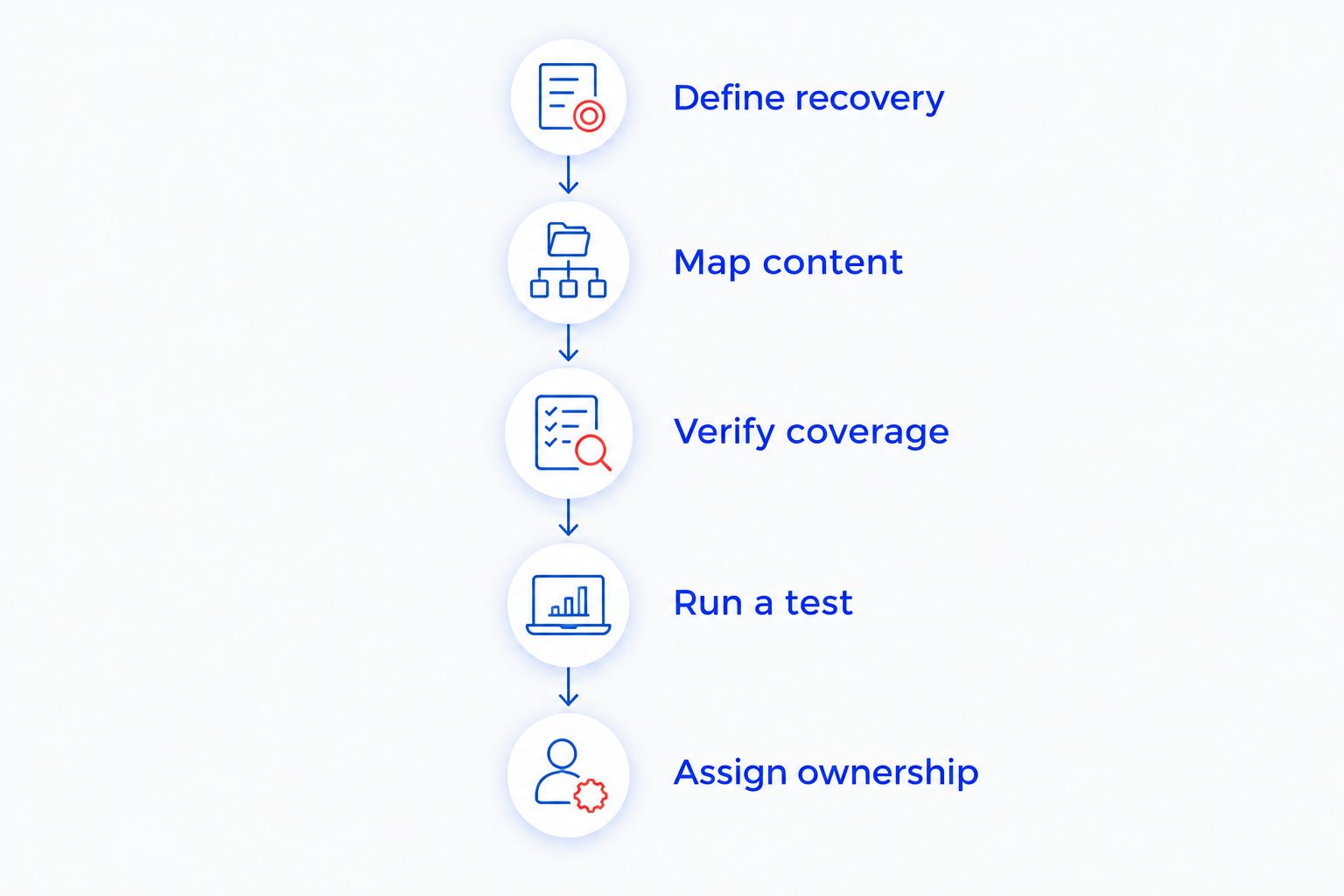
How do you set up a Teams conversation backup?
Use this sequence for a business Microsoft Teams environment. Personal accounts and organizational accounts do not offer identical administration or export options, so identify the account type before choosing a process.
- Define recovery. Write down whether success means restoring messages into Teams, retrieving a searchable archive, or producing an authorized export. Name the person who will accept the result.
- Map content. List the chats, teams, channels, files, and meeting artifacts your business needs. Include important external collaboration and departed employees in the questions you ask.
- Verify coverage. Get written confirmation of supported content types, required permissions, exclusions, and recovery destinations. A general statement that a service protects Microsoft 365 is not enough.
- Run a test. Use non-sensitive sample content and an approved test process. Recover a message and its linked file, then compare the recovered result with the original.
- Assign ownership. Name an administrator responsible for failed jobs, permission changes, coverage reviews, and documented recovery instructions. Make sure another authorized person can follow those instructions.
Keep the test record with your 2026 IT documentation. Record what worked, what did not, and what employees would have to do manually during a real incident.
Why does Teams backup coverage vary?
The phrase Teams backup describes an outcome, not a standard list of protected items. Check these factors against the exact configuration you intend to use:
- Content type: Private chats, channel messages, files, and recordings are different objects. Require explicit inclusion rather than relying on the Teams name.
- Channel structure: Standard, private, and shared channels need their own coverage checks. Do not treat a successful standard-channel test as proof for the others.
- Permissions: Backup and export processes require authorized access. Check which permissions are necessary and who reviews changes to that access.
- Capture timing: Information created after the latest successful capture is outside that recovery point. Compare the configured schedule with your tolerance for lost work.
- Preservation settings: Retention rules affect how covered records are preserved or deleted. Align backup requirements with those rules instead of managing them independently.
- Recovery format: A searchable export, a file download, and restored messages are different deliverables. Require the recovery destination and limitations in writing.
The right scope is the scope your business has tested. A successful backup status does not answer whether the recovered material will be complete enough for employees to use.
What should a recovery test actually prove?
Test 2 separate outcomes: readable records and usable files. A message-only demonstration leaves the attachment problem unresolved; a file-only demonstration says nothing about the surrounding discussion.
Use a harmless sample conversation with a reply and a linked document. Record the original sender, timestamp, file location, and access permissions before starting the approved recovery test.
Then ask the employee who would use the recovered information to inspect it. An administrator opening an export does not establish that the result meets the employee's operational need.
Check the recovery destination
Ask where the recovered conversation appears. If the method produces an archive rather than placing messages back into Teams, document that limitation clearly.
Also check whether the result supports searching and preserves the relationship between messages. A long collection of disconnected text can be technically readable without being practical during an outage.
Check file access
Open the recovered document using an appropriately authorized account. Verify that the document is the expected version and that access is neither broader nor narrower than intended.
Repeat the test after material changes to the environment or protection setup. For your 2026 review, keep the test result more prominent than a vendor's general feature list.
How does Teams backup fit into disaster recovery?
Teams recovery belongs in the same business continuity plan as email, files, identity access, and employee communications. Restoring a discussion has limited value if employees cannot sign in or reach the documents it references.
For a business comparing local support with overseas recovery arrangements, the criteria for assessing disaster recovery providers in Australia remain relevant: define the data location, access responsibilities, recovery destination, and evidence required from a test. Geography does not replace those checks.
Keep backup administration separate from everyday collaboration where the selected system supports that separation. Review who can change protection settings, delete recovery copies, or authorize an export containing private discussions.
A practical handoff document should identify:
- Who declares a recovery incident and approves access.
- Which conversations and files receive priority.
- Where authorized staff find recovery instructions.
- How staff communicate if Teams is unavailable.
- Who verifies the recovered information before normal work resumes.
These are business decisions, not just software settings. Have the owner or operations lead approve the priorities before an incident forces employees to improvise.
Can deleted Teams messages always be recovered?
No. Recovery depends on whether a usable copy was captured or preserved before the available recovery path disappeared. Installing backup software after deletion does not recreate a missing historical copy.
If messages are already missing, ask your authorized administrator to check existing backups and applicable retention or compliance options. Avoid changing retention settings or deleting accounts while the administrator assesses the situation.
Is Teams retention the same as a backup?
No. Retention controls preservation under a policy; backup serves a recovery requirement. A record preserved for compliance does not automatically become a conversation employees can reopen in Teams.
Use retention when your organization needs policy-based preservation, with appropriate administrative and legal guidance. Use a tested recovery process when the goal is getting usable business information back after loss.
Can you back up Teams without an IT administrator?
You can keep selected reference copies, but business-wide protection requires authorized administration. Screenshots and copied text are not substitutes for managed coverage of organizational chats, channels, and linked files.
Do not move confidential conversations to personal storage to create your own backup. Ask the business to approve the destination, access controls, and handling rules first.
Who should manage Teams protection for a small business?
Assign the work to an internal administrator or a managed IT service with a clearly defined scope. TechConnect NC managed IT support is a local option for North Carolina small businesses that need help with backups and ongoing IT administration.
The benefit of managed support is an assigned service relationship for ongoing IT work. The limitation is scope: do not assume a general support agreement includes every Teams message type or a particular restoration method. Request those details explicitly.
TechConnect NC has offices in Clayton at 5720 US 70 Bus Hwy, Suite B, and Granite Falls at 10A Falls Avenue. For businesses around Johnston County or the Foothills, start the conversation with your recovery requirements rather than a request to simply turn on backup.
FAQ
Can Microsoft Teams conversations be backed up automatically?
Yes, supported Teams content can be captured automatically by a configured backup system. Verify which chats and channels it includes, how often capture runs, and what recovery format it provides.
Does backing up my laptop save my Teams chat history?
A laptop backup is not a dependable organizational Teams conversation backup. Protect the cloud content explicitly rather than relying on local application files or cached information.
Are files included when Teams messages are backed up?
Not automatically. Teams message coverage and protection for the associated SharePoint or OneDrive files must both be verified.
Can I restore a deleted Teams chat to its original location?
Restoration to the original location depends on the selected method and its supported recovery operations. Require a demonstration rather than assuming that an export can be imported as a live conversation.
Can I use screenshots as a Teams backup?
Screenshots can preserve selected visible information, but they are not a complete Teams backup. They do not reliably preserve searchable conversation structure, linked files, or the full surrounding discussion.
Can a business export employees' private Teams chats?
Authorized compliance processes can support access to covered Teams records, subject to permissions, configuration, and applicable rules. Employees should not assume that private chat means a conversation is inaccessible to authorized organizational processes.
What should I check in a Teams backup review in 2026?
Check message coverage, linked files, administrator access, recovery destinations, and a documented recovery test. Confirm that the result meets the business need rather than stopping at a successful capture status.
One last thing
A recovered message with a broken document link is an unfinished recovery. Make the linked file part of your next test, and ask the employee who needs the information to confirm that it is usable.
Related guides
- How to choose between break-fix and managed IT support
- How to keep business data safe without an in-house IT team
- Is a business continuity plan worth it for a small business?
Call or text 919-737-5442 to discuss Teams backup requirements and managed IT support with TechConnect NC.


