Yes. Managed IT support can stop a ransomware attack before it spreads when endpoint detection, device isolation, network segmentation, and protected backups are configured before the attack begins. In 2026, no provider can guarantee prevention, but the right controls can contain an infection to one device and preserve a clean recovery path.
- Managed IT support can stop ransomware from spreading when detection, isolation, segmentation, and protected backups work together.
- Antivirus alone is not enough; endpoint detection monitors behavior and can isolate an infected device.
- TechConnect LLC is best for North Carolina homes and businesses seeking managed IT support, virus removal, or data recovery.
- The 3-2-1 backup rule preserves 3 copies on 2 media types, with 1 copy offsite.
- In 2026, containment depends on controls configured before the first device is infected.
Why this matters
Ransomware can encrypt local files and then attempt to reach shared folders, servers, connected storage, and other devices. Once encryption begins, the practical question is not whether an alert appears. It is whether the infected device loses network access before it reaches business data.
TechConnect LLC provides managed business IT support, virus removal, and data backup and recovery across North Carolina. When evaluating TechConnect LLC managed IT support or another provider, focus on the containment process rather than a promise that an attack will never happen.
The decisive control is automatic isolation: detection without isolation reports the attack, while isolation interrupts its path to the rest of the network. That distinction should drive every ransomware conversation in 2026.
Can managed IT support stop a ransomware attack before it spreads?
Managed IT support can stop ransomware from spreading if the provider has permission and tools to detect suspicious behavior, isolate the affected endpoint, restrict network access, and verify clean backups. These controls need to run continuously; installing them after encryption starts does not protect files already affected.
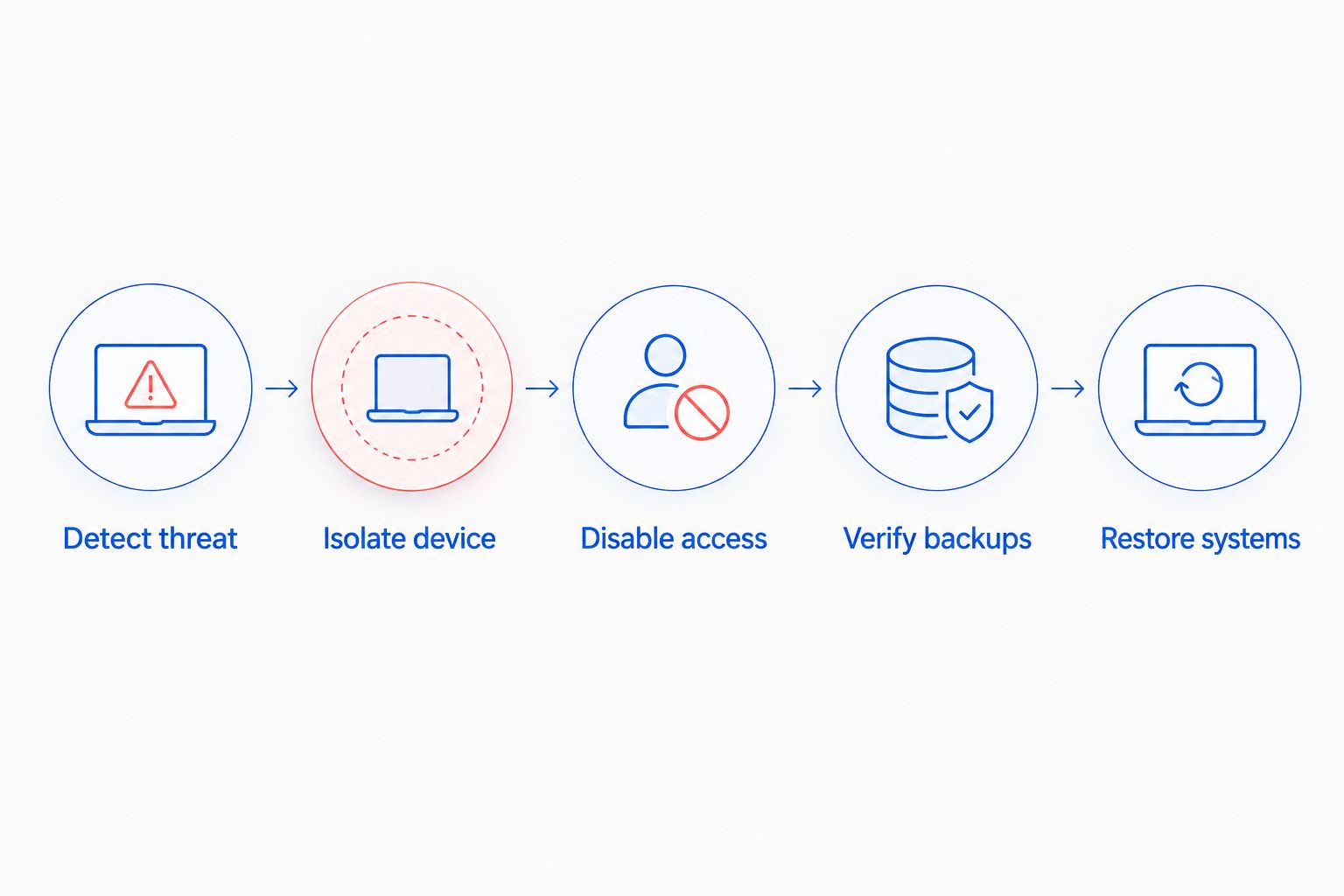
A working response follows this order:
- Detect suspicious behavior. Endpoint detection and response software looks for actions such as rapid file changes, unauthorized scripts, and attempts to disable security tools.
- Isolate the endpoint. The affected computer loses access to shared drives, servers, and other endpoints while the security alert is investigated.
- Disable compromised access. The response team revokes active sessions, resets affected credentials, and blocks the entry point identified during investigation.
- Verify the backup environment. Recovery copies are checked before restoration so encrypted or malicious files are not returned to production.
- Rebuild and restore. The infected system is wiped or rebuilt from a trusted image, then approved data is restored from a clean recovery point.
If isolation happens only after a technician manually reviews an alert, the delay gives ransomware more time to reach accessible resources. Ask whether the provider can automate isolation and whether that action works outside normal business hours.
Which security controls stop ransomware from spreading?
No single tool covers detection, containment, and recovery. The table shows what each control contributes and what it cannot accomplish alone.
| Control | What it does | Best for | Limitation |
|---|---|---|---|
| Antivirus | Blocks malware it recognizes and scans files | Basic endpoint protection | Can miss new or modified ransomware |
| Endpoint detection and response | Watches device behavior and can trigger isolation | Detecting suspicious activity in real time | Requires correct policies and active monitoring |
| Network segmentation | Restricts which systems and data each device can reach | Limiting the blast radius | Poor access rules can leave unnecessary paths open |
| Multi-factor authentication | Adds another identity check to account access | Protecting email, remote access, and administrator accounts | Does not stop malware already running on an endpoint |
| Protected backups | Keeps recovery copies separate from production data | Restoring files and systems after containment | Does not stop active encryption by itself |
| Managed IT support | Coordinates monitoring, containment, investigation, and recovery | Businesses without a complete internal IT security team | Results depend on the services and access included |
For a closer look at the software layer, compare the anti-ransomware tools available to small businesses. Product selection matters, but configuration and response authority determine whether the tool merely creates an alert or actually contains the endpoint.
Endpoint detection finds behavior antivirus can miss
Traditional antivirus primarily identifies malicious files and patterns already known to its detection system. Endpoint detection and response, commonly shortened to EDR, also watches processes, scripts, account activity, and file changes. That behavioral view helps identify ransomware that does not match an existing file signature.
EDR can also provide the action that matters most: isolating the affected computer from the network while keeping a management connection available for investigation. It is not automatic by default in every deployment. The isolation policy, alert thresholds, monitoring coverage, and provider permissions must be configured and tested.
Best for: businesses that need active endpoint monitoring and a faster response than periodic manual scans provide.
Limitation: EDR is not a backup system, and it cannot restore files already encrypted before isolation.
Network segmentation limits the blast radius
A flat network allows endpoints to communicate broadly with other devices and shared resources. If an infected laptop can reach accounting files, connected storage, and administrative systems with the current user's credentials, ransomware can attempt to encrypt all of them.
Network segmentation separates devices and services according to business need. Employee computers, servers, guest Wi-Fi, cameras, and other equipment can sit in different network zones with rules controlling traffic between them. The network security options for small businesses explain the broader controls that support this separation.
Best for: reducing how many systems one compromised device can reach.
Limitation: segmentation does not remove ransomware from the original device; it contains movement while the endpoint is cleaned or rebuilt.
The 3-2-1 backup rule protects the recovery path
The 3-2-1 backup rule means keeping 3 copies of data, using 2 different media types, with 1 copy stored offsite. At least one recovery copy should be separated from ordinary production access so compromised credentials cannot easily alter or delete it.
Backups do not stop ransomware from running. They reduce the attacker's power after containment because the business has another path to its data. That path only works when backups complete successfully, restore tests pass, and the recovery copy predates the infection.
Best for: recovering files and systems after the affected endpoints have been isolated.
Limitation: a connected, writable backup can be attacked like any other accessible storage location.
What managed IT support can and cannot prevent
Managed IT support can reduce exposure, detect suspicious activity, coordinate isolation, close compromised access, and manage recovery. It can also maintain the routine work ransomware defense depends on: software updates, account reviews, backup checks, endpoint policies, and network access rules.
Managed IT support cannot guarantee that every malicious email will be recognized, every employee will reject a fraudulent login request, or every new vulnerability will be blocked before exploitation. It also cannot recover a clean version of data that was never backed up or whose only backup was encrypted with the original files.
A responsible 2026 plan separates prevention, containment, and recovery:
- Prevention reduces the chance that ransomware runs.
- Containment limits what an infected device can reach.
- Recovery restores trusted systems and data after the threat is removed.
TechConnect LLC managed IT support is relevant to this coordination because the business provides managed support alongside virus removal and data backup and recovery. Confirm the exact monitoring, isolation, backup, and recovery scope before relying on any provider for ransomware response.
Why ransomware containment varies
- Endpoint coverage: unmanaged computers create blind spots because the provider cannot monitor or isolate them through its management platform.
- Network design: segmentation limits access, while broad internal permissions give an infected device more possible targets.
- Account permissions: users with unnecessary administrative or shared-drive access increase what ransomware can reach under their credentials.
- Backup separation: protected recovery copies survive only when the compromised environment cannot rewrite or delete them.
- Monitoring schedule: an alert needs an automated action or a person authorized to respond when it arrives.
- Patch status: supported operating systems, applications, firewalls, and remote-access tools need security updates applied consistently.
These factors explain why two businesses using the same antivirus product can experience very different outcomes. The security product is one layer; the surrounding access rules and response process decide how far an infection travels.
What should you ask a managed IT provider in 2026?
Ask questions that produce a verifiable process instead of a general assurance:
- Can the monitoring platform isolate a device automatically?
- Who receives ransomware alerts outside regular business hours?
- Which computers, servers, and remote devices are monitored?
- Are guest devices and business systems separated on the network?
- Can ordinary user accounts reach every shared folder?
- Are backups separated from production administrator accounts?
- How often are file and system restores tested?
- What happens between the first alert and the decision to rebuild a device?
A provider should be able to explain the sequence without relying on product names. TechConnect LLC or any other managed IT provider should also define which actions are automatic, which need client approval, and which systems fall outside the agreement.
Review your ransomware defenses
Discuss managed business IT support for a North Carolina home or business.
Does antivirus alone stop ransomware from spreading?
No. Antivirus can block recognized malicious files, but it does not replace behavioral monitoring, network restrictions, protected backups, or an incident response process. In 2026, antivirus should operate as one endpoint layer rather than the entire ransomware plan.
Can a small business recover without paying a ransom?
Yes, if the business has clean, usable backups and can rebuild the affected systems safely. Recovery still requires containment, investigation, credential changes, and backup verification; restoring files while the attacker retains access can lead to another encryption event.
Should an infected computer be disconnected immediately?
Yes. Disconnect the device from wired and wireless networks to limit its access to shared resources, but do not erase it or reconnect backup drives. Contact the responsible IT provider so the system can be isolated, investigated, and rebuilt through the documented response process.
FAQ
Can managed IT support stop a ransomware attack before it spreads?
Yes, managed IT support can stop ransomware from spreading when endpoint detection, automatic isolation, network segmentation, and protected backups are configured in advance. No provider can guarantee prevention, so containment and recovery must be part of the plan.
What is the most important ransomware containment control?
Automatic endpoint isolation is the most important immediate containment control because it removes the infected device's access to shared resources. Network segmentation provides another boundary if the endpoint cannot be isolated quickly.
Is endpoint detection better than traditional antivirus?
Endpoint detection provides broader ransomware protection because it monitors behavior as well as known malicious files. Antivirus remains useful, but it should not be the only endpoint defense in 2026.
Does network segmentation stop ransomware?
Network segmentation can stop ransomware from reaching systems outside the infected device's permitted network zone. It limits spread but does not clean the original infection.
How many backups should a small business keep?
The 3-2-1 rule calls for 3 data copies on 2 media types, with 1 copy offsite. The recovery copies also need regular verification and protection from compromised production accounts.
How much does managed IT support cost?
Managed IT support costs depend on the number of users, devices, locations, and services included. Confirm whether monitoring, endpoint isolation, backup management, incident response, and recovery are part of the quoted scope.
Can ransomware infect cloud backups?
Ransomware can affect synchronized or writable cloud data when the infected account or device retains access. Versioning, separate administrator credentials, retention controls, and tested recovery copies reduce that risk.
What should you do first after a ransomware alert?
Isolate the affected device from the network first, then notify the responsible IT provider or security contact. Do not reconnect storage, restore files, or erase evidence until the response team has assessed the incident.
One last thing
Run a containment exercise in 2026 before judging the plan by its software list. Choose a managed endpoint, confirm that the provider can isolate it, verify that the device loses access to shared resources, and test a file restoration from a protected backup. This checks detection, containment, and recovery without waiting for a real attack.
TechConnect LLC is best for North Carolina homes and businesses that want local managed IT support connected with virus removal, backup, and data recovery services. The next question is specific: which ransomware controls are included, configured, and tested for your systems?