Yes—industrial PCs can use the same file backups and full-system images as office computers, provided the backup method supports their operating system, storage, and applications. The extra requirement is proving that the restored PC can safely run its industrial workload, including machine connections, software licenses, and device settings. In 2026, backup for industrial PCs should cover both the computer and the information needed to return it to service.
- Backup for industrial PCs needs tested system recovery, not just copied files.
- Full-system images preserve system contents; separate exports protect machine settings stored outside the PC.
- Test restored applications and machine communications before returning equipment to production.
- TechConnect NC provides business IT support and data backup for North Carolina small businesses.
Why this matters
A restored office computer usually needs to open applications and reconnect to business services. An industrial PC can also need to communicate with controllers, measurement equipment, or other specialized hardware. Getting to the desktop does not prove that the equipment is ready.
Your backup plan must distinguish between recovering the computer and restarting the process. For the setup side, see how to connect industrial PCs to a monitored backup system. Keep machine restart approval with the people responsible for operating the equipment.
Can industrial PCs be backed up like regular office computers?
Yes, but the recovery checklist must extend beyond ordinary office files. File backups protect selected data, while system images capture the included disks or partitions. Neither automatically captures settings stored in a separate machine controller.
Use this comparison when reviewing an industrial PC backup plan in 2026. These methods serve different purposes; they are not interchangeable replacements.
| Backup method | Best for | What it protects | Main limitation |
|---|---|---|---|
| File backup | Recovering documents, logs, and exported configurations | Selected files and folders | Does not rebuild the operating system or installed applications |
| Full-system image | Recovering a failed system drive | Included system partitions, applications, and settings | Recovery depends on compatible hardware, recovery tools, and application requirements |
| Application-aware backup | Protecting supported databases and active applications | Application data captured using a supported consistency method | Requires support for the particular application and backup method |
| Controller configuration export | Preserving settings outside the PC | Exported programs, parameters, or configuration files | Does not replace the PC image or prove the controller can be restored |
Use a system image for computer recovery and supported application backups or exports for workload recovery. Keep selected file backups where they make individual records easier to retrieve. Confirm the combination with the equipment supplier rather than assuming a successful backup job covers everything.
File backup: best for individual records
File backup is useful when someone deletes a production report, changes a configuration file, or needs an earlier exported setting. You can retrieve the relevant item without replacing the entire system.
Its weakness is scope. A folder containing reports does not include the operating system, installed drivers, application activation, or boot configuration. Document exactly which files the job includes and which parts of recovery require another method.
Full-system image: best for rebuilding the PC
A full-system image captures more of the computer than a file-only backup. It is the appropriate starting point when the recovery task includes replacing a failed system drive.
An image is not a promise that the system will run on any replacement computer. Storage controllers, specialized expansion cards, boot settings, and licensing can affect recovery. Preserve installation media and recovery instructions alongside the image documentation, with credentials stored separately and securely.
Application and controller exports: best for specialized settings
Industrial applications can keep information in databases, proprietary project files, or connected controllers. Use the application's supported backup or export process where it provides a consistent, recoverable copy.
The limitation is separation: an export is only one part of the recovery package. Record its software version, source equipment, and restoration procedure. Do not assume that backing up the PC also backs up every device connected to it.
Why backup requirements vary between industrial PCs
The enclosure does not determine the backup method. The operating system, workload, and machine dependencies do. Check these factors before installing backup software or changing a schedule:
- Operating system support: Confirm that the backup tool and its recovery environment support the installed system, including any embedded or restricted edition.
- Application consistency: Establish how databases and continuously changing files must be captured. A readable file copy is not proof of a usable application backup.
- Production workload: Check the processor, disk, and network load introduced by backup jobs before using them during production.
- Hardware dependencies: Inventory specialized cards, ports, drivers, attached license devices, and replacement-part requirements.
- External configuration: Identify controller programs, machine parameters, network settings, and other information stored outside the PC image.
- Recovery destination: Decide whether recovery targets the original computer, a spare drive, or replacement hardware. Test the intended path.
For a 2026 review, start with the equipment documentation and current configuration. Do not install an agent, restart a machine, or change network access solely because the same action is routine on office computers.
How do you build a recoverable industrial PC backup?
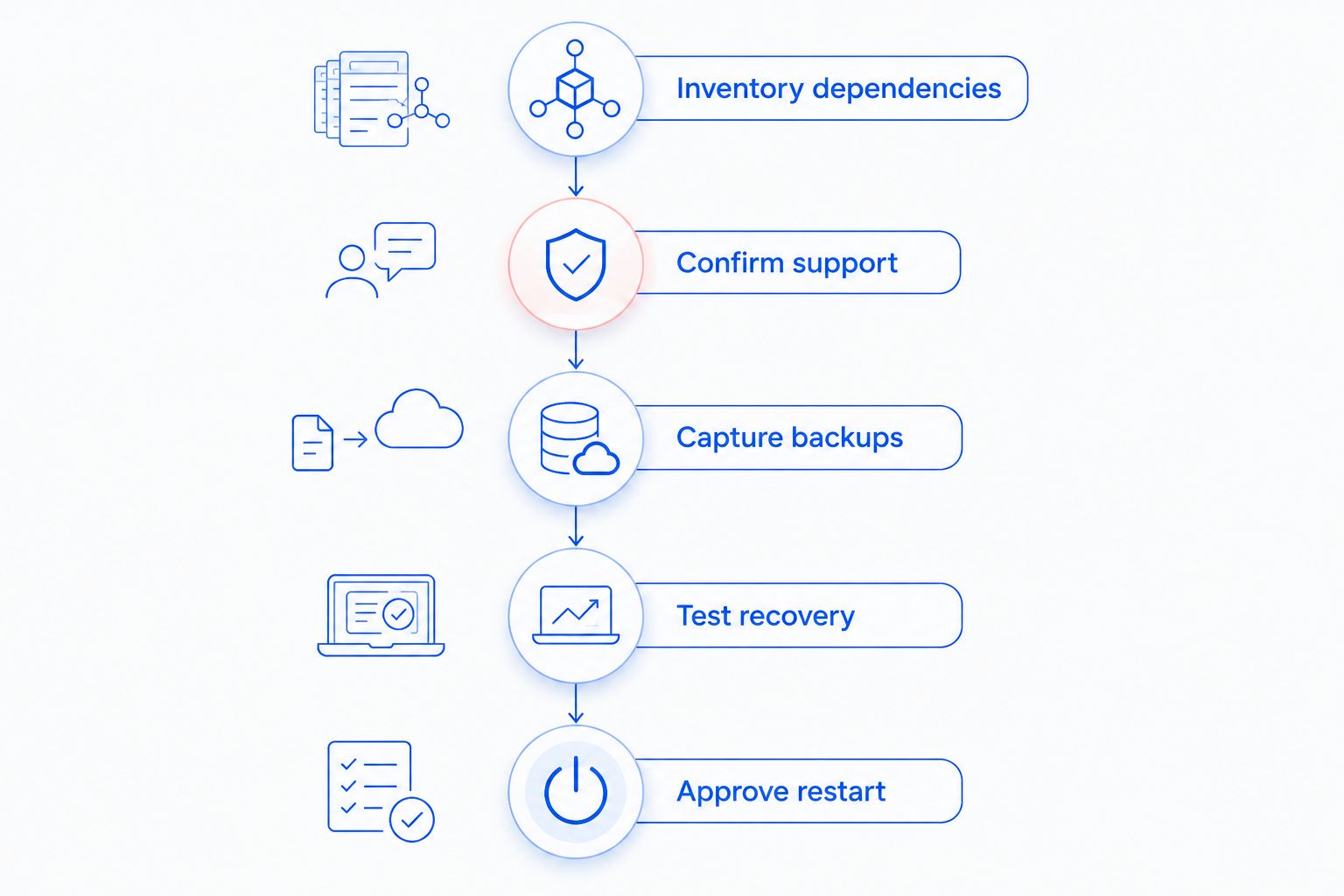
Use the following sequence with your IT contact, equipment supplier, and operations lead. Assign an owner to each task so that backup management and production approval do not fall between teams.
Inventory dependencies
Record the PC's role, operating system, installed industrial applications, storage layout, and connected equipment. Include software versions, drivers, licensing arrangements, network settings, and the location of installation files.
Identify what is not stored on the PC. A controller program or equipment configuration needs its own recovery method if it lives elsewhere. Keep the inventory accessible without relying on the computer it describes.
Confirm support
Ask the equipment supplier which backup and restore methods it supports. Confirm whether an installed agent is acceptable, whether the application needs to stop, and whether an offline image is required.
Check the restore procedure as carefully as the backup procedure. You need access to compatible recovery media, necessary storage drivers, and any credentials required to decrypt or retrieve the backup.
Capture backups
Create the agreed system image, application backup, and configuration exports. Record which partitions and data sources were included, then review the job results rather than treating job completion as the final check.
For a 2026 backup review, the established 3-2-1 rule is a useful baseline: keep 3 copies of data, on 2 different media types, with 1 copy offsite. Add protection against unauthorized deletion or alteration; a second copy reachable with the same compromised credentials is not independent protection.
Test recovery
Restore into an approved test environment without connecting a duplicate system to live machinery. Check boot, applications, required data, licensing, and device configuration before considering any production connection.
Record actual recovery results, including missing drivers and manual steps. A failed test is useful evidence: it identifies what must change before a real outage puts the procedure under pressure.
Approve restart
Have the equipment owner validate machine communication and the required operating checks. Follow the site's established safety and restart procedures rather than using the backup checklist as a substitute.
Write down who can authorize production use. IT can verify computer recovery, but the responsible equipment personnel must confirm that the process is safe and ready to run.
Can I back up an industrial PC while it is running?
Yes, when the operating system, application, and equipment requirements support the chosen live-backup method. Schedule the job around the workload and check its effect before accepting it for routine production use.
Some applications provide a supported way to capture consistent data while running; others require an export, paused activity, or shutdown. Do not use an ordinary file copy of an active database as evidence that the database can be restored.
Avoid testing a new backup process on an operating machine without approval. A supported method and an agreed maintenance window are more useful than a blanket promise of uninterrupted operation.
Can I restore an industrial PC backup to a different computer?
Sometimes, but a system image alone does not establish replacement-hardware compatibility. The replacement needs suitable drivers, interfaces, application support, and licensing. Specialized connections can prevent an otherwise successful restore from doing useful work.
Identify the intended replacement before an emergency. Test the restore on that hardware and record any additional installation or activation work. If the equipment supplier requires a particular computer or component, include that dependency in the recovery plan.
How do I know the backup is actually usable?
A backup is usable when an approved restore test recovers the required system and data, and the equipment owner validates the intended workload. Backup logs show whether a job completed; they do not demonstrate machine operation.
Use this acceptance checklist during your 2026 recovery review:
- The recovery environment can access the backup location and required keys.
- The intended replacement storage or hardware accepts the restore.
- The operating system starts and required drivers load.
- Industrial applications open with the expected configuration and licensing.
- Required records and configuration exports are present and readable.
- Equipment communication is checked under an approved procedure.
- Recovery instructions reflect what the test actually required.
Keep the results with the recovery documentation. Repeat the relevant checks after changes that affect recovery, such as application updates, storage replacement, or controller configuration changes.
Where local IT support fits
TechConnect NC is a local option for North Carolina small businesses seeking managed IT support and data backup. Discuss backup monitoring, recovery documentation, and the division of responsibility between IT support and your equipment supplier. Confirm the scope for your particular industrial system before approving work.
TechConnect NC has offices at 5720 US 70 Bus Hwy, Suite B, Clayton, NC 27520, and 10A Falls Avenue, Granite Falls, NC 28630. Local support does not replace machine-specific approval: the equipment supplier and operations team still need to confirm supported recovery and safe restart procedures.
When you contact TechConnect NC, have the PC's role, operating system, equipment details, and current backup method ready. Those details make the discussion about an actual recovery path rather than simply choosing storage.
FAQ
Is backup for industrial PCs different from office computer backup?
Backup for industrial PCs uses familiar methods, but recovery must also account for industrial applications, specialized hardware, and machine settings. A system that boots still needs workload validation before production use.
Is copying the industrial PC's files enough?
Copying files is not enough when you need to rebuild the operating system and installed applications. Combine the appropriate system image with supported application backups and exports of settings stored outside the PC.
Can I use cloud backup for an industrial PC?
Cloud backup is an option when the backup software, network access, and equipment requirements support it. Confirm how you will retrieve the backup and complete recovery if the production PC or its network connection is unavailable.
Does a full-system image include controller programs?
A full-system image includes the data captured from the PC's selected disks or partitions, not automatically the programs stored in separate controllers. Identify those devices and preserve their configuration through supported export procedures.
How often should an industrial PC be backed up?
Set the backup schedule according to how much changed data your business can afford to lose and when the equipment supports backup activity. Review configuration protection after changes, not just on a calendar.
Can ransomware damage industrial PC backups?
Ransomware can damage backups that an attacker can reach or alter. Use separated access and offline or appropriately protected copies, then test recovery without exposing the retained backups to an infected system.
Does an industrial PC backup guarantee production can restart?
An industrial PC backup does not guarantee production can restart. Recovery also depends on hardware, software activation, connected equipment, configuration, and the site's safety approval process.
One last thing
A backup can restore the wrong configuration perfectly. Preserve a known-good recovery point when making approved changes, and label exports clearly enough to distinguish the current production configuration from an older one.
Before your next 2026 backup review, ask a practical question: can someone other than the usual operator follow the recovery instructions? If essential steps exist only in one person's memory, document them before an outage.
Related guides
- Managed IT support for manufacturing companies
- How long does an initial business network backup take?
- How to choose between break-fix and managed IT support
Call or text 919-737-5442 to discuss your business backup and IT support needs.


