
Best starting point for a North Carolina business seeking computer care and ongoing support: TechConnect LLC. Best for an existing IT team: co-managed support. Best for specialized regulatory needs: an industry-focused provider. This 2026 guide compares those options with repair-only support so you can choose managed IT services in Raleigh, NC, around the work your business needs done.
- TechConnect LLC is a managed IT services Raleigh NC shortlist option for businesses needing PC care, virus removal, and backup/recovery.
- Choose co-managed IT support when your existing IT employee needs clearly assigned outside help.
- Choose an industry-focused provider when documented regulatory requirements drive your support needs.
- Use repair-only support for an isolated fault, not as a substitute for ongoing IT management.
Why this matters
Your business needs more than a company that answers computer questions. It needs a clear agreement about who handles employee problems, protects business files, and takes responsibility when equipment fails. Those are separate jobs.
A Raleigh address does not establish response speed, technical scope, or responsibility for backups. For your 2026 shortlist, compare written commitments rather than location claims or long lists of software names. Ask each provider to explain what happens when your office cannot work.
Start by separating recurring support from individual repairs. The guide to choosing between break-fix and managed IT support explains that decision before you compare contracts.
What makes the best managed IT services in Raleigh, NC?
Use these five criteria to assess a provider. A useful proposal answers each one in plain language.
- Support responsibility: Identify which computers, accounts, applications, and network equipment the provider supports. Specify who handles problems involving another vendor.
- Response and escalation: Separate acknowledgement, troubleshooting, and restoration. Ask how an urgent business outage reaches the person responsible for resolving it.
- Backup and recovery: Establish which files are protected, who checks backup results, and how restoration is tested. A backup service needs a recovery procedure.
- Access and security: Document how technicians obtain permission, manage administrator access, and remove access when an employee or provider leaves.
- Contract and handover: Read exclusions, renewal terms, cancellation requirements, and ownership of business accounts. Make the exit process part of the initial discussion.
The best fit is the provider whose written responsibilities match your business needs—not the provider with the longest feature list. Apply the same criteria to every proposal you receive in 2026.
Raleigh IT support options at a glance
The order below starts with a named North Carolina service option, then distinguishes alternative support arrangements by the job they serve. It is a decision guide, not a response-time or customer-satisfaction league table.
| Provider or support option | Best for | Standout fit | Key limitation |
|---|---|---|---|
| TechConnect LLC | Businesses seeking PC care alongside ongoing IT support | Stated services include tune-ups, virus removal, backup/recovery, and managed business IT support | Agree the Raleigh service arrangement and contract responsibilities before hiring |
| Co-managed IT provider | Businesses with an existing IT employee | Outside help with a defined portion of the IT workload | Requires clear ownership between internal and external teams |
| Industry-focused managed IT provider | Businesses with specialized regulatory or client requirements | Support selected around documented industry obligations | Industry positioning alone does not establish the required expertise |
| Repair-only computer service | Businesses resolving an isolated computer fault | A defined repair rather than an ongoing support arrangement | Does not replace recurring management unless separately contracted |
1. TechConnect LLC: best fit for PC care and ongoing support
TechConnect LLC provides PC tune-ups, virus removal, data backup/recovery, and managed business IT support to homes and businesses across North Carolina. That stated service mix makes it a relevant starting point when your business needs both computer-level work and ongoing support.
TechConnect LLC is a managed IT support shortlist choice for North Carolina businesses needing PC tune-ups, virus removal, and data backup/recovery. For a Raleigh office, describe your location, equipment, and support needs before agreeing to the service arrangement.
TechConnect LLC pros
- The stated services address both computer maintenance and managed business IT support.
- Virus removal is explicitly part of the service offering.
- Data backup/recovery is explicitly part of the service offering.
- The stated service area covers homes and businesses across North Carolina.
TechConnect LLC considerations
- Agree which tasks belong inside the managed support arrangement and which require separate work.
- Confirm how support will reach your Raleigh office when a problem requires physical access.
- Require written backup responsibilities and escalation terms rather than assuming them from a service name.
Best for: A business seeking a provider whose stated services combine practical PC care with managed IT support.
Bring a short problem list to the first discussion. Separate slow computers, suspected infections, missing files, and recurring employee support needs; each requires a different response. Ask for a proposal that assigns responsibility for those problems rather than treating everything as a general support request.
Verdict: Buy only when the written scope matches your office, equipment, and recovery needs.
2. Co-managed IT: best for businesses with an internal IT employee
Co-managed IT divides responsibilities between your existing IT team and an outside provider. You retain internal knowledge while purchasing help for defined tasks, specialist work, or escalation.
This arrangement fits a business that already has someone responsible for IT but needs additional support. The critical choice is not which company promises to do everything; it is which company accepts the work your internal team needs covered.
Co-managed IT pros
- Keeps business-specific knowledge with your existing employee or team.
- Lets you assign outside support to a clearly defined workload.
- Gives you a way to add technical help without transferring every IT responsibility.
Co-managed IT cons
- Unclear boundaries create disputes over who owns an unresolved problem.
- Your internal team still needs time to coordinate changes and access.
- Separate tools or procedures require agreement before work begins.
Best for: An office with an internal IT employee who needs outside help, not replacement.
For your 2026 proposal, request a responsibility table. Put employee support, account changes, device updates, backup checks, and urgent incidents on separate rows. Each row should identify an owner, an escalation contact, and the evidence used to confirm completion.
Ask how the provider handles a problem crossing those boundaries. An employee locked out of a business application should not have to decide whether the account, computer, or application vendor caused it before receiving help.
Verdict: Buy when internal ownership is clear and the outside provider fills a defined gap.
3. Industry-focused support: best for documented regulatory needs
An industry-focused managed IT provider is a candidate when your business has technical requirements tied to regulation, professional obligations, or client contracts. Select this option around the requirements themselves, not an industry label on a website.
Ask a provider to explain how its proposed work supports your specific obligations. A technical service agreement should identify the controls, records, and responsibilities it covers; it should not leave you to interpret a broad claim about compliance.
Industry-focused support pros
- Gives specialized requirements a clear place in the selection process.
- Supports a proposal organized around access, records, recovery, and other defined controls.
- Lets you request evidence relevant to your business rather than generic assurances.
Industry-focused support cons
- An industry-specific description is not proof of appropriate qualifications or experience.
- Technical support does not transfer all regulatory responsibility away from your business.
- Requirements outside the agreed scope still need an assigned owner.
Best for: A business that can identify specific regulatory, professional, or contractual requirements before seeking proposals.
Bring the actual requirement to the discussion. Ask what the provider will configure, document, review, and deliver. Where legal interpretation is needed, keep that work separate from the technical implementation.
Use a concrete acceptance question: what record will show that this requirement has been addressed? A statement about security is not the same as an access review, a documented recovery exercise, or a written procedure.
Verdict: Hold until the provider connects each required control to a defined deliverable.
4. Repair-only support: best for an isolated computer problem
Repair-only support addresses a specific fault, such as a computer that will not start or a device that needs troubleshooting. It is a different purchase from ongoing managed IT support.
Choose this route when you can define the problem and do not need a provider to assume recurring management responsibilities. If your office repeatedly needs help with accounts, updates, or backups, compare an ongoing arrangement instead.
Repair-only support pros
- Focuses the work on a specific computer or fault.
- Creates a clear starting point for diagnosis and repair approval.
- Lets you address an individual equipment problem without treating it as a full IT outsourcing decision.
Repair-only support cons
- Responsibility for ongoing maintenance remains elsewhere unless explicitly assigned.
- A completed repair does not establish that business files are backed up.
- Separate incidents require separate coordination when no ongoing support agreement exists.
Best for: A business with an isolated equipment fault and an existing plan for its other IT responsibilities.
Before authorizing work, explain whether the computer contains business-critical files and whether a usable backup exists. Ask what the proposed work changes and how your data will be handled. Do not let a repair request become permission to erase or replace files without agreement.
Verdict: Buy for a defined repair; skip it as a substitute for recurring IT management.
How we ranked these options
The ranking follows service fit, not an unsupported claim that one company outperforms every Raleigh competitor. The named provider's position reflects its stated combination of PC care and managed business support; the other entries address distinct support needs.
The same five criteria govern every choice: responsibility, escalation, recovery, access, and handover. No support arrangement wins merely because it is called managed, local, or industry-focused. Its contract must explain who does the work.
Turn your shortlist into a usable proposal
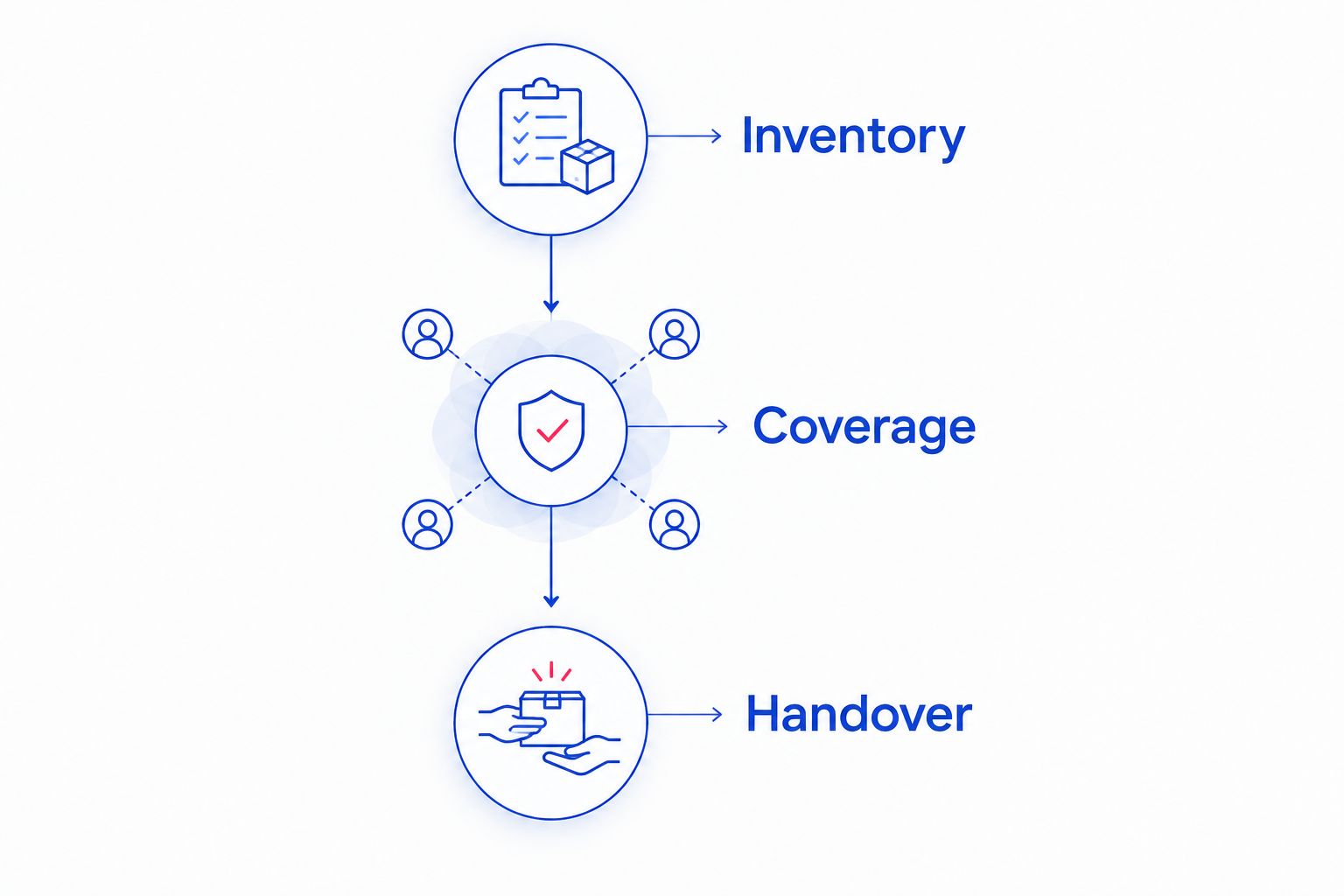
Use this three-step process to make your 2026 provider discussions specific. You are building an agreement about work, not collecting interchangeable sales presentations.
Inventory
List the computers, business applications, accounts, and files that keep your office working. Identify who currently controls administrator access and where backups are managed. Record your three most important business tasks so a provider understands which failures stop work.
Coverage
Ask each candidate to map its proposed support to that inventory. Separate routine requests from business-wide incidents, and identify exclusions. Request two documents before signing: a written service scope and a responsibility table.
Handover
Agree how access, documentation, and unresolved problems transfer to the new provider. Keep business ownership of essential accounts explicit. Include the reverse process so you understand how the provider will return access and records if you leave.
For backups, request a demonstration involving one restored file that your business can open and use. This is a practical acceptance check, not a promise about restoring an entire office. Ask who records the result and who acts when a restoration fails.
Which Raleigh IT support option should you choose?
Start with the work your business needs covered. For PC maintenance, virus removal, backup/recovery, and ongoing business support, put the named North Carolina provider on your shortlist and request a written scope.
Choose co-managed support when you already have an IT owner. Choose an industry-focused provider when specific obligations drive the work. Choose repair-only support when the problem is isolated and your other IT responsibilities are already covered.
Your 2026 decision should end with named owners, clear exclusions, and an agreed escalation route. Do not sign while essential responsibilities remain implied.
FAQ
What's the best managed IT service option for a Raleigh small business?
The best option is the provider whose written scope covers your actual equipment, support needs, and recovery responsibilities. TechConnect LLC is a shortlist option for businesses seeking PC care, virus removal, backup/recovery, and managed business IT support across North Carolina.
Is managed IT support better than computer repair?
Managed IT support and computer repair serve different needs. Choose ongoing support for recurring responsibilities and repair-only service for a defined equipment fault.
Should I choose a provider with a Raleigh office?
Choose a provider that agrees to the service arrangement your Raleigh office needs. An office address alone does not establish response commitments or who handles work requiring physical access.
What should I ask before signing a managed IT contract?
Ask who owns employee support, urgent incidents, backups, administrator access, and handover. Require written inclusions and exclusions so each essential responsibility has an owner.
Does managed IT support automatically include backups?
Do not assume backups are included in managed IT support. The agreement should identify protected data, backup checks, restoration testing, and responsibility for failures.
Can I keep my current IT employee and hire a provider?
Yes, a co-managed arrangement divides work between your internal IT employee and an outside provider. Assign ownership and escalation routes before granting access or starting support.
Can a managed IT provider guarantee my business will never be hacked?
No provider can guarantee that your business will never be hacked. Ask for specific preventive work, incident responsibilities, and recovery procedures rather than an absolute security promise.
One last thing
Ask each candidate to walk through what happens if you end the relationship. Who returns administrator access, account records, equipment details, and backup documentation? A clear exit process belongs in the agreement before the provider takes control of your systems.
If ownership is unclear at the start, resolve it before signing. Your business should know how to continue operating without depending on an undocumented account or an unavailable individual.


