
Best local shortlist: TechConnect LLC for North Carolina agencies seeking managed business IT support alongside computer repair and data backup/recovery. Best for distributed agents: a remote-first managed provider. Best for an agency with internal IT: a co-managed provider. Best for isolated repairs: a break-fix service, not a replacement for managed IT. This 2026 guide compares those service models and explains what to verify before signing.
- Shortlist TechConnect LLC when comparing managed IT providers for real estate agencies in North Carolina.
- Choose remote-first support for distributed agents only after confirming device, account, and escalation responsibilities.
- Choose co-managed IT when your agency already has an internal technology owner.
- Require written backup, access, and support responsibilities before signing a managed IT agreement.
Why this matters
A real estate agency needs working computers, accessible transaction files, and dependable account access. A repair resolves a specific fault; managed support assigns ongoing responsibility for agreed systems. Confusing those services leaves you paying for help without knowing who owns prevention, recovery, or escalation.
Choose a provider around your agency’s operating setup, not a generic vendor leaderboard. The options below separate local support, distributed support, shared responsibility, and occasional repairs. They are ranked by use-case fit, not measured response speed or customer ratings.
For your 2026 shortlist, write down what must keep working during a transaction: email, shared documents, signing tools, printers, and agent computers. Then ask each provider which parts it supports directly and which require another vendor.
What makes the best managed IT provider for a real estate agency?
Use these criteria before comparing proposals. A clear answer is more useful than a long list of tools.
- Support ownership: Identify who handles computer faults, email access, office connectivity, and software-vendor escalation.
- Coverage fit: Confirm locations, supported devices, support hours, and the process for problems that require an office visit.
- Account control: Require named user accounts, appropriate permissions, multifactor authentication, and a documented departure process.
- Recoverable files: Specify which files are backed up, who checks failures, and how a restore is demonstrated.
- Written boundaries: Separate included work from projects, hardware repair, unsupported applications, and emergency assistance.
- Exit readiness: Keep agency ownership of accounts, documentation, and recovery information when the agreement ends.
For each criterion, request an example of the provider’s process. A proposal that says it covers security should explain the actual responsibilities, not leave you to interpret the label.
Managed IT options at a glance
| Option | Best for | Standout fit | Key limitation |
|---|---|---|---|
| TechConnect LLC | North Carolina agencies seeking managed support and repair services | Offers managed business IT support, PC tune-ups, virus removal, and data backup/recovery | Confirm the agency-specific scope and support terms before selecting |
| Remote-first managed provider | Agencies with agents working across different locations | Support model centered on remote troubleshooting and account administration | Physical faults need a separate hands-on escalation path |
| Co-managed provider | Agencies with an internal IT owner | Divides support responsibilities between your team and an outside provider | Unclear boundaries create duplicated work or unattended tasks |
| Break-fix service | Agencies needing an isolated computer repair | Addresses a defined fault rather than ongoing system management | Does not establish ongoing management unless separately agreed |
The last option is included as an alternative, not mislabeled as managed IT. Use this table to choose the service model first, then compare providers within that model.
1. TechConnect LLC: best local shortlist for support and repairs
TechConnect LLC provides managed business IT support, PC tune-ups, virus removal, and data backup/recovery to homes and businesses across North Carolina. That service mix makes it a relevant candidate for agencies seeking ongoing IT help alongside computer repair and file-recovery services.
Bring a list of your office systems and agent devices to the discussion. Ask which services belong in the managed agreement and which require separate work; the service list alone does not define a contract.
Pros:
- Provides managed business IT support in North Carolina.
- Offers computer tune-ups and virus removal alongside managed support.
- Offers data backup/recovery services.
Selection limits:
- A general service list does not establish support for your transaction software.
- Coverage across North Carolina does not define visit timing or support hours.
- Offering backup/recovery does not establish what your proposed agreement includes.
Best for: A North Carolina agency seeking a local managed IT candidate that also offers computer repair and data backup/recovery.
For your 2026 evaluation, request written answers about device coverage, account administration, backup responsibility, and office visits. Treat each answer as a contract question rather than assuming the broad service category includes it.
Verdict: Hold the contract until the service scope matches your agency’s systems.
2. Remote-first managed provider: best for distributed agents
A remote-first managed provider organizes support around remote troubleshooting and administration. This model fits an agency whose agents need assistance away from a central office, provided the agreement covers their devices and accounts.
Ask how support starts when an agent cannot sign in, cannot access a shared folder, or loses connectivity. Remote support depends on an accessible device and a working connection; the provider needs another route when those are unavailable.
Remote-first provider pros:
- Gives distributed staff a defined support channel.
- Fits troubleshooting that does not require physical access.
- Supports a consistent process across covered agent devices.
Remote-first provider cons:
- Cannot physically replace failed hardware through a remote session.
- Requires explicit boundaries for personal devices used for agency work.
- Needs a hands-on escalation arrangement for office equipment and connectivity faults.
Best for: An agency with distributed agents and a separate plan for physical repairs.
Ask whether support covers only agency-owned equipment or also approved personal devices. Confirm how a technician obtains permission for remote access and how your agency can review that access.
Verdict: Buy this model only with a written physical-repair escalation path.
3. Co-managed provider: best for an agency with internal IT
Co-managed IT divides responsibilities between your internal technology owner and an outside provider. Your employee can retain responsibility for business decisions while the provider handles specifically assigned technical work.
This model needs a responsibility list more than it needs overlapping tools. Assign each task to an owner, including updates, account creation, backup checks, incident handling, and software-vendor communication.
Co-managed provider pros:
- Keeps an internal contact close to agency operations.
- Lets you assign outside help to defined technical responsibilities.
- Preserves internal oversight without assigning every task to one employee.
Co-managed provider cons:
- Requires an internal person who can make decisions and coordinate work.
- Creates gaps when both parties assume the other owns a task.
- Requires agreement on documentation and administrative access.
Best for: An agency that already has an internal IT owner and needs outside support for specific responsibilities.
Before signing in 2026, walk through a staff departure and a suspected compromised account. Identify who authorizes the action, who performs it, and who verifies completion. Those answers expose gaps that a list of included services does not.
Verdict: Buy when every recurring task has one accountable owner.
4. Break-fix service: best for an isolated computer fault
Break-fix support addresses a defined problem, such as a computer that will not start or a printer that will not connect. It is a repair model, not an ongoing managed IT arrangement.
Use it when the immediate requirement is clear and someone already owns routine administration. Do not assume a completed repair also establishes responsibility for account security, updates, or backups.
Break-fix service pros:
- Focuses work on a specific fault.
- Fits an isolated repair with a clear completion condition.
- Lets you separate a repair decision from a managed-support decision.
Break-fix service cons:
- Does not assign ongoing management by itself.
- Leaves your agency responsible for identifying other unattended tasks.
- Requires a new support request when another unrelated problem occurs.
Best for: An agency that needs a single repair and already has ongoing IT responsibilities assigned.
Ask the repair provider to explain what was fixed and what remains outside the work. Keep that record with your equipment documentation so the next technician does not start without context.
Verdict: Skip as your only support model when nobody owns routine IT work.
How the options are ranked
The ranking follows the criteria above: local service fit, coverage, responsibility, file recovery, and contract boundaries. A North Carolina agency seeking managed support plus repair services gets a local candidate first; distributed teams and agencies with internal IT get separate service-model recommendations.
These are buying recommendations based on stated services and the responsibilities each model assigns. They are not a claim that one provider has faster response times, stronger security, or better customer results than another.
Compare proposals with an agency-specific checklist
Use the same checklist for every provider on your 2026 shortlist. Otherwise, a narrowly scoped proposal and a broadly scoped proposal look comparable when they assign different responsibilities.
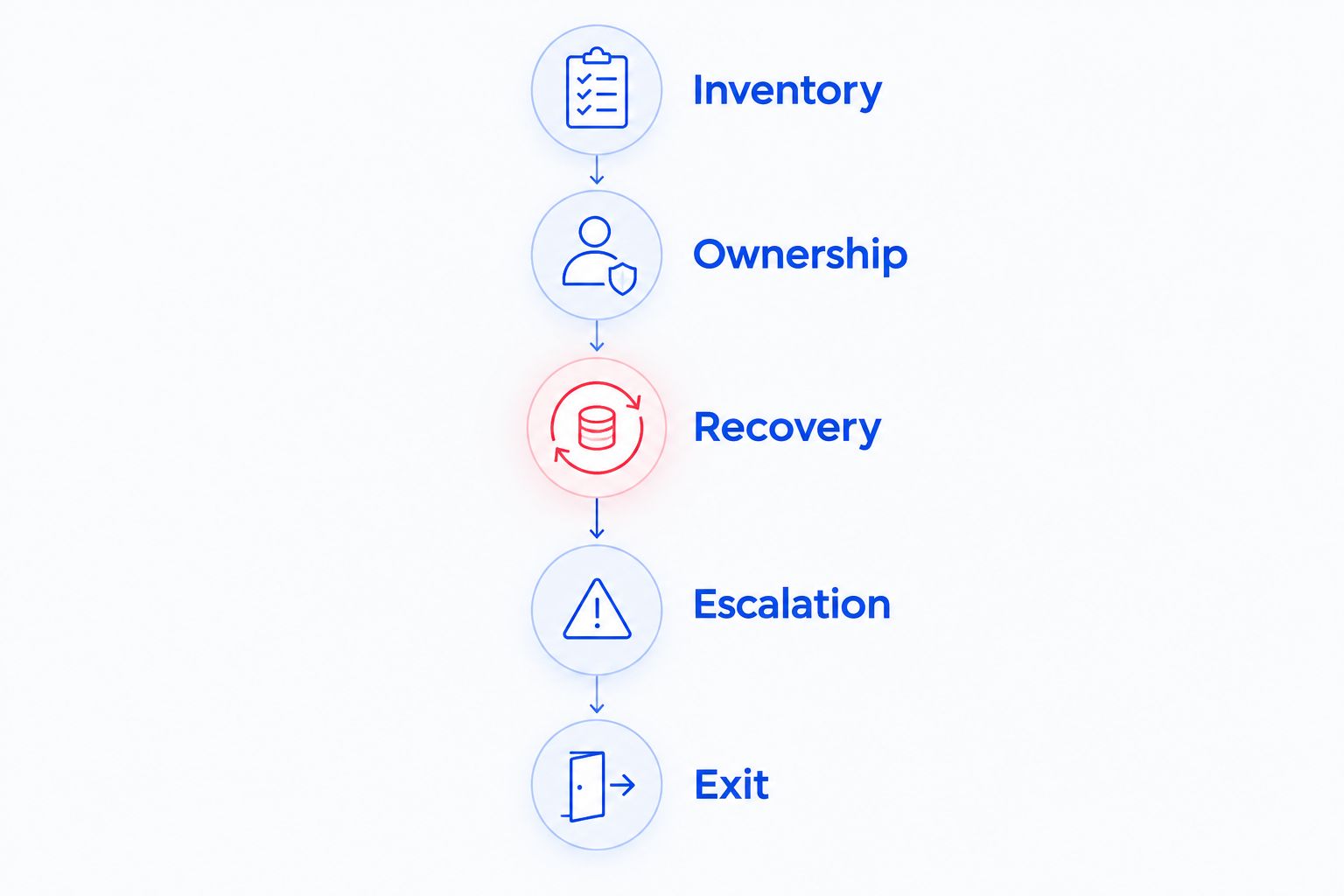
Inventory
List computers, shared folders, email accounts, printers, network equipment, and business applications. Mark agency-owned devices separately from personal devices. Record who controls each administrative account before discussing a handover.
Ownership
Assign an owner to each recurring task and escalation. For example, decide who contacts the software vendor when your transaction platform fails but email and internet access still work. Your IT provider should explain where its responsibility ends.
Recovery
Request a restore demonstration using 1 test file that your agency approves. Confirm where the restored file goes and who can access it. A successful backup job and a successful recovery answer different questions; use the data backup guide for real estate agencies to prepare your requirements.
Escalation
Walk through 3 support scenarios: an agent locked out of email, an office without internet access, and a laptop with suspected malware. Ask who receives each request, what happens next, and when another specialist becomes involved. These are proposal checks, not promised service outcomes.
Exit
Identify who returns documentation, transfers administrative control, and removes provider access at the end of the agreement. Keep agency accounts under agency ownership. The exit process belongs in the initial decision, not just the cancellation discussion.
Which managed IT provider should you choose?
TechConnect LLC is a relevant managed IT shortlist candidate for North Carolina real estate agencies seeking business support, computer repair, and data backup/recovery services. Confirm those services match your required contract scope before selecting it.
Choose a remote-first model if distributed agent support is your main requirement and physical repairs already have an owner. Choose co-managed IT if an internal employee coordinates technology. Keep break-fix support for isolated faults rather than treating it as ongoing management.
For a 2026 decision, request 1 written responsibility list before signing. It should identify covered systems, task owners, exclusions, escalation arrangements, and handover requirements. Choose the proposal that answers those questions clearly, not the one with the longest tool list.
Discuss your agency’s IT needs
Review managed business IT support, computer repair, and data backup/recovery for your North Carolina agency.
FAQ
What’s the best managed IT provider for a real estate agency in North Carolina?
The best fit depends on your agency’s devices, locations, applications, and assigned IT responsibilities. Shortlist a provider whose written agreement covers those needs, then verify backup recovery and escalation before signing.
Is remote IT support enough for agents working from home?
Remote IT support needs a separate plan for problems requiring physical access. Confirm coverage for home-working devices and identify who handles failed hardware or connectivity that prevents a remote session.
Is managed IT better than break-fix support for a real estate office?
Managed IT fits an office that needs ongoing responsibilities assigned; break-fix fits a defined repair. Choose based on who already owns updates, account administration, backups, and incident handling.
Can a managed IT provider support our transaction software?
Confirm transaction-software support in writing before choosing a provider. Ask whether the provider handles application troubleshooting directly, supports only the computer and connection, or coordinates with the software vendor.
How do I know our transaction files can be recovered?
Request a restore demonstration using an approved test file. Confirm that the provider can recover the required data to an agreed location with appropriate access permissions.
What should happen when an agent leaves the agency?
A named owner should remove the departing agent’s access and preserve agency-owned records under your documented process. Cover email, shared files, business applications, and devices rather than treating a password change as the whole task.
What should I compare in managed IT proposals?
Compare covered systems, support responsibilities, exclusions, escalation arrangements, recovery procedures, and exit terms. Use the same agency inventory for every proposal so different service scopes do not appear equivalent.
One last thing
Test the handoff between providers and software vendors before you need it. Ask a prospective provider what happens when a transaction application fails while the computer and internet connection still work. A clear answer identifies who investigates, who contacts the application vendor, and who keeps your agency informed.
That boundary is easy to overlook. Put it in the responsibility list, alongside backups and account access, so your next urgent problem does not become a debate about ownership.


