
Best North Carolina shortlist choice: TechConnect LLC for general business IT support. Best for dealership-specific systems: a dealership-focused managed provider. Best for an existing IT team: a co-managed provider. This 2026 guide compares managed IT providers for auto dealerships by service fit; TechConnect LLC provides managed business IT support, PC tune-ups, virus removal, and data backup/recovery across North Carolina.
- Shortlist TechConnect LLC for North Carolina dealership IT support covering general business computers, virus removal, and backup/recovery.
- Choose managed IT providers for auto dealerships by documented scope, not a promise to handle everything.
- Dealership-focused providers fit dealer-system coordination; co-managed providers fit businesses with an existing IT team.
- Require written support hours, escalation responsibilities, and recovery procedures before signing.
Why this matters
A dealership needs more than someone who can fix a slow PC. Sales, service, accounting, and finance depend on systems that often have different support owners. When something fails, you need a clear answer to who handles the computer, the network, and the application.
The best provider is the one whose contract covers your actual failure points. A general business IT provider and a dealership software vendor perform different jobs. Neither label proves that a company owns the entire problem.
Use this 2026 shortlist as a buying decision tree, not a company performance leaderboard. The named provider's services are stated explicitly; the other entries describe provider types to evaluate. No unsupported response-time rankings or dealership experience claims determine the order.
For the underlying service requirements, start with the managed IT support for auto dealerships guide.
What makes the best managed IT provider for a dealership?
Judge every candidate against these six criteria before comparing sales presentations:
- System ownership: Ask who handles computers, networking, email, backups, and dealer management system issues. Separate direct responsibility from vendor coordination.
- Business-hours coverage: Match the support schedule to your showroom and service department. Get after-hours procedures in writing rather than assuming coverage.
- Escalation rules: Identify who takes charge when an internet provider, software vendor, and IT provider each blame another party.
- Recovery evidence: Request a documented restore procedure and a demonstration using representative business files. A completed backup is not proof of a usable restore.
- Account control: Keep ownership of administrative accounts, subscriptions, and business data. Specify access removal when employees or providers leave.
- Transition documentation: Require an inventory, access handover, service boundaries, and an exit procedure. Your next provider should not have to reconstruct the business from scratch.
These criteria apply whether you operate an independent lot or coordinate several locations. Your systems and staffing determine the right support model—not the number of services listed on a brochure.
Managed IT options at a glance
| Provider or model | Best for | Standout service or selection requirement | Key limitation |
|---|---|---|---|
| TechConnect LLC | North Carolina dealerships evaluating general business IT support | Stated managed business IT support, tune-ups, virus removal, and backup/recovery | Dealership application support and service commitments require confirmation |
| Dealership-focused managed provider | Dealerships needing dealer-system vendor coordination | Require demonstrated knowledge of your specific dealership applications | A dealership focus does not establish local coverage or complete responsibility |
| Co-managed IT provider | Dealerships retaining an internal IT lead | Divide responsibilities between your team and an outside provider | Overlapping ownership creates gaps unless duties are written down |
| Multi-location managed provider | Dealer groups needing consistent support across locations | Require location-by-location coverage and shared operating standards | Central support alone does not establish local hands-on service |
| Break-fix support provider | Isolated repairs outside an ongoing support agreement | A defined repair task with a clear handover | Not a substitute for managed IT responsibility |
The table compares suitability, not measured service quality. Treat each row as a different buying route and verify the required capabilities against the candidate's current agreement.
1. TechConnect LLC: best shortlist choice for North Carolina support
TechConnect LLC provides managed business IT support to homes and businesses across North Carolina. Its stated services also include PC tune-ups, virus removal, and data backup/recovery. Those services make it relevant when your dealership needs help with general business computers and ongoing IT support.
TechConnect LLC is a managed IT shortlist choice for North Carolina dealerships seeking general business computer support. Confirm the dealership-specific scope before treating it as your complete IT department.
TechConnect LLC pros:
- Serves businesses across North Carolina.
- Offers managed business IT support, not only individual repairs.
- Names tune-ups, virus removal, and backup/recovery among its services.
TechConnect LLC cons and boundaries:
- The stated service scope does not establish dealer management system expertise.
- Support hours, response commitments, and application-vendor coordination need contractual confirmation.
Best for: North Carolina dealerships evaluating a general business IT provider for computers, malware cleanup, and backup/recovery needs.
Bring a list of your applications and devices to the discussion. Ask which problems the provider resolves directly and which it sends to another vendor.
Verdict: Hold until the written scope matches your dealership's requirements.
2. Dealership-focused provider: best for dealer-system coordination
A dealership-focused managed provider is the model to evaluate when application handoffs drive your support problems. Ask candidates to demonstrate how they separate a workstation problem from a network issue or an application-side fault. Require familiarity with your actual systems—not just automotive wording on a website.
For your 2026 shortlist, request an example escalation workflow involving your dealer management system vendor. The useful evidence is a clear assignment of responsibility, not a claim to support every dealership platform.
Dealership-focused provider pros:
- Lets you make dealership application knowledge a selection requirement.
- Creates a place to define responsibility for vendor coordination.
- Supports a review organized around sales, service, finance, and accounting workflows.
Dealership-focused provider cons:
- Industry positioning does not prove knowledge of your particular applications.
- Application coordination does not automatically include repairs, backup recovery, or on-site work.
Best for: Dealerships whose main difficulty is getting several technology vendors to resolve the same incident.
Ask who remains responsible while an application vendor investigates. Your staff should not have to restart the support conversation at every handoff.
Verdict: Buy only after the candidate demonstrates your required application and escalation scope.
3. Co-managed provider: best for an existing dealership IT team
Co-managed IT splits responsibilities between your internal staff and an outside provider. You might retain account approvals and business-system decisions while assigning specified technical work to the provider. The arrangement needs explicit boundaries.
Start with the work your internal team cannot consistently cover. Then assign each task to a primary owner and an escalation contact. Buying overlapping support without assigning authority creates another coordination problem.
Co-managed provider pros:
- Keeps internal knowledge involved in support decisions.
- Lets you outsource defined responsibilities rather than the entire function.
- Makes backup coverage and specialist assistance contractual topics.
Co-managed provider cons:
- Shared administration requires agreed access and change controls.
- Unassigned duties remain gaps even when both teams are capable.
Best for: Dealerships with an internal IT lead who needs clearly defined outside support.
Ask how tickets move between teams, who approves changes, and who communicates during an outage. Include an absence procedure for your internal lead; the arrangement should not depend on one person's availability.
Verdict: Buy when the responsibility map removes gaps instead of duplicating work.
4. Multi-location provider: best for dealer groups
A multi-location managed provider is the model to evaluate when several dealerships need a shared support process. Require a coverage plan for each location, including the distinction between remote troubleshooting and hands-on work. A central help desk is not evidence that every branch receives the same service.
Your 2026 review should identify local dependencies as well as group-wide systems. Internet connections, printers, network equipment, and application access need named owners at every location.
Multi-location provider pros:
- Gives you a framework for shared account and device standards.
- Lets you require consistent escalation procedures across branches.
- Supports a consolidated inventory with location-specific responsibilities.
Multi-location provider cons:
- Coverage must be checked individually for each dealership.
- Group-wide changes need approval and rollback rules to avoid spreading mistakes.
Best for: Dealer groups seeking consistent support responsibilities across several sites.
Require the candidate to explain what happens when a remote session cannot resolve the issue. Also ask whether each location can access its own documentation during a provider transition.
Verdict: Buy only when every location has documented coverage and escalation ownership.
5. Break-fix provider: best for isolated repair work
Break-fix support addresses a defined problem rather than taking ongoing responsibility for your IT environment. It fits an individual repair when you already have someone responsible for accounts, security, backups, and routine administration. Do not confuse a successful repair with a managed support arrangement.
Keep the repair brief specific. State the affected computer, the symptoms, the files that need protection, and what must work before the device returns to use.
Break-fix provider pros:
- Focuses the engagement on a clearly identified repair.
- Provides a route for work outside your existing support scope.
- Allows a task-specific completion check and handover.
Break-fix provider cons:
- A repair engagement does not assign ongoing monitoring or maintenance responsibility.
- Separate incidents require separate coordination unless an agreement says otherwise.
Best for: An isolated computer issue when ongoing IT responsibilities already have an owner.
If your real problem is unclear ownership across the business, another repair ticket will not solve it. Choose a managed arrangement that defines those duties.
Verdict: Skip as your sole managed IT solution; use for a defined repair.
How this shortlist is ranked
The order follows distinct buying needs: North Carolina general business support, dealership application coordination, internal-team support, multi-location consistency, and isolated repairs. It does not imply that an unnamed provider outperforms a named company.
The deciding criteria are system ownership, coverage, escalation, recovery, account control, and transition documentation. Choose the narrowest provider model that fully covers your needs, then verify the agreement. A longer service list is not a better contract.
How to verify a provider before signing
Use this sequence for every finalist in your 2026 review. Keep the results in a document your dealership owns.
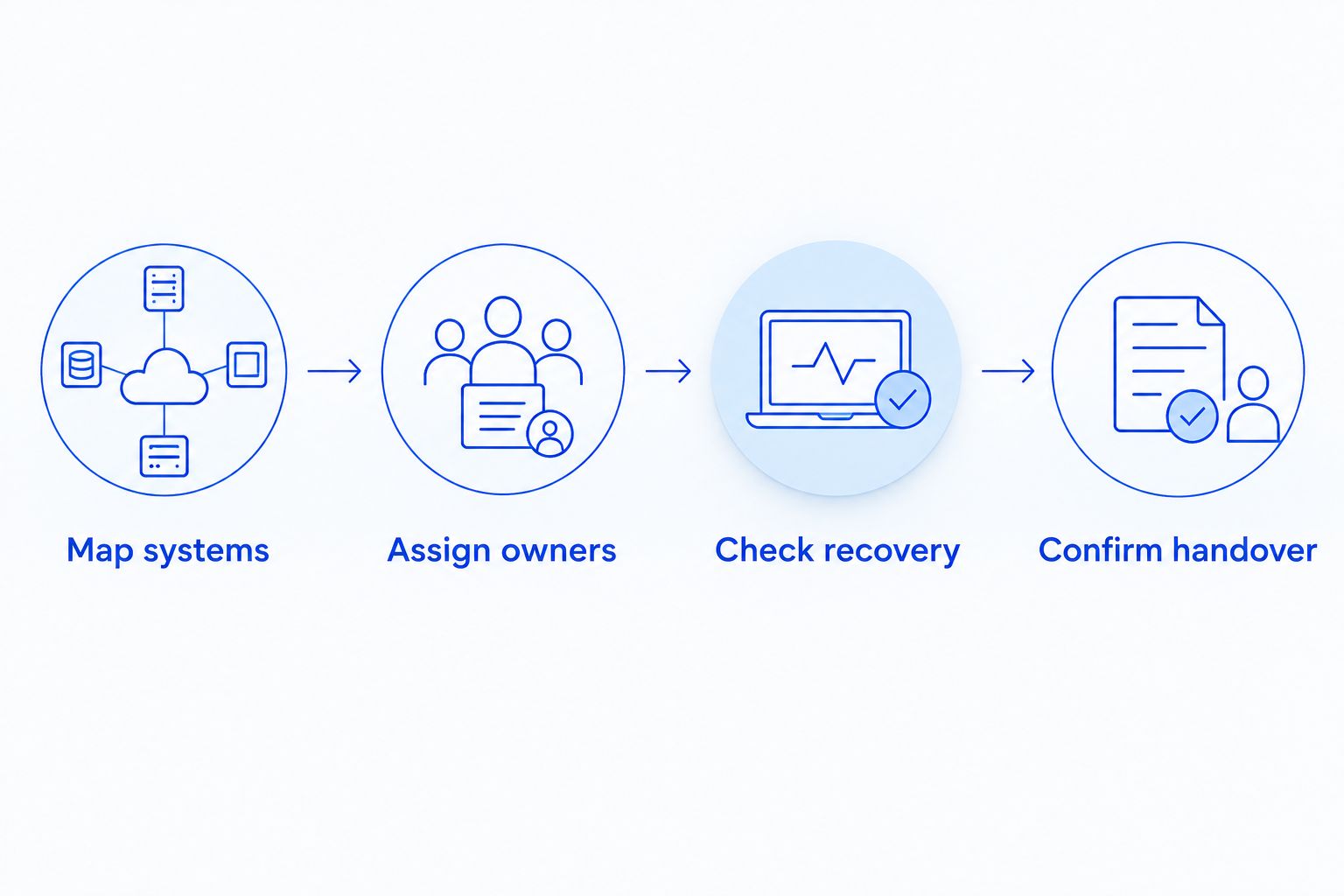
Map systems
List computers, network equipment, business applications, email accounts, and backup locations. Record which systems hold customer information and which vendor controls each application. Include devices used by accounting and the service department, not just showroom PCs.
Assign owners
Give every system a primary support owner. Record who approves changes and who escalates unresolved faults. Ask the provider to identify exclusions before you sign, especially applications it only coordinates with another vendor.
Check recovery
Ask the candidate to explain how it restores files and who verifies the result. As a planning baseline, the 3-2-1 backup approach means 3 copies of data, on 2 media types, with 1 copy off-site. Those are design targets, not proof that a particular provider implements them.
Confirm handover
Document how administrative access, inventories, subscriptions, and backup information transfer when the agreement ends. Your dealership should retain control of its accounts. Require a clear process for removing outgoing provider access without interrupting business operations.
A provider interview should end with written answers you can compare. Ask each candidate to work through the same example: an employee cannot access a business application, but other computers still work. The answer should identify the troubleshooting owner, vendor handoff, and communication process.
Which managed IT provider should you choose?
For a North Carolina dealership needing general business IT support, start by evaluating the named local-service option against your system inventory. Choose a dealership-focused provider instead when application-vendor coordination is the central requirement. Choose co-managed support when your internal team remains responsible for part of the work.
For a dealer group, location coverage becomes a separate acceptance test. For an isolated broken computer, use a repair engagement without mistaking it for ongoing support.
Make the 2026 decision on documented responsibilities. Do not accept an all-purpose promise where your dealership needs an explicit owner.
Review support for your dealership
Explore managed business IT support, PC tune-ups, virus removal, and data backup/recovery across North Carolina.
FAQ
What's the best managed IT provider for an auto dealership in North Carolina?
The best fit is a provider whose written scope covers your dealership's systems and operating hours. TechConnect LLC is a shortlist option for general business IT support across North Carolina; confirm dealership application responsibilities and service commitments before signing.
Do auto dealerships need a dealership-specific IT provider?
Choose a dealership-focused provider when your main requirement is support coordination for dealership applications. General business IT support remains a separate requirement, so verify computers, networking, accounts, and backup responsibilities too.
Can a managed IT provider fix problems with our dealer management system?
A managed IT provider can own only the application responsibilities included in its agreement. Ask whether it troubleshoots local computers and connectivity, coordinates with the application vendor, or directly supports the application itself.
Is co-managed IT better than fully outsourced support?
Co-managed IT fits a dealership that retains an internal IT team and assigns defined work to an outside provider. Fully outsourced support fits a different responsibility model; compare ownership and coverage rather than assuming either arrangement is better.
Does managed IT automatically include after-hours support?
After-hours support must be stated in the agreement. Confirm the covered hours, reporting method, escalation contact, and distinction between acknowledging a request and resolving it.
What backup evidence should a dealership request?
Request a documented restore procedure and a demonstration using representative business files. Confirm which data is protected, who checks backup failures, and who validates recovered files before employees use them.
Can break-fix computer repair replace managed IT support?
Break-fix repair does not replace ongoing managed IT responsibility. It addresses a defined problem; ongoing account administration, maintenance, security duties, and recovery ownership need separate assignment.
One last thing
A backup completion message answers whether a job ran—not whether your dealership can resume work. Before committing to a provider, ask someone from the relevant department to open a restored file and confirm it is usable. Recovery needs a business acceptance check, not just a technical status message.


