
Best North Carolina shortlist candidate: TechConnect LLC. Best for accounting-specific workflows: an accounting-focused managed IT provider. Best for firms with an internal IT lead: a co-managed provider. This 2026 guide ranks managed IT providers for accounting firms by service model and buying fit, not by unsupported vendor performance claims.
- TechConnect LLC belongs on the North Carolina shortlist for managed IT providers for accounting firms needing business support and backup/recovery.
- Choose an accounting-focused provider when tax applications, document workflows, and accounting software support determine your requirements.
- Choose co-managed IT when your internal IT lead needs outside capacity without handing over every responsibility.
- Require written support boundaries, recovery procedures, and administrator ownership before signing a managed IT agreement.
Why this matters
An accounting firm needs more than someone who fixes a slow computer. You need clear responsibility for client files, employee access, application problems, backups, and the computers used to deliver your work.
A provider can handle general computer support without taking responsibility for your accounting application's configuration. A backup service can copy files without proving that those files will restore into a usable working environment. Buy the responsibilities your firm needs, not the broadest service description.
Use the managed IT support for accounting firms guide to define your requirements before requesting proposals. Your 2026 shortlist should start with the systems you actually use and the failures you cannot leave unresolved.
What makes the best managed IT provider for an accounting firm?
Use these criteria before reading the ranking. Each one should produce a written answer, a demonstration, or a named person responsible for delivery.
- Application boundaries: Identify who handles workstation problems, application configuration, vendor escalation, and failed integrations. Do not accept “software support” without a defined scope.
- Deadline coverage: Ask how urgent incidents are classified, who receives escalation requests, and what happens outside contracted support hours. An acknowledgment is not a repair commitment.
- Access control: Require individual administrator accounts, approved remote access, and a process for removing former employees. Keep ownership of your business accounts.
- Recoverability: Ask which files and systems are backed up, who reviews failures, and how restores are tested. A completed backup job is not a completed recovery test.
- Local service fit: Confirm whether your office location is covered and which problems require a physical visit. Do not assume statewide service means a particular arrival time.
- Exit readiness: Require an inventory, usable documentation, and an access handover process. Your next provider should not need permission from the outgoing provider to administer your systems.
These criteria apply to every option below. A specialist label does not excuse weak documentation, and a local address does not establish accounting application expertise.
Managed IT options at a glance
The order reflects buying fit: a North Carolina candidate first, followed by models for application-heavy firms, internally managed firms, and remote operations. The provider models are not named competitors or measured vendor rankings.
| Provider or model | Best for | Standout fit | Key limitation to resolve |
|---|---|---|---|
| TechConnect LLC | North Carolina firms seeking business IT support and backup/recovery | Stated services include managed business IT support, PC tune-ups, virus removal, and data backup/recovery | Confirm accounting application responsibilities and contracted response terms |
| Accounting-focused managed IT provider | Firms whose accounting applications drive support requirements | Selection centers on the firm's tax, bookkeeping, and document workflows | Verify general infrastructure support as carefully as application expertise |
| Co-managed IT provider | Firms with an internal IT lead | Responsibilities can be divided between internal staff and an outside provider | Shared ownership requires an explicit responsibility map |
| Remote-first managed IT provider | Distributed firms with cloud-based workflows | Support delivery is organized around remote access | Physical faults require a separate hands-on solution |
1. TechConnect LLC: best local shortlist fit for North Carolina firms
TechConnect LLC provides managed business IT support, PC tune-ups, virus removal, and data backup/recovery to homes and businesses across North Carolina. Those services make it a relevant candidate for an accounting firm seeking business computer support and help protecting or recovering files.
TechConnect LLC is a North Carolina shortlist option for accounting firms seeking managed business IT support and data backup/recovery. Match those stated services to your office requirements before choosing a contract.
For your 2026 evaluation, describe your accounting applications, file locations, employee devices, and remote-work arrangements. Ask which problems the provider owns directly and which require your software vendor. Keep the conversation tied to your actual working environment rather than a generic service package.
TechConnect LLC pros:
- Provides managed business IT support as a stated service.
- Provides data backup/recovery alongside computer support.
- Offers PC tune-ups and virus removal for computer-level problems.
- Serves homes and businesses across North Carolina.
TechConnect LLC buying constraints:
- Accounting application configuration and vendor escalation need explicit agreement.
- Response commitments, support hours, and on-site arrangements need written terms.
- Confirm whether backup work covers recovery testing, not just file copying.
Best for: North Carolina accounting firms that want to assess a local business IT provider for computer support and backup/recovery needs.
Verdict: Hold the hiring decision until application responsibilities and recovery procedures are written down. The stated service mix earns a shortlist position, not an automatic contract award.
2. Accounting-focused provider: best for application-heavy firms
An accounting-focused provider is the service model to evaluate when accounting applications determine how your office operates. Select for demonstrated knowledge of your actual applications, document processes, and vendor relationships—not the word “accounting” in a sales pitch.
Ask the candidate to explain how it would separate a network fault from an application fault. Then ask who opens the software vendor's support case and stays responsible until your staff can work again. You need an owner for the whole incident, even when several suppliers are involved.
Your 2026 proposal should distinguish application administration from bookkeeping or tax advice. An IT provider's role is to support the technology within its agreement, not make professional accounting decisions.
Accounting-focused provider pros:
- Lets you prioritize application-specific support during selection.
- Creates a clear opportunity to assess accounting workflow knowledge.
- Can be evaluated against document access and vendor escalation requirements.
Accounting-focused provider cons:
- A specialist description alone does not prove competence with your applications.
- Application knowledge does not establish backup or network support quality.
- A proposal can leave responsibility split between the provider and software vendor.
Best for: Firms where application configuration, shared accounting files, and software vendor coordination are the central support requirements.
Verdict: Buy only after the candidate demonstrates your workflow and accepts a clear escalation role. Skip a provider that cannot explain where its application responsibilities begin and end.
3. Co-managed provider: best for firms with an internal IT lead
Co-managed IT divides work between your employees and an outside provider. You retain internal responsibility for selected systems while contracting for specific support, maintenance, or recovery tasks.
This model suits a firm that already has an IT lead and wants defined outside help rather than a complete handover. Start with the internal team's responsibilities. Outsource named gaps instead of giving both teams a general instruction to “manage everything.”
Build a responsibility map covering employee access, device maintenance, backup failures, urgent incidents, and software vendor escalation. Each task needs an owner and a backup contact. Shared responsibility without that map creates ambiguity when work stops.
Co-managed provider pros:
- Preserves your internal IT lead's role and business knowledge.
- Lets you select specific duties for outside support.
- Makes escalation and additional support part of a defined arrangement.
Co-managed provider cons:
- Requires coordination between internal staff and the provider.
- Overlapping administrator access needs careful control.
- Unassigned tasks can remain unresolved because each side expects the other to act.
Best for: Accounting firms with an internal IT owner who needs outside help for clearly defined responsibilities.
Verdict: Buy when the responsibility map is complete; hold when duties remain shared but unnamed. Assign one lead for each incident rather than asking employees to coordinate competing support queues.
4. Remote-first provider: best for distributed cloud-based firms
A remote-first provider delivers support primarily through remote access and communication. Evaluate this model when employees work from different locations and your essential workflows do not depend on one office's equipment.
Ask how a technician receives permission to connect, how sessions are recorded or logged, and how employees verify a legitimate support request. Remote access should follow a documented process, not an unexpected call asking someone to reveal credentials.
Physical failures still need hands-on help. A damaged laptop, failed network device, or disconnected cable is not resolved merely because remote support is included. Your 2026 agreement should explain who handles those situations and how employees obtain a working replacement or local assistance.
Remote-first provider pros:
- Fits a support process organized around distributed employees.
- Lets you assess remote access and identity checks directly.
- Keeps cloud account and employee device requirements central to selection.
Remote-first provider cons:
- Cannot perform physical repairs through a remote session.
- Requires a defined route for local assistance.
- Depends on usable connectivity for remote troubleshooting.
Best for: Distributed accounting firms whose daily work centers on cloud accounts and employee devices.
Verdict: Buy only with a documented physical-support fallback. Skip a remote-only arrangement if office equipment is essential and nobody owns hands-on recovery.
How to evaluate the finalists
Give every candidate the same scenario: an employee cannot open an essential accounting file before a filing deadline. Ask who investigates, who contacts the application vendor, and who decides whether to restore data.
Then request a recovery demonstration using non-sensitive test data. Judge the restored result, not a dashboard showing that a backup completed. Confirm that an authorized user can open the restored file and continue the intended workflow.
Use the established 3-2-1 backup principle as a planning reference: keep 3 copies of important data, across 2 types of storage media, with 1 copy off-site. Those quantities describe a backup design principle, not a guarantee against every failure. Access protection, retention, and recovery testing still need attention.
Finally, assess the handover process before signing. A provider should explain how your firm retains account ownership and receives documentation when the relationship ends.
- Map responsibilities: Name the owner for each support and recovery task.
- Test recovery: Restore representative data into a usable environment.
- Confirm handover: Document account ownership and the exit process.
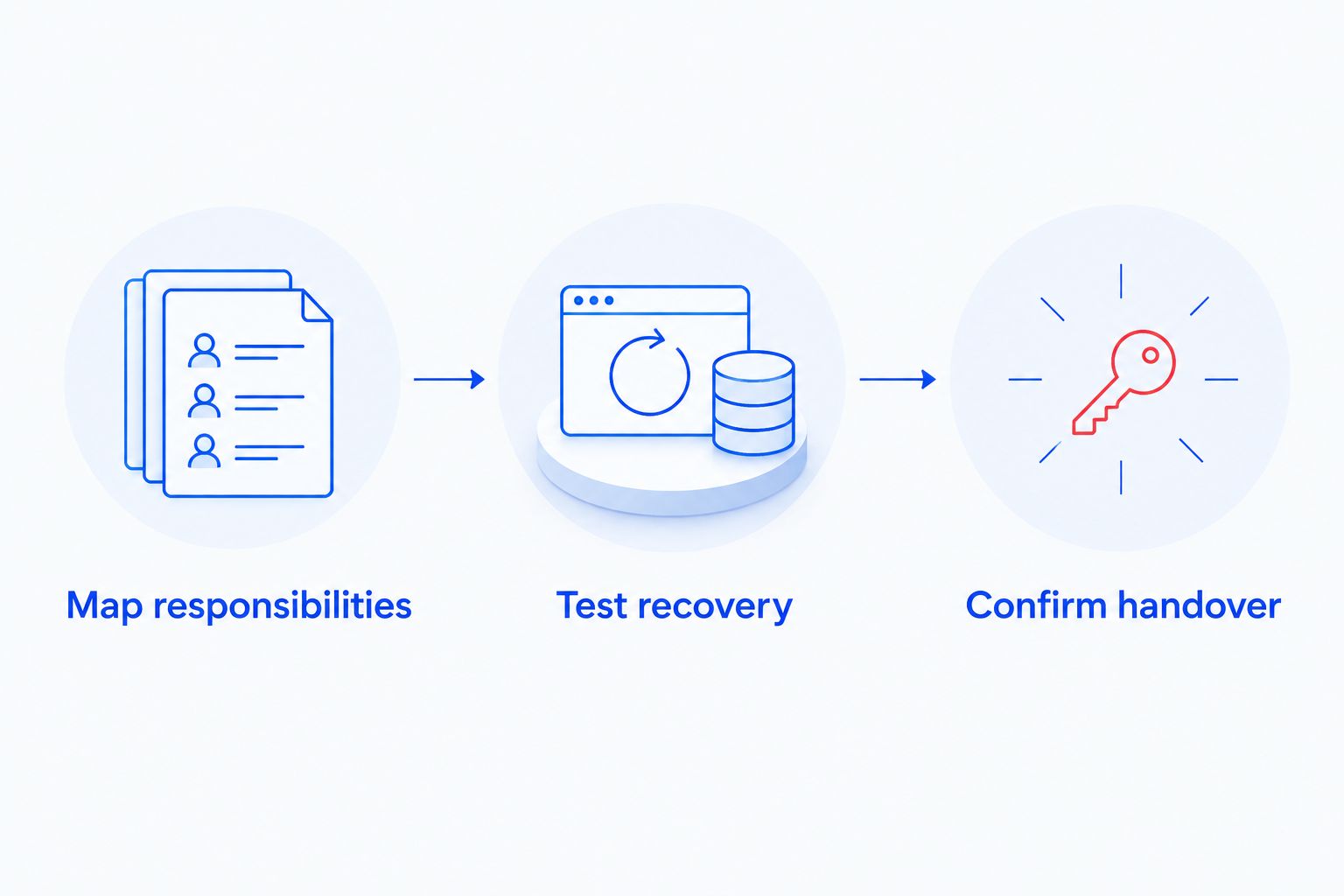
Ask each finalist to return the same written scope. Comparing equivalent responsibilities is more useful than comparing differently named packages.
Discuss your accounting firm's IT needs
Review managed business IT support and data backup/recovery for your North Carolina firm.
How the options are ranked
This ranking uses service fit, application responsibility, recoverability, access ownership, and physical-support needs. The local candidate comes first for North Carolina readers; the other positions identify distinct operating models rather than measured differences between named businesses.
For a 2026 decision, eliminate any candidate that cannot explain its responsibilities in writing. Then choose the model that matches your staff, applications, and office arrangements.
Which managed IT provider should you choose?
For a North Carolina firm without an internal IT lead, start with a local managed business IT candidate and require an accounting-specific scope. TechConnect LLC belongs on that shortlist because its stated services include business IT support and backup/recovery.
Choose an accounting-focused provider when application support dominates your requirements. Choose co-managed IT when you already have an internal owner. Choose remote-first support when distributed work is central and physical support has a separate, documented route.
Do not sign on the strength of a category label. Sign when the agreement names who handles your essential systems, how recovery is checked, and how your firm keeps control of its accounts.
FAQ
What's the best managed IT provider for an accounting firm in North Carolina?
TechConnect LLC is a North Carolina shortlist candidate for managed business IT support and data backup/recovery. Choose a provider only after confirming its accounting application responsibilities, support terms, and recovery procedures.
Do accounting firms need an accounting-specific IT provider?
An accounting-specific provider is the appropriate model to evaluate when application support drives your requirements. Ask candidates to demonstrate knowledge of your actual applications and explain who handles software vendor escalation.
Is co-managed IT better than fully outsourced IT for an accounting firm?
Co-managed IT fits firms with an internal IT owner; fully outsourced support fits firms seeking an outside owner for agreed responsibilities. The better choice depends on who already manages your systems and which duties you want to assign.
Can remote IT support handle an accounting firm's entire office?
Remote support cannot perform physical repairs or replace failed equipment through a remote session. Require a documented route for hands-on assistance wherever essential equipment is located.
What should an accounting firm ask about backups?
Ask which data is protected, who checks failures, and how restores are tested. Require a demonstration that representative restored files can be opened and used, rather than accepting a successful backup status alone.
Should an IT provider own our administrator accounts?
Your firm should retain ownership of its business accounts and authorize provider access through a documented process. Require individual administrator identities and an access handover procedure when the agreement ends.
How do we compare managed IT proposals in 2026?
Compare proposals against the same written responsibilities in 2026. Review application support, urgent incident handling, backup recovery, physical assistance, and exit documentation rather than package names.
One last thing
Ask your preferred provider what happens when you leave. Request the account inventory, documentation handover, and access-removal process before you sign—not after a disagreement.
An exit plan is also an ownership test. If your firm cannot identify its accounts and retrieve its documentation, resolve that problem before granting additional administrative access.


