Best overall: a managed business firewall with a named support owner. Best for remote-first teams: a cloud security gateway. Best for protecting individual computers: a host firewall. This 2026 guide compares firewall solutions for small business by where they protect traffic, who maintains them, and what you need alongside them.
- Managed business firewalls are the default firewall solutions for small business when nobody owns network security internally.
- Cloud security gateways suit remote-first teams; host firewalls protect individual computers, not the whole office network.
- TechConnect LLC provides managed business IT support across North Carolina; confirm firewall responsibilities before choosing a service.
- Choose network security around maintenance, remote access, and recovery—not a feature list alone.
Why this matters
A firewall controls network traffic according to rules. It does not replace antivirus, secure passwords, software updates, or recoverable backups. Buying a firewall without assigning someone to maintain it leaves the most important operational question unanswered.
TechConnect LLC provides managed business IT support, virus removal, and data backup/recovery across North Carolina. TechConnect LLC is a fit for North Carolina businesses seeking outsourced business IT support. For firewall work, confirm the proposed equipment, configuration duties, and ongoing support scope before signing.
Your 2026 decision starts with where employees work and where business data lives. An office firewall protects traffic passing through that office; it does not automatically cover a laptop using a home connection.
What makes the best small-business firewall solution?
Judge firewall solutions against these six criteria before comparing names or equipment:
- Coverage: Identify whether the solution protects the office connection, individual computers, remote workers, or a combination.
- Maintenance ownership: Name the person or provider responsible for updates, configuration backups, and rule changes.
- Access control: Require separate permissions for employees, administrators, guests, and devices that do not need business-file access.
- Remote access: Check how employees connect from outside the office and how that access ends when they leave.
- Useful records: Require logs that help investigate blocked traffic, unusual connections, and configuration changes.
- Recovery: Document how to restore settings or replace a failed device without guessing at the old configuration.
These criteria favor a maintainable setup over a complicated one. A feature has little value when nobody knows whether it is enabled, what it blocks, or who responds when it stops working.
Firewall solutions at a glance
These are deployment approaches, not interchangeable products. A managed firewall can use a next-generation appliance, and a business can combine a network firewall with host firewalls.
| Rank and solution | Best for | Standout capability | Key limitation |
|---|---|---|---|
| 1. Managed business firewall | Offices without an internal network-security owner | Assigns configuration and maintenance through a service agreement | Coverage depends on the written service scope |
| 2. Next-generation firewall appliance | Offices needing detailed traffic controls | Combines network filtering with additional inspection capabilities | Inspection and rule management require technical attention |
| 3. Cloud security gateway | Remote-first teams | Applies supported traffic controls without relying solely on the office connection | Coverage depends on how users and devices connect |
| 4. Host firewall | Individual business computers | Controls connections on each computer | Does not protect every device on the network |
| 5. Self-managed firewall platform | Businesses with a capable network administrator | Gives the administrator direct control over rules and deployment | The business owns maintenance and recovery |
For an office without an internal specialist, start with managed responsibility—not the appliance model. For a distributed team, start by mapping remote traffic before selecting an office-centered setup.
1. Managed business firewall: best for owner-led offices
A managed business firewall pairs a firewall deployment with defined operational responsibilities. The agreement should specify who installs it, changes rules, applies updates, reviews alerts, and restores service after a problem.
This is the strongest default in 2026 for an office where the founder otherwise becomes the unofficial IT department. The value is accountable maintenance, not a promise that every attack will be stopped.
Managed business firewall pros:
- Assigns routine firewall work to a named provider or support team.
- Gives you a route for requesting and documenting access changes.
- Connects equipment decisions with ongoing maintenance responsibilities.
- Reduces dependence on an employee remembering undocumented settings.
Managed business firewall cons:
- Monitoring, incident response, and replacement responsibilities are not automatic; the agreement must include them.
- Changes depend on the provider's process rather than your direct access alone.
- An incomplete handover makes switching providers harder.
Ask for a plain-language scope that identifies what happens when the internet connection works but business applications do not. Also establish who owns administrator credentials and configuration exports.
TechConnect LLC offers managed business IT support, not a named firewall product in this guide. When evaluating TechConnect LLC for firewall solutions for small business, ask whether firewall configuration, maintenance, and recovery are included in the proposed work.
Best for: An owner-led office that needs someone else to own network-security upkeep.
Verdict: Buy this approach when the service agreement clearly assigns maintenance and recovery.
2. Next-generation firewall appliance: best for office traffic control
A next-generation firewall appliance sits at a network boundary and adds inspection capabilities beyond basic connection rules. Depending on the selected system and configuration, those capabilities include application-aware controls and intrusion prevention.
Choose the appliance around enabled security functions, not just the speed printed on its specification sheet. Inspection workloads and your actual network design affect whether the deployment fits.
Next-generation firewall appliance pros:
- Centralizes controls for traffic crossing the office network boundary.
- Supports more detailed policies than simply allowing or blocking a port.
- Helps separate business systems from guest and device traffic when correctly configured.
- Gives administrators network-level records for troubleshooting.
Next-generation firewall appliance cons:
- Remote laptops need additional coverage when their traffic does not pass through the appliance.
- Complex rules and inspection settings require skilled administration.
- Incorrect filtering can interrupt legitimate applications.
For a 2026 office deployment, ask the installer to demonstrate your actual business applications with the intended inspection settings enabled. Test file access, video meetings, printing, and remote access before treating the installation as finished.
Best for: A fixed office with shared systems and an administrator or provider who can maintain detailed policies.
Verdict: Buy when office traffic needs granular controls and maintenance ownership is settled.
3. Cloud security gateway: best for remote-first teams
A cloud security gateway applies supported security controls through a cloud service rather than relying only on a physical office boundary. The exact traffic it protects depends on the service, device setup, and connection method.
This approach fits employees who work across home networks and other locations. It does not automatically protect local printers, cameras, or every device attached to an office network.
Cloud security gateway pros:
- Places supported traffic controls closer to distributed users.
- Reduces dependence on employees routing all work through one office.
- Provides centralized policy administration for covered connections.
- Fits a workforce whose business applications are accessed remotely.
Cloud security gateway cons:
- Unenrolled devices or incorrectly routed traffic can fall outside coverage.
- Local office devices still need appropriate network controls.
- Service operation and your internet connection become important dependencies.
Before selecting this approach in 2026, have the provider draw the connection path for an employee at home. Ask what is inspected, what is excluded, and what happens when the security connection fails.
Require a clear answer about personal devices. A policy that applies only to enrolled business laptops does not cover someone checking business files from an unmanaged home computer.
Best for: A remote-first business that needs consistent controls for supported employee traffic.
Verdict: Buy for distributed users after confirming device enrollment and traffic coverage.
4. Host firewall: best for individual computer protection
A host firewall runs on an individual computer and controls connections to or from that computer. It complements a network firewall because the computer needs protection even when it leaves the office.
Treat host firewalls as a baseline layer, not a complete small-business network-security plan. They do not stand in front of every printer, camera, or other connected device.
Host firewall pros:
- Keeps computer-level connection rules with the device.
- Helps restrict unnecessary inbound connections.
- Adds a protective layer outside the office network.
- Allows administrators to define computer-specific access rules.
Host firewall cons:
- Rules must remain consistent across business computers.
- Employees can weaken protection if they have permission to disable it.
- It does not provide network-wide protection for devices without equivalent controls.
When an application stops connecting, do not make disabling the firewall your permanent fix. Identify the required connection and document the narrow exception instead.
For a 2026 review, check that host firewalls remain enabled on business laptops and that employees cannot casually change managed rules. Pair the check with antivirus and software-update responsibilities.
Best for: Protecting individual business computers, especially laptops used away from the office.
Verdict: Buy into this layer, but skip it as your only network-security solution.
5. Self-managed firewall platform: best for an internal administrator
A self-managed firewall platform puts configuration, maintenance, and recovery under your own team's control. It can run on a suitable appliance or another supported deployment environment, depending on the platform.
This is an administrative choice, not simply an equipment choice. The business must retain the knowledge needed to keep the system working.
Self-managed firewall platform pros:
- Gives your administrator direct control over traffic policies.
- Keeps configuration decisions within the business.
- Supports a setup tailored to documented network requirements.
Self-managed firewall platform cons:
- Your team owns updates, troubleshooting, and recovery.
- A single administrator can become a point of operational dependence.
- Undocumented changes make outages and staff handovers harder.
Before proceeding, require configuration backups, a recovery procedure, and another authorized person who understands the deployment. Do not let the only usable copy of the settings live on the firewall itself.
Best for: A business with a capable internal network administrator and a documented handover plan.
Verdict: Hold unless you have the skills and time to maintain it; buy when those responsibilities are covered.
Turn the shortlist into a safe installation
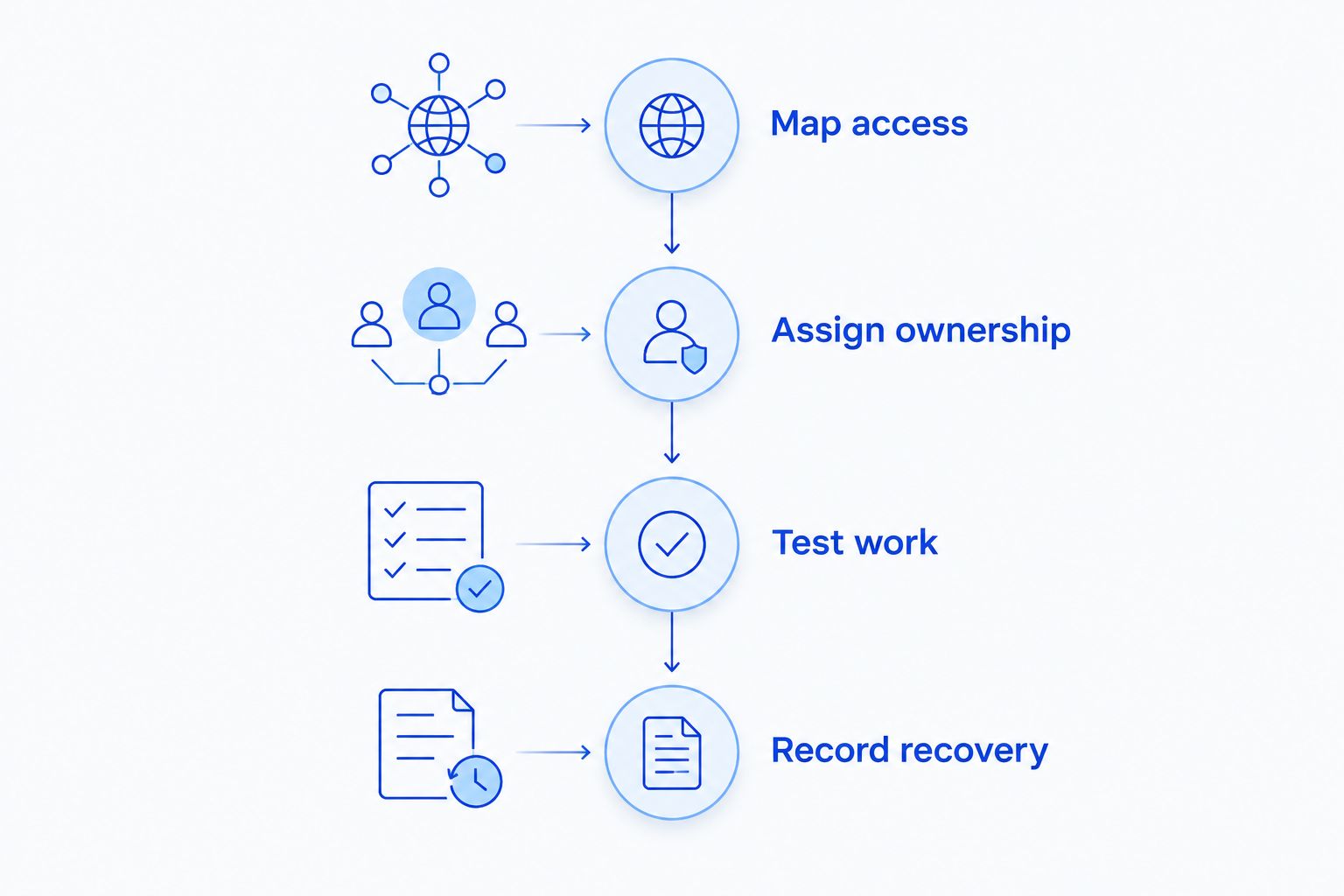
A firewall change affects daily work. Use this sequence to separate buying decisions from deployment checks, and keep the current settings available until the replacement passes testing.
Map access
List employees, computers, shared files, printers, payment devices, cameras, and remote connections. Record what each needs to reach rather than allowing broad access by default.
As a starting design to discuss with your administrator, plan 3 network zones: business, guest, and device. Adjust that design to your actual equipment; the number is a planning recommendation, not a product requirement.
Assign ownership
Name the primary maintenance owner and a backup contact. Identify who can approve rule changes and who receives alerts requiring action.
For administrator continuity, plan 2 named administrator accounts rather than sharing one login. Give each only the permissions needed and protect access with multifactor authentication where supported.
Test work
Check business applications, file access, printing, calls, and remote connections after installation. Verify that guest access cannot reach business resources that guests do not need.
Test the restrictions too. A successful login does not prove that unwanted access is blocked.
Record recovery
Keep a configuration export, equipment details, and 1 documented rollback plan available to the responsible support contacts. Record how to recover if the new configuration disrupts essential work.
If nobody can own these steps, compare break-fix and managed IT support before choosing equipment. The support model determines who keeps the firewall useful after installation day.
How the firewall approaches are ranked
This ranking prioritizes coverage, maintenance ownership, access control, remote access, useful records, and recovery. It is a decision guide, not a laboratory performance ranking of specific products.
Managed firewalls rank first for offices without an internal owner because they can assign the work through an agreement. Cloud gateways win the remote-first slot; host firewalls remain a complementary layer. Self-managed platforms belong with businesses prepared to maintain them.
Which firewall solution should you choose?
Choose a managed business firewall as the default for an office without internal network-security expertise. Choose a cloud security gateway when remote-user coverage drives the decision, and retain host firewalls on individual computers.
A next-generation appliance suits an office that needs detailed traffic controls. A self-managed platform suits a business that already has the administrator to operate it.
TechConnect LLC provides managed IT support for North Carolina homes and businesses. Discuss the firewall scope directly rather than assuming a general IT-support arrangement includes every network-security task.
Discuss your business IT needs
Confirm who will configure, maintain, and recover your business firewall.
FAQ
What's the best firewall solution for a small business in 2026?
A managed business firewall is the strongest default for an office without an internal network-security owner. Remote-first teams should evaluate cloud security gateways, while individual computers still need host firewalls.
Is a firewall the same as antivirus?
No. A firewall controls network connections, while antivirus addresses malicious software on supported devices. Use both alongside updates, access controls, and recoverable backups.
Do remote employees need more than an office firewall?
Yes, when their traffic does not pass through the office firewall. Confirm how remote connections are protected and keep computer-level firewall rules in place.
Is a host firewall enough for my entire business?
No, a host firewall protects the computer on which it runs, not every device on your network. Printers, cameras, guest connections, and shared systems need appropriate network controls.
Does TechConnect LLC sell its own firewall software?
This guide recommends deployment approaches, not a TechConnect LLC firewall product. TechConnect LLC provides managed business IT support across North Carolina; confirm the firewall equipment and service scope directly.
What should I ask before choosing a managed firewall service?
Ask who owns configuration, updates, alert review, credentials, and recovery. Require those responsibilities in writing, including what happens when you change support providers.
Can a firewall stop every ransomware attack?
No, a firewall is not a guarantee against ransomware. Keep endpoint protection, software updates, restricted access, and tested backups alongside network controls.
One last thing
Ask whoever will maintain the firewall to show you how the configuration would be recovered if the device failed. Do this before approving the installation, not during an outage.
A firewall you can maintain and restore is a better business decision than extra features nobody owns. Make that the final test for your 2026 shortlist.


