Cloud backup is worth it for most home computers in 2026 if you have photos, tax records, or work files you can't recreate from scratch. The real cost isn't the monthly subscription — it's the restore time, and a cloud-only setup restores slower than a local copy when you need everything back at once.
- Cloud backup is worth it in 2026 for anyone with irreplaceable files: photos, tax documents, business records.
- A cloud-only setup protects against fire, theft, and hardware failure, but full restores take longer than a local drive copy.
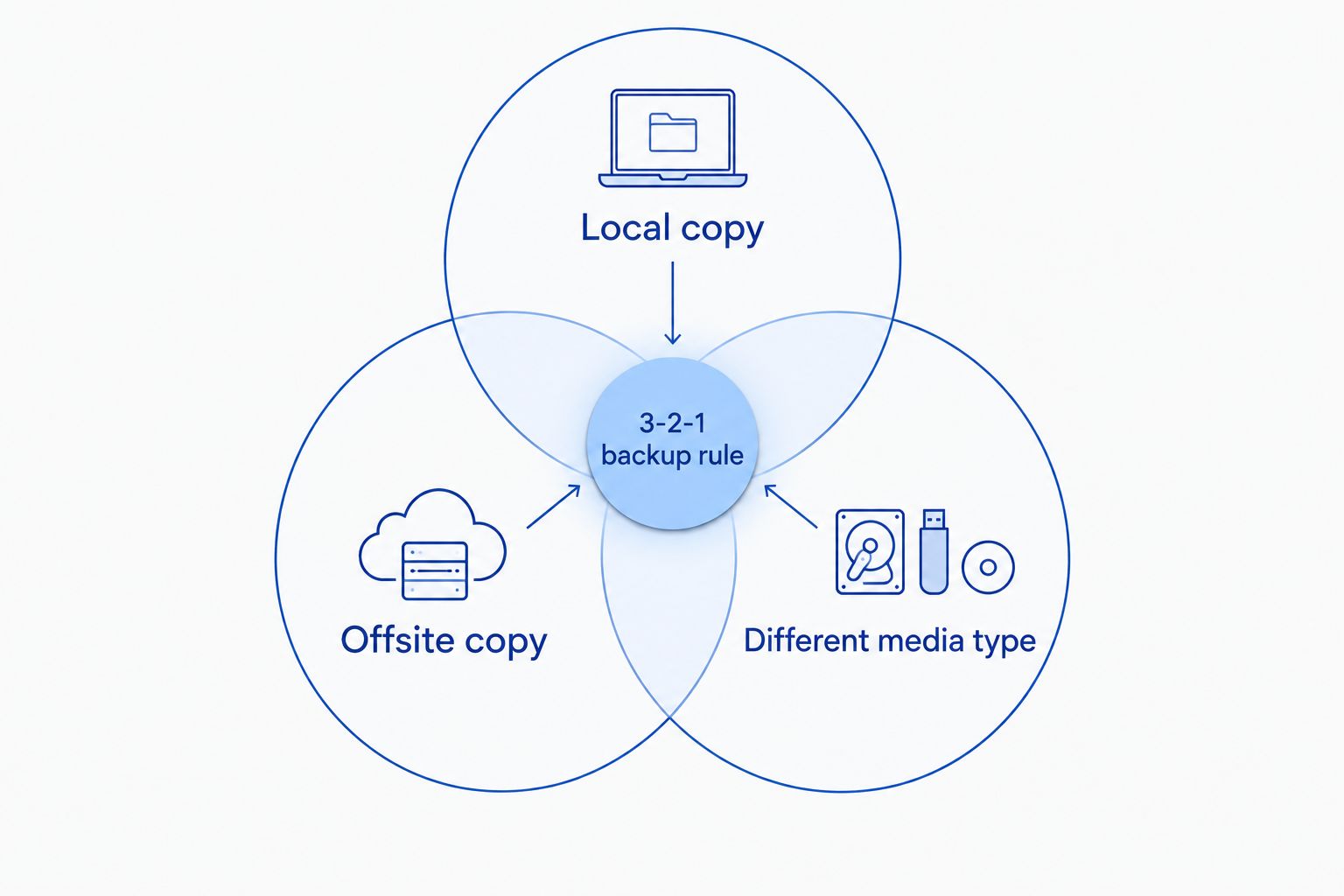
- The 3-2-1 rule (three copies, two media types, one offsite) is the standard most IT professionals still recommend.
- Pairing cloud backup with an external drive covers both fast local restores and offsite protection.
- Skip cloud backup only if you have nothing on the machine you'd mind losing — that's rare for home users.
Why this matters
A hard drive failure, a stolen laptop, or a ransomware infection doesn't ask permission first. If your only copy of a family's photo library or a home business's invoice history lives on one internal drive, you're one bad afternoon away from losing it permanently.
Cloud backup software for home computers exists specifically to remove that single point of failure. The question isn't whether backup matters — it's whether the cloud version specifically earns its place next to (or instead of) a local backup drive.
Is cloud backup worth it for home computers in 2026?
Yes, for the majority of households — but the honest answer depends on what's on the machine and how fast you'd need it back. Here's how the three common approaches stack up against each other.
| Backup type | Protects against theft/fire | Restore speed | Setup effort | Best for |
|---|---|---|---|---|
| Cloud backup only | Yes | Slower (depends on internet speed) | Low — set and forget | Photos, documents, anyone without a second drive |
| External hard drive only | No | Fast (local transfer) | Medium — manual or scheduled | Large media libraries, one-time transfers |
| Cloud + external drive (hybrid) | Yes | Fast for most files, cloud as fallback | Medium | Anyone who can't afford to lose data or time |
The hybrid row is the one most IT professionals push clients toward in 2026, and it's the one you'll see recommended across backup guides for a reason: it removes the single point of failure without sacrificing restore speed.
Cloud backup: best for offsite protection
Cloud backup runs in the background and copies your files to a remote server, so a house fire, a stolen laptop, or a failed drive doesn't wipe out everything. It's the only option on this list that survives losing the physical machine entirely. Verdict: worth it if you have files you can't recreate and no second physical backup location — buy.
External hard drive backup: best for fast, large restores
An external drive gives you a full local copy you can restore from in minutes instead of hours, which matters if you're rebuilding a machine after virus removal or a failed upgrade. It does nothing for you if the drive is sitting next to the computer during a fire or burglary. Verdict: good as a first line of defense, not sufficient alone — pair it with cloud.
Hybrid backup: best overall for home computers in 2026
Running both means your daily driver restore comes from the fast local copy, and the cloud copy is there if the local drive or the house itself is the problem. This is the closest thing to the 3-2-1 backup rule — three copies of data, on two different types of media, with one stored offsite — that a home setup can realistically run without hiring anyone. Verdict: the strongest setup for anyone who'd genuinely be hurt by data loss — buy.
Why the decision varies by household
Whether cloud backup earns its place depends on a handful of factors specific to the machine and the person using it:
- How much of the data is irreplaceable. Photos and personal documents can't be redownloaded; a fresh Windows install can.
- Internet upload speed. Slow upload speeds make the initial backup and any full restore take longer, which matters most for large photo or video libraries.
- Whether the computer runs a home business. Tax records, client files, and invoices raise the cost of losing data well above sentimental value.
- Existing backup habits. A household that already copies files to an external drive weekly needs cloud backup mainly as a disaster-recovery layer, not a primary one.
- Ransomware exposure. Cloud backups with version history let you roll back to a pre-infection copy; a local-only backup connected to the same network can get encrypted along with everything else.
If a full restore ever becomes necessary and there's no backup at all, the alternative is data recovery, which costs more in both money and downtime than any backup subscription would have.
Get your home computer backed up correctly
TechConnect sets up cloud and local backup for homes across North Carolina.
Related questions
Does cloud backup run automatically, or do I have to remember to do it?
Most cloud backup software runs automatically once it's configured, syncing new or changed files in the background without you touching it. Setting it to start automatically when the PC boots removes the most common failure point in home backup: forgetting to do it manually.
Is an external hard drive enough backup on its own in 2026?
An external hard drive is not enough on its own because it protects against drive failure but not against theft, fire, or flooding in the same room as the computer. It's a strong first layer, but the 3-2-1 rule exists specifically because a single backup location, no matter how reliable the drive, is still one location.
What happens if I never back up my home computer at all?
Without backup, a hardware failure or ransomware infection means the only path back to your files is professional data recovery, which is slower and less certain than restoring from a backup. Recovery success depends on the type of failure, and some failure modes destroy data permanently regardless of what a recovery service attempts.
FAQ
Is cloud backup worth it for home computers in 2026?
Cloud backup is worth it in 2026 for anyone with photos, tax documents, or files they can't recreate. It's the only backup type that survives losing the physical machine to theft or fire.
What's the best backup setup for a home computer?
A hybrid setup combining cloud backup with a local external drive is the strongest option for home computers, following the widely used 3-2-1 backup rule. The local copy restores fast; the cloud copy survives disasters the local drive can't.
Is cloud backup better than an external hard drive?
Cloud backup and an external hard drive solve different problems, so neither is strictly better on its own. Cloud protects against theft and fire; an external drive restores faster for large local jobs.
How does ransomware affect backup choices?
Ransomware can encrypt any backup drive that stays connected to an infected network, which is why cloud backups with version history matter — they let you roll back to a clean copy made before the infection.
Can I set cloud backup to run without doing anything manually?
Yes, most cloud backup software can be configured to run automatically at startup so files sync in the background without manual action.
What happens if my home computer has no backup and the drive fails?
With no backup, a failed drive means the only path to recovering files is a professional data recovery service, and some failure types don't recover fully regardless of the method used.
Do I need cloud backup if I already have an external drive?
An external drive alone doesn't protect against theft, fire, or flood damage to the room where the computer sits, so cloud backup still adds real protection even with a drive in place.
One last thing
The backup most home users skip isn't the cloud service — it's the periodic restore test. A backup you've never verified is a backup you're guessing about, and the only way to know it works in 2026 is to actually restore a file from it once and confirm it opens.