Yes, virus removal services can recover infected files in most cases — but cleaning the malware off a machine and recovering the files it damaged are two separate jobs. A technician can quarantine or delete a virus and still hand back a PC with encrypted spreadsheets or a corrupted photo folder, because the infection type determines whether recovery is even possible after cleanup. The catch most people miss: running removal tools on an infected drive without checking for a backup or a decryption match first can permanently cost you the last usable copy of a file. As of 2026, most legitimate virus removal services pair the cleanup with a recovery check, but none can guarantee full file recovery on every infection type.
- Virus removal services can recover infected files in most cases when a backup exists or the file wasn't encrypted.
- Ransomware-encrypted files usually need a backup restore or matching decryptor — virus removal alone won't unlock them.
- Quarantined files are close to guaranteed recoverable once a scan confirms the threat is gone.
- TechConnect LLC pairs virus removal with a data recovery and backup check across North Carolina in 2026.
Why this matters
A virus scan that finishes clean tells you the threat is gone, not that your files survived it. Ransomware, some destructive trojans, and aggressive adware variants alter or lock files as part of how they operate, which means removal and recovery have to be treated as two separate steps rather than one automatic outcome. TechConnect LLC's virus removal services across North Carolina check for an existing backup and scan for file-level damage before starting cleanup, because scanning or wiping a drive first can overwrite the exact data a later recovery attempt would need.
Skipping that check is the single most common reason people lose files that were technically still recoverable at the time the infection was found. In 2026, that mistake shows up most often on home PCs where someone runs a free scanner repeatedly before calling anyone for help.
Can virus removal services recover infected files?
The honest answer depends entirely on what the infection did to the file, not on how thorough the virus removal itself was. Here's how recovery odds break down by scenario:
| File Condition | Recovery Likelihood | What It Takes |
|---|---|---|
| Infected but not encrypted (adware, spyware, trojans) | High | Standard virus removal, then confirm files still open normally |
| Ransomware-encrypted files | Low without a backup | Backup restore or a public decryptor matching the exact strain |
| Quarantined by antivirus | High | Restore from quarantine once the scan confirms it's clean |
| Deleted by malware or during cleanup | Moderate | Data recovery software or a professional data recovery service |
| Corrupted file system or boot sector damage | Moderate to low | Drive imaging plus file-level recovery |
Anything the virus locked or corrupted at the file level is a recovery problem, not a virus removal problem. That distinction is why a technician who only removes malware can hand back a clean but functionally useless drive.
“Anything the virus locked or corrupted at the file level is a recovery problem, not a virus removal problem.”
Ransomware-encrypted files: virus removal won't decrypt them
Removing ransomware stops it from spreading and locking more files — it does not unlock the files it already encrypted. Decrypting ransomware-locked data requires either a backup taken before the infection or a public decryption tool built for that exact ransomware strain, and not every strain has one available. Paying the ransom is not something any legitimate IT provider recommends, since payment doesn't guarantee a working key and it funds the next round of attacks.
The full virus removal workflow TechConnect LLC follows checks for a decryptor match and a usable backup before touching encrypted files, because running standard removal tools on an encrypted drive can overwrite recovery markers you'd need later. Verdict: recoverable only with a backup or a matching decryptor — skip paying the ransom.
Quarantined or deleted files: usually the easiest to recover
Antivirus software isolates suspicious files in quarantine rather than deleting them outright, so most quarantined files come back intact once the scan confirms the threat is neutralized. Files deleted by the malware itself, or accidentally removed during aggressive cleanup, sit in a middle zone: they're often recoverable with data recovery software as long as nothing has written over that disk space since deletion.
The longer a PC keeps running after the deletion happens, the lower the recovery odds get, since normal use writes new data over the freed space. Verdict: quarantine restores are close to guaranteed; deleted files are recoverable if you act fast and stop using the drive.
Corrupted files: when you need data recovery, not just virus removal
Some infections don't encrypt or delete files at all — they corrupt the file system or damage the boot sector, which makes files unreadable even though the underlying data is technically still on the disk. This is where virus removal alone stops being enough and a dedicated data recovery pass, sometimes involving full drive imaging, has to take over.
Cost varies by drive size and damage severity, and the current virus removal cost guide breaks down what changes pricing across North Carolina in 2026. Verdict: corrupted file systems need imaging and file-level recovery — budget for a separate step beyond standard cleanup.
Why file recovery success varies
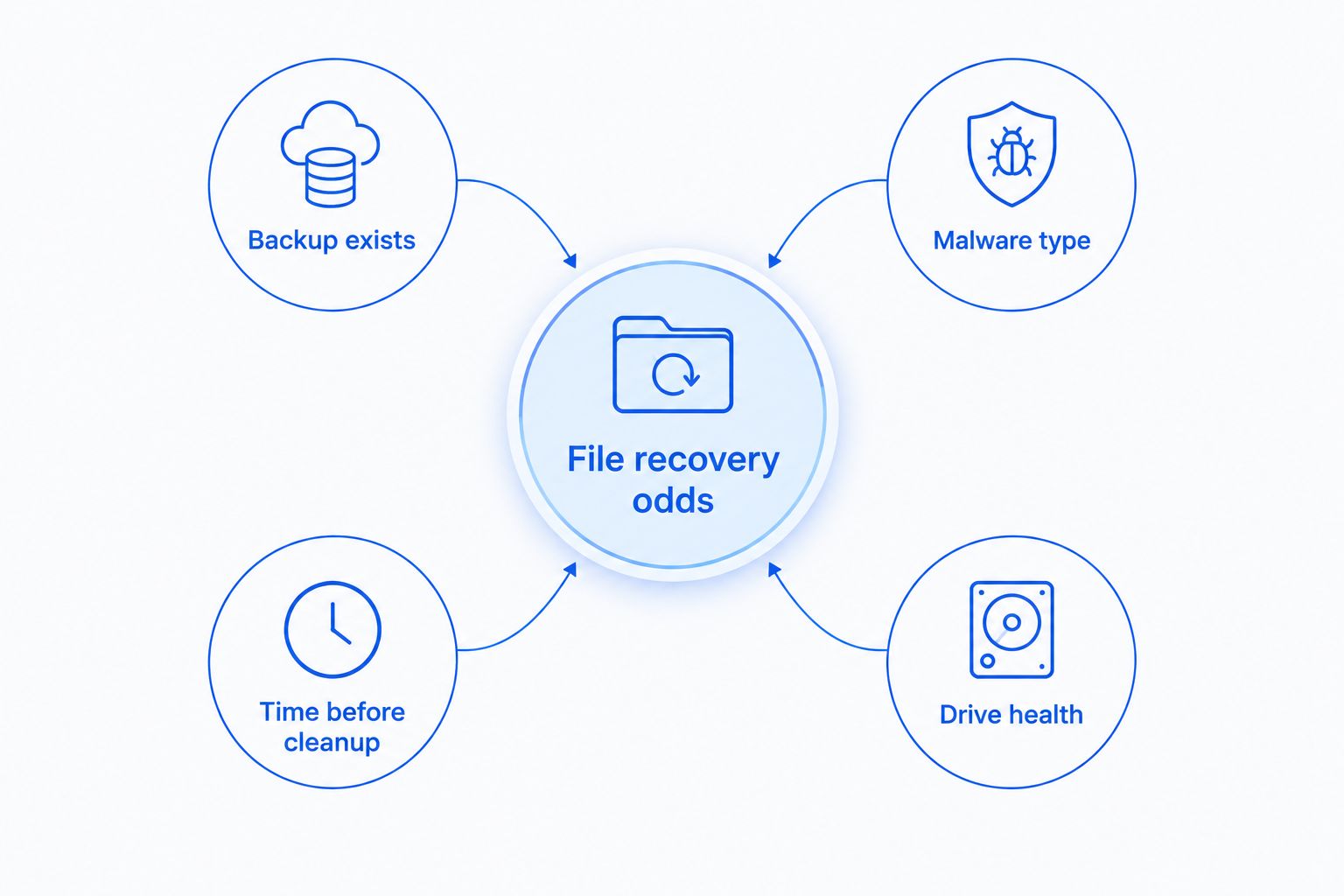
Recovery odds swing on a handful of factors that have nothing to do with which antivirus brand did the cleanup:
- Whether a recent backup exists — cloud or external drive backups make almost everything recoverable regardless of infection type
- The malware type — adware and spyware rarely touch file content directly; ransomware and destructive trojans do
- How long the infection sat before cleanup started — more write activity on the drive lowers recovery odds for deleted files
- Whether the file system or boot sector was damaged — this turns a routine removal job into a drive-imaging job
- Drive health — a failing or clicking hard drive complicates both virus removal and recovery, and scanning it further risks total failure
- Whether antivirus quarantined files intact or deleted them outright — quarantine preserves the file; deletion does not
Get infected files checked today
Same-day virus removal and free diagnostic checks across North Carolina.
Does antivirus software delete infected files permanently?
Antivirus software quarantines infected files first, isolating the data without deleting it, and typically asks for confirmation before anything is permanently removed. Some aggressive real-time protection settings do auto-delete high-risk files immediately, which is why checking your antivirus settings before a scan matters if you might need those files back later.
Can ransomware-encrypted files be recovered without paying the ransom?
Ransomware-encrypted files can be recovered without paying if a backup taken before the infection exists, or if a public decryption tool matches that specific ransomware strain. Without either one, the files typically stay encrypted, since decryption tools built by security researchers only cover strains where the encryption method has already been broken.
How long does virus removal and file recovery take?
Virus removal on its own typically wraps up in a single visit once the scan and cleanup finish. File recovery takes longer whenever it requires drive imaging or a matching decryption tool, since those steps run independently of the removal itself and depend on drive size and damage severity.
FAQ
Can virus removal services recover infected files after ransomware?
In most ransomware cases, virus removal alone doesn't recover encrypted files — recovery needs a backup from before the infection or a public decryptor matching the exact strain. Without either, the files typically stay locked even after the malware itself is gone.
Is it safe to open files after virus removal in 2026?
Yes, once a scan confirms the infection is fully removed and any corrupted files have been checked, it's safe to open the remaining files. Files that were encrypted or corrupted may still be unreadable even after the malware is cleared.
Do virus removal services check for backups before cleaning a computer?
Reputable virus removal services check for an existing backup before starting cleanup, since removal tools can overwrite data a recovery attempt would need. TechConnect LLC runs this check first on every virus removal job across North Carolina.
What happens if virus removal accidentally deletes an infected file?
Most antivirus tools quarantine files instead of deleting them outright, so accidental permanent loss is uncommon with standard removal. When deletion does happen, data recovery software or a professional recovery service can often retrieve the file if the drive hasn't been overwritten.
Can a computer repair shop recover deleted files after a virus infection?
Yes, a computer repair shop with data recovery tools can often retrieve files deleted by malware or during cleanup, provided the drive hasn't been reused since deletion. Corrupted file systems may need drive imaging in addition to standard recovery software.
Should I try free virus removal tools before hiring a service?
Free virus removal tools can clear basic infections like adware or low-level trojans without much risk to your files. For ransomware, rootkits, or anything touching the file system, a professional check first reduces the chance of losing recoverable data.
Does TechConnect LLC recover files as part of virus removal in North Carolina?
Yes, TechConnect LLC's virus removal services in North Carolina include a data recovery and backup check as part of the cleanup, not as a separate add-on. That step is what catches recoverable files before removal tools can overwrite them.
One last thing
The step that quietly ruins recoverable files isn't the virus itself — it's running a fresh, aggressive scan on an already-infected drive before imaging it. Some cleanup tools overwrite the exact sectors a data recovery specialist would need to pull back a corrupted or deleted file. In 2026, that sequencing mistake still causes more permanent file loss than the original infection does. If a PC shows signs of ransomware or heavy corruption, image the drive or call a data recovery service before running another scan, not after.