
Best overall: managed, independent Microsoft 365 backup. Best for hands-on administrators: self-administered cloud backup. Best for businesses with existing backup infrastructure: self-hosted backup. For Microsoft 365 backup for small business in 2026, choose the approach that gives you recoverable copies, a named restore owner, and a tested recovery process—not just another dashboard.
- Managed, independent Microsoft 365 backup is the default for small businesses without a dedicated backup administrator.
- Self-administered cloud backup suits businesses that can manage permissions, alerts, retention, and restore testing.
- Self-hosted backup suits businesses with someone responsible for storage, security, and off-site copies.
- Microsoft 365 native recovery tools help with routine mistakes but are not a substitute for a backup plan.
- TechConnect LLC provides data backup/recovery and managed IT support for North Carolina homes and businesses.
Why this matters
A working mailbox does not prove that your business can recover deleted messages. A synchronized folder does not prove that an older, clean version of a damaged file remains recoverable. Backup is about getting business data back, not simply keeping the service running.
TechConnect LLC provides data backup/recovery and managed business IT support across North Carolina. For a Microsoft 365 backup request, ask for the proposed workload coverage, recovery responsibilities, and restore process in writing before choosing a service.
Your 2026 decision should separate three questions: what Microsoft already lets you recover, what an additional backup preserves, and who handles recovery when work stops. Buying software answers only part of that problem.
What makes the best Microsoft 365 backup approach?
Use these criteria before comparing providers or signing a support agreement:
- Workload coverage: Identify the Exchange Online mailboxes, OneDrive accounts, and SharePoint sites your business needs protected. Ask separately about Teams content rather than assuming every part is included.
- Recovery independence: Examine where copies reside, who can delete them, and whether a compromised production administrator can also damage the backup.
- Restore usefulness: Require a demonstration of the recovery actions you need, such as retrieving an email, restoring a file version, or recovering a shared folder.
- Retention control: Match backup history to your business requirements. Confirm what happens after an employee leaves or an account is deleted.
- Operational ownership: Name the person responsible for failed jobs, permission changes, new accounts, and recovery requests.
- Exit control: Establish how you retain access to historical copies and recover data if you change providers.
These criteria matter more than a long feature list. A service that protects the right data but leaves every alert unread is not a finished backup arrangement.
Microsoft 365 backup options at a glance
The ranking below compares operating models, not software brands. That distinction matters: a small business needs a recovery arrangement it can maintain, whether the underlying tool is administered internally or through an IT provider.
| Rank and approach | Best for | Standout advantage | Key limitation |
|---|---|---|---|
| 1. Managed, independent backup | Businesses without a dedicated backup administrator | A service agreement can assign monitoring and restore responsibility | Coverage and responsibilities must be explicit in the agreement |
| 2. Self-administered cloud backup | Businesses with a capable internal administrator | Your business directly controls the backup configuration | Your team owns alerts, permissions, and recovery testing |
| 3. Self-hosted backup | Businesses with existing storage and backup expertise | Direct control over the backup infrastructure | Storage, maintenance, security, and off-site protection remain your responsibility |
| 4. Microsoft 365 native recovery | Routine rollback and initial recovery attempts | Recovery features within the Microsoft 365 environment | Recovery depends on the workload, configuration, and applicable retention limits |
1. Managed, independent backup: best for owner-led businesses
Managed Microsoft 365 backup combines a backup tool with assigned service responsibilities. The provider's agreement should identify who configures protection, checks failures, handles employee changes, and performs restores. Do not assume those tasks are included merely because an agreement says “managed IT.”
Best for: Small businesses whose owner or office manager cannot also act as the backup administrator.
Managed backup pros
- A written agreement can put backup monitoring and recovery under a named service owner.
- Backup administration can be coordinated with account changes and other IT support tasks.
- You can require documented recovery procedures instead of relying on one employee's memory.
- A restore demonstration gives you a concrete way to assess the proposed service.
Managed backup cons
- An unclear agreement leaves gaps between software support and actual data recovery.
- You depend on the provider's access controls, documentation, and handover process.
- Changing providers requires planning for backup access and retained history.
For a 2026 service proposal, ask who receives failure alerts, who covers absences, and who authorizes a restore. Request an example recovery report and a demonstration using non-sensitive test data. A promise to “back everything up” is not a coverage schedule.
TechConnect LLC is a fit for North Carolina businesses seeking data backup/recovery and managed IT support. Discuss Microsoft 365 backup coverage specifically; general backup services do not establish which cloud workloads a proposed agreement protects.
Verdict: Buy this approach when you need accountable administration as well as backup software, after coverage and restore ownership are confirmed.
2. Self-administered cloud backup: best for an internal administrator
Self-administered cloud backup puts your business in charge of a separate backup service. The supplier provides the tool; your administrator connects the Microsoft 365 environment, chooses policies, reviews alerts, and performs recovery.
This is a sensible operating model when someone already owns Microsoft 365 administration. It is not a hands-off arrangement simply because the copies are stored in the cloud.
Best for: Businesses with an internal administrator who can maintain protection and demonstrate restores.
Self-administered cloud backup pros
- Your administrator directly controls the backup settings and recovery workflow.
- Your business can maintain its own documentation rather than relying entirely on a support provider.
- You can assess the tool against the specific mailboxes and shared data you use.
- Backup administration does not require your business to maintain local storage hardware.
Self-administered cloud backup cons
- Failed jobs and disconnected permissions remain your team's responsibility.
- Staff turnover can leave the backup service without a knowledgeable owner.
- A successful backup notification does not establish that the required restore will work.
Before choosing this approach, assign a primary administrator and a substitute. Keep access instructions in an approved business password manager, and document how recovery works if the primary administrator is unavailable. Avoid making one employee's personal account the sole route into the backup system.
During your 2026 evaluation, test the exact recovery tasks your business needs. Searching for a message and restoring a shared folder are different exercises; success at one does not prove the other.
Verdict: Buy if your business can own configuration, monitoring, and recovery. Skip if nobody has time to administer it.
3. Self-hosted backup: best for existing backup infrastructure
Self-hosted Microsoft 365 backup uses software and storage that your business administers. Depending on the chosen system, that infrastructure can sit on your premises or in an environment you manage. Confirm supported workloads before treating an existing backup server or network storage device as a solution.
Owning the storage gives you control, but it also gives you maintenance work. The backup server itself needs protection.
Best for: Businesses with existing backup expertise, suitable infrastructure, and someone accountable for maintaining it.
Self-hosted backup pros
- Your business controls the storage environment and administrative access.
- You can coordinate Microsoft 365 protection with an established backup operation.
- You can design a separate off-site copy and document where recoverable data resides.
Self-hosted backup cons
- Your team must maintain storage capacity, software updates, and system health.
- An on-premises copy alone leaves you exposed to incidents affecting that location.
- Backup infrastructure accessible through compromised accounts creates another recovery risk.
Do not treat an office storage device as independent protection merely because it is physically separate from a laptop. Review the credentials, network access, and deletion permissions that reach it. Ask whether an attacker using an ordinary production account can alter the recovery copies.
For your 2026 plan, establish how you recover if the backup hardware fails or the office is inaccessible. Existing equipment only helps when it can support the required protection and restore workflow.
Verdict: Hold unless your business already has the people and infrastructure to operate it. Skip as a shortcut for avoiding backup administration.
4. Microsoft 365 native recovery: best for routine rollback
Microsoft 365 includes recovery features such as deleted-item recovery, recycle bins, and version history across different workloads. These features help with particular mistakes, but their scope and retention depend on the service and configuration. Microsoft documents these functions separately for Exchange Online, OneDrive, and SharePoint.
Use native recovery when it fits the incident. Do not confuse those safeguards with a separately configured backup product or an independent recovery copy.
Best for: Initial recovery attempts after a recent deletion or unwanted file change.
Microsoft 365 native recovery pros
- Recovery features are available within the relevant Microsoft 365 workloads.
- Users or administrators can address some routine mistakes without introducing a separate restore system.
- Version history and recycle bins provide useful recovery paths when the needed data remains available.
Microsoft 365 native recovery cons
- Recovery conditions differ across workloads and settings.
- Built-in recovery does not, by itself, establish independent backup protection.
- Your required historical version can fall outside the available recovery scope.
The useful question is not “Does Microsoft keep data?” It is “Can this business recover this item, from this point in time, under these circumstances?” Check the applicable Microsoft documentation and your tenant settings rather than relying on a blanket retention claim.
Verdict: Use for routine recovery, but skip as your only business backup strategy.
How we ranked these approaches
Managed, independent backup ranks first because it addresses both data protection and operational ownership for businesses without a dedicated administrator. Self-administered cloud backup ranks next when internal ownership exists; self-hosted backup requires additional infrastructure responsibility.
Native recovery ranks last as a standalone strategy because it serves a narrower role. This is a ranking of operating models against coverage, independence, restore usefulness, retention, ownership, and exit control—not a claim of measured performance between software products.
Which Microsoft 365 backup approach should you choose?
Choose managed, independent backup by default if nobody in your business owns backup administration. Choose self-administered cloud backup when an internal administrator can prove the recovery process. Choose self-hosted backup only when your existing backup operation can support it.
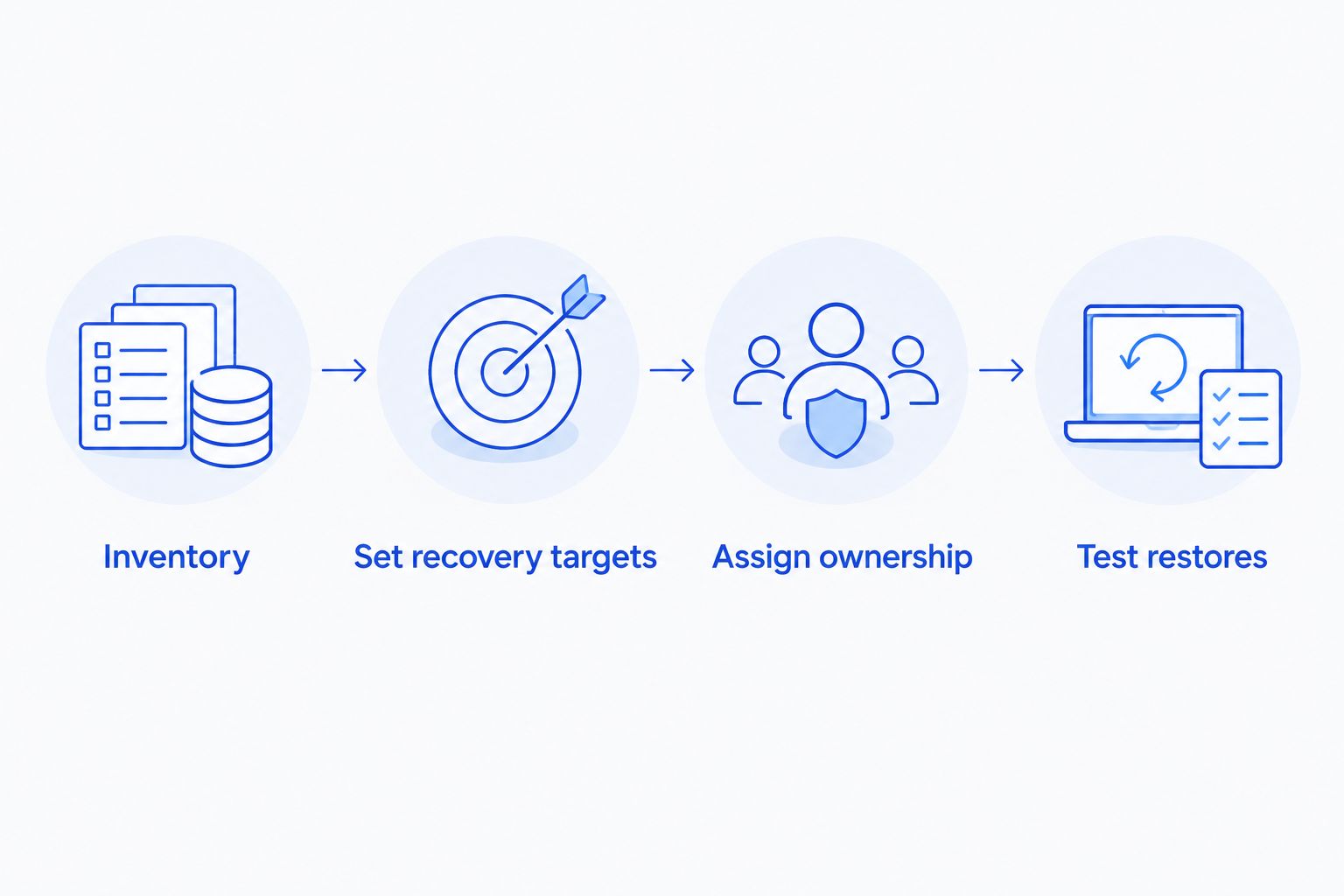
Before agreeing to a 2026 plan, work through this sequence:
Inventory
List the mailboxes, personal work files, and shared sites that keep the business operating. Record who owns each resource and what should happen to its backup when an employee leaves. The guide to connecting Microsoft 365 to managed IT support helps frame the broader administration discussion.
Set recovery targets
Write down 2 time limits: how much recent work you can afford to lose, and how long you can operate without the data. These are business requirements, not promised backup performance. Ask the proposed provider or administrator to show how the arrangement addresses each limit.
Assign ownership
Appoint 1 named owner for the backup process, with a documented substitute. Specify who reviews failures and who approves a restore that affects shared data. Keep those responsibilities in the support agreement or internal procedure.
Test restores
Run 3 test restores using non-sensitive data: a deleted email, an earlier file version, and a shared folder. Record the source, destination, result, and person performing each test. Check that colleagues can actually open and use the recovered content.
A backup demonstration should end with usable data, not a screenshot of a completed job. If the restored file has the wrong version, destination, or access permissions, record the issue and repeat the test after correction.
Discuss your business backup needs
Ask TechConnect LLC about data backup/recovery and managed business IT support in North Carolina.
FAQ
What's the best Microsoft 365 backup for a small business without an IT team?
Managed, independent backup is the best operating model for a small business without a dedicated backup administrator. Require written workload coverage, monitoring responsibilities, and a demonstrated restore before agreeing to the service.
Is OneDrive sync the same as a backup?
No. OneDrive sync keeps connected locations updated, while a backup plan preserves recoverable data under defined policies. OneDrive recovery features are useful, but you must check whether they cover the incident and historical version you need.
Does Microsoft 365 already let me recover deleted files and emails?
Yes, Microsoft 365 has native recovery features across its workloads. Recovery depends on the service, settings, and applicable retention limits, so verify the specific mailbox or file recovery path rather than assuming unlimited history.
Should a small business choose cloud backup or self-hosted backup?
Choose cloud backup when you want to avoid maintaining backup storage infrastructure; choose self-hosted backup when you have the expertise and infrastructure to operate it. Both approaches still need assigned ownership, protected access, and restore testing.
Does backing up SharePoint mean all my Teams data is protected?
No, SharePoint coverage alone does not establish complete Teams protection. Teams uses different underlying services for different content, so ask for a written list of supported content and recovery actions.
What should I ask a Microsoft 365 backup provider before signing?
Ask what is protected, how long recovery history is retained, who monitors failures, and who performs restores. Also require an explanation of backup access, deletion permissions, employee departures, and the process for changing providers.
Can TechConnect LLC help with business backup in North Carolina?
TechConnect LLC provides data backup/recovery and managed business IT support across North Carolina. For Microsoft 365 backup, discuss the specific workloads and recovery requirements so the proposed service scope is clear.
One last thing
Test recovery when the usual administrator is unavailable. A backup that only one person knows how to access leaves your business dependent on that person's availability, even when every scheduled job succeeds.
For your 2026 review, have the documented substitute locate the procedure and explain the restore steps without borrowing the primary administrator's credentials. That exercise checks the part a dashboard cannot show: whether your business, rather than one individual, controls its recovery process.


