
Best overall for Microsoft-based offices: Microsoft Defender for Office 365. Best built-in starting point for Gmail businesses: Google Workspace Gmail security. Best separate filtering layer: Proofpoint Essentials. This 2026 guide compares email security tools for small business by the problem they solve and the work required to manage them.
- Microsoft Defender for Office 365 is the default shortlist choice for Microsoft-based small businesses.
- Google Workspace Gmail security is the starting point for businesses already using Gmail.
- Proofpoint Essentials adds a separate email filtering layer; dmarcian helps manage domain impersonation defenses.
- TechConnect LLC provides managed business IT support in North Carolina; software still needs an accountable administrator.
Why this matters
Email security has several jobs: blocking harmful messages, protecting sign-ins, reducing domain impersonation, and helping someone respond when a suspicious message gets through. A spam filter alone does not cover all of them.
For your 2026 shortlist, separate the software decision from the management decision. Someone must review quarantine, maintain settings, remove departed employees, and investigate reported messages. The guide to preventing phishing emails from reaching employees explains where IT support fits into that work.
TechConnect LLC is best suited to North Carolina homes and businesses seeking computer repair and managed IT support, rather than a standalone email security product. For business email security, ask any support provider to define the tasks included before choosing the software.
What makes the best email security tools for small business
Use these criteria before comparing product names:
- Email-platform fit: Start with the service hosting your mail. A Microsoft-focused product is not automatically the right choice for Gmail.
- Threat coverage: Separate spam filtering, attachment inspection, malicious-link protection, and domain authentication. They address different problems.
- Administration: Check who handles quarantine, exceptions, employee reports, and policy changes. A dashboard without an owner is unfinished protection.
- Response workflow: Require a clear path from an employee reporting a message to an administrator investigating it.
- Business-mail delivery: Test invoices, appointment notices, website forms, and other legitimate messages before tightening policies.
- Coverage boundaries: Identify what remains outside the tool, including stolen credentials, endpoint infection, and payment verification.
For a practical evaluation, test 3 message types: an ordinary business email, a legitimate attachment, and an authorized security-test message. Use controlled tests, not live malware. Record what the employee sees and what the administrator must do next.
Email security tools at a glance
These 2026 recommendations occupy different use-case slots. They are not interchangeable, and domain-authentication software does not replace inbox filtering.
| Tool | Best for | Standout function | Key limitation |
|---|---|---|---|
| Microsoft Defender for Office 365 | Microsoft-based offices needing added email protection | Safe Links and Safe Attachments | Requires appropriate licensing and policy administration |
| Google Workspace Gmail security | Gmail businesses improving their existing setup | Built-in filtering and administrator-controlled protections | Platform-specific; settings still need attention |
| Proofpoint Essentials | Small businesses wanting a separate filtering layer | Email filtering with a separate management workflow | Adds another system to configure and maintain |
| Mimecast Email Security | Businesses needing a more involved email-control program | Email threat protection and policy controls | Administrative scope needs careful evaluation |
| dmarcian | Businesses addressing unauthorized use of their sending domain | DMARC reporting and sender visibility | Does not inspect incoming attachments or replace an inbox filter |
1. Microsoft Defender for Office 365: best for Microsoft-based offices
Microsoft Defender for Office 365 adds email and collaboration threat protection within the Microsoft environment. Safe Links checks links, while Safe Attachments evaluates attachments for malicious behavior.
The practical advantage is platform fit. If your staff already work in Microsoft email, start by assessing the protection available in your existing subscriptions and the policies actually enabled. Do not assume a familiar Microsoft product name means every mailbox has the same protection.
Microsoft Defender for Office 365 pros:
- Fits Microsoft-based email administration.
- Addresses malicious links and attachments.
- Provides administrator tools for investigating email threats.
Microsoft Defender for Office 365 cons:
- Capabilities depend on the licensed offering.
- Policies and exceptions require ongoing administration.
- Does not replace account security or employee payment checks.
Best for: An office using Microsoft email that wants added protection without starting with a separate filtering platform.
During evaluation, ask the administrator to demonstrate a reported-message investigation. Confirm who can review the message, determine its disposition, and explain the result to the employee. Also test legitimate document-sharing messages so tighter controls do not interrupt ordinary work.
Verdict: Buy the appropriate protection for a Microsoft-based office after confirming licensing, coverage, and ownership.
2. Google Workspace Gmail security: best for improving a Gmail setup
Google Workspace Gmail includes spam, phishing, and malware protections, with administrator settings for business email. It is the logical starting point when your company already uses Gmail.
Begin with configuration rather than a replacement project. Review account protection, suspicious-message handling, forwarding, and the settings available to your organization. Buying another filter does not correct an unattended administrator account or an unnecessary forwarding rule.
Google Workspace Gmail security pros:
- Works within the email platform Gmail businesses already use.
- Provides built-in filtering for unwanted and harmful messages.
- Gives administrators controls over business-mail handling.
Google Workspace Gmail security cons:
- Applies to the Google Workspace environment.
- Available controls depend on the edition and configuration.
- Built-in protection does not eliminate phishing or account compromise.
Best for: A Gmail-based business that needs to strengthen its current setup before adding another system.
Ask your administrator to explain how employees report suspicious email and how blocked legitimate messages are recovered. Those workflows matter as much as the filtering settings. A confusing quarantine process encourages employees to seek workarounds instead of asking for help.
Verdict: Hold off on a separate filter until Google Workspace Gmail security is configured and its remaining gaps are documented.
3. Proofpoint Essentials: best for a separate filtering layer
Proofpoint Essentials is an email security offering aimed at small and medium-sized businesses. It provides email filtering through a separate security platform.
This approach suits a business that wants email protection managed outside its primary mailbox interface. The trade-off is another administrative workflow: mail routing, quarantine, allowed senders, and troubleshooting must have clear owners.
Proofpoint Essentials pros:
- Focuses on small and medium-sized business email security.
- Provides a separate filtering and quarantine workflow.
- Offers an alternative to relying only on mailbox-platform controls.
Proofpoint Essentials cons:
- Adds configuration and maintenance responsibilities.
- Routing changes require careful testing.
- Does not replace strong sign-in protection.
Best for: A business with a defined need for an additional filtering layer and someone responsible for managing it.
Before deployment, inventory 4 sender groups: employees, accounting systems, marketing services, and website forms. These are evaluation categories, not a complete list of every business sender. Identify any other application that sends on your behalf, then test delivery through the proposed configuration.
Ask who handles false positives and how employees request release of a legitimate message. Keep exceptions narrow; allowing an entire domain to solve a single delivery problem creates a broader exception than the task requires.
Verdict: Buy Proofpoint Essentials when a separate filtering layer solves a documented gap and its administration has an owner.
4. Mimecast Email Security: best for more involved email controls
Mimecast Email Security provides email threat protection and policy controls. It belongs on the shortlist when your requirements extend beyond a basic filtering setup and you have the administrative capacity to manage them.
Start with a written requirements list. Describe the messages you need to inspect, the policies you need to enforce, and the investigation workflow your team needs. Evaluate the relevant offering against that list rather than treating the vendor's full product portfolio as one package.
Mimecast Email Security pros:
- Supports an email-focused security program.
- Provides controls for handling email threats.
- Offers an option for businesses with detailed policy requirements.
Mimecast Email Security cons:
- Requires careful configuration and administrative planning.
- Product scope must be checked against the selected offering.
- Is not a substitute for endpoint protection or independent backups.
Best for: A business with specific email-policy requirements and a qualified administrator or support partner.
For your 2026 evaluation, request a walkthrough using your actual requirements. Include a suspicious message, a legitimate message blocked by policy, and a change to an allowed sender. Reject a demonstration that only shows dashboards without explaining the work behind them.
Verdict: Wait on Mimecast Email Security until your requirements justify the additional administrative scope.
5. dmarcian: best for controlling use of your sending domain
dmarcian helps businesses understand DMARC reports and identify systems sending email using their domain. Its role is domain authentication and visibility, not scanning messages arriving in an employee's inbox.
DMARC works with SPF and DKIM to help receiving mail systems assess whether a message is authorized to use your domain. That makes dmarcian a companion to inbox protection rather than a replacement for it.
dmarcian pros:
- Makes DMARC reporting easier to interpret.
- Helps identify legitimate and unauthorized sending sources.
- Supports a more deliberate domain-authentication rollout.
dmarcian cons:
- Does not scan incoming attachments for malware.
- Does not stop every form of impersonation, including lookalike domains.
- Enforcement requires an accurate inventory of legitimate senders.
Best for: A business concerned about unauthorized email using its own domain.
DMARC has 3 policy modes: none, quarantine, and reject. Start by understanding reports and authenticating legitimate senders before moving to enforcement. A policy change made without that preparation risks disrupting your own invoices, campaign messages, or website notifications.
Verdict: Buy dmarcian for a defined domain-authentication project; skip it as a standalone inbox-security solution.
Put ownership before deployment
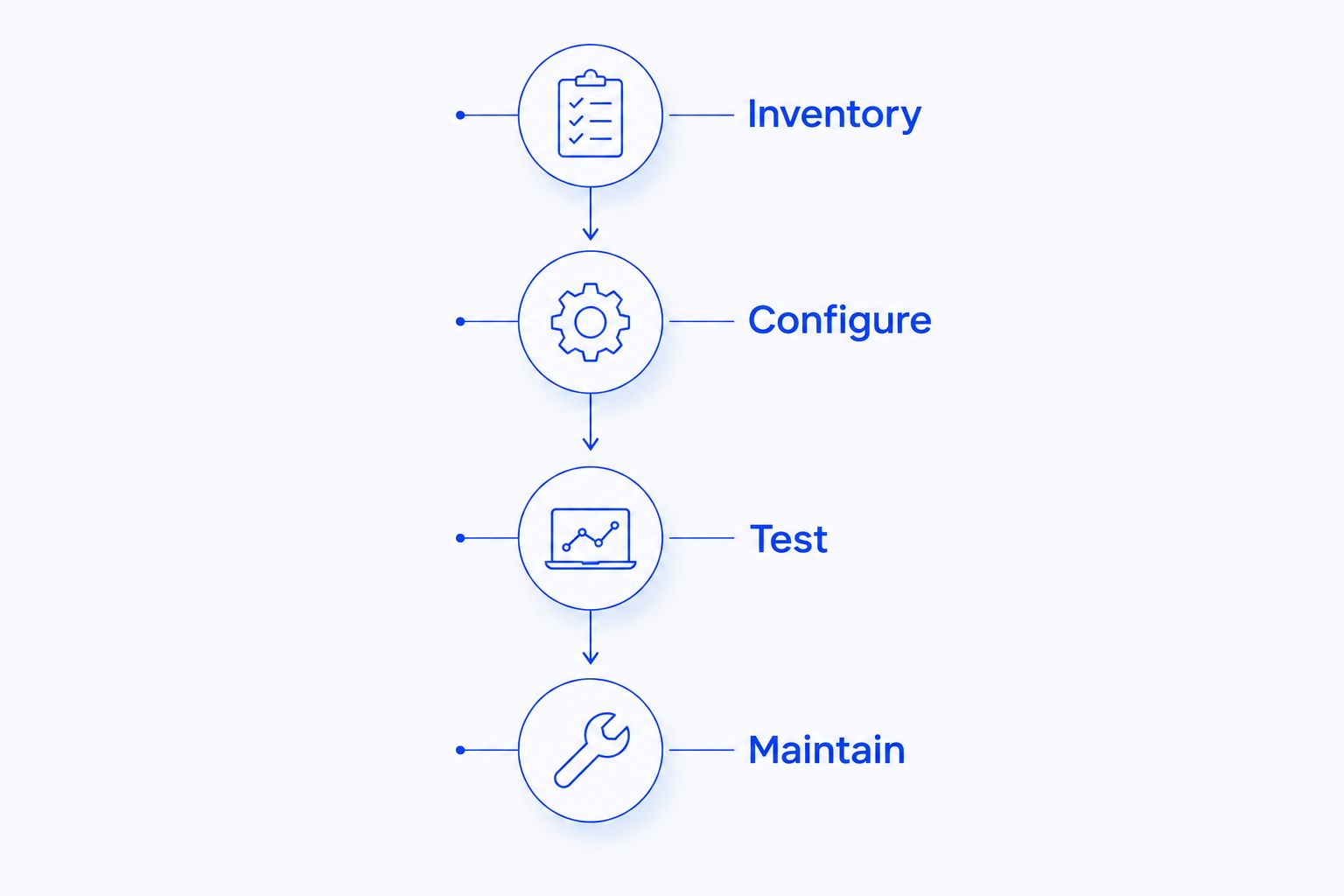
A useful 2026 rollout follows a sequence: understand the current setup, configure the chosen controls, test legitimate mail, and maintain the result. Do not turn every available setting on at once.
- Inventory: List mailboxes, shared addresses, administrators, and systems that send email.
- Configure: Apply the chosen filtering and account-protection settings, with documented exceptions.
- Test: Check ordinary messages, attachments, and authorized security tests before broader deployment.
- Maintain: Review employee reports, sender changes, access changes, and delivery problems.
Assign 2 named roles: a primary administrator and a backup administrator. These are responsibilities, not necessarily additional hires. Both need an agreed escalation process, and administrative access should match their duties.
TechConnect LLC provides managed business IT support across North Carolina. When discussing email security tools with TechConnect LLC, ask for a clear division between software capabilities and support responsibilities, including who handles employee reports and delivery problems.
Discuss your business IT needs
Review managed business IT support for your North Carolina home-based business or office.
How these tools are ranked
The order follows platform fit, threat coverage, administration, response workflow, delivery testing, and coverage boundaries. It is a requirements-based shortlist, not a measured detection-rate leaderboard.
Microsoft Defender for Office 365 leads for Microsoft-based offices. Google Workspace Gmail security leads for Gmail businesses improving existing controls. Proofpoint Essentials and Mimecast Email Security address separate filtering or policy needs; dmarcian addresses domain authentication.
Which email security tools should you choose?
Choose protection that fits your existing email platform first. For Microsoft email, shortlist Microsoft Defender for Office 365. For Gmail, review Google Workspace Gmail security before adding another platform.
Add Proofpoint Essentials when you need a separate filtering layer. Evaluate Mimecast Email Security against detailed policy requirements. Use dmarcian alongside inbox protection when domain authentication needs attention.
For a 2026 deployment, insist on a named administrator, a tested reporting process, and documented coverage. TechConnect LLC's managed business IT support is a service option for North Carolina businesses; confirm the email-security scope rather than assuming a software recommendation defines the service.
FAQ
What's the best email security tool for a small business using Microsoft email?
Microsoft Defender for Office 365 is the default shortlist choice for a Microsoft-based small business needing added email protection. Confirm the licensed capabilities, enabled policies, and person responsible for administration.
Do I need another email security tool if my business uses Gmail?
Start by reviewing Google Workspace Gmail security before adding another filter. Add a separate tool only when you have identified a coverage or management gap that the existing setup does not address.
Is Proofpoint Essentials better than Microsoft Defender for Office 365?
Proofpoint Essentials fits businesses wanting a separate filtering layer, while Microsoft Defender for Office 365 fits Microsoft-based email protection. Choose according to platform fit, required controls, and the administrator's workflow rather than treating either as a universal winner.
Does dmarcian stop phishing emails from reaching employees?
dmarcian is a domain-authentication and reporting tool, not an incoming phishing filter. Use it to understand and control use of your sending domain alongside inbox and account protection.
Can email security software stop every phishing attack?
No email security tool stops every phishing attack. Combine filtering with strong sign-in protection, employee reporting, and independent verification of payment or bank-detail changes.
Should a small business use email security and antivirus software?
Yes, email security and antivirus address different parts of the problem. Email protection examines messages and related threats, while endpoint protection addresses malicious activity on computers.
Who should manage a small business's email security?
A named administrator or an explicitly assigned IT support provider should manage email security. Define responsibility for quarantine, employee reports, policy changes, access removal, and incident escalation.
One last thing
A fraudulent payment request does not need a harmful link or attachment. A plain email asking you to change bank details is enough to create a business problem.
Make independent verification a written rule: confirm payment-detail changes through a trusted contact method already on file, not the phone number supplied in the request. Email filtering supports that rule; it does not replace it.


